How to Handle Fake/Negative Reviews on Google Business Profile

Google’s 2025 Trust and Safety Report shows the company blocked or removed more than 292 million policy-violating reviews out of over 1 billion submitted that year. That’s not a rare edge case – it’s roughly three out of every ten reviews Google processes being flagged as fake, incentivized, or otherwise manipulated. If your business has never dealt with a fake or malicious review on its Google Business Profile, it’s largely a matter of time.
In this article10 sections
Handling fake Google reviews well comes down to three things: knowing what actually qualifies as a policy violation, flagging it correctly through the right channel, and responding publicly in a way that protects your reputation while Google’s review sits in the queue. This guide – drawing on how Search Savvy approaches review and reputation issues for local businesses – walks through all three, plus what changed in Google’s policy in 2026 and what to do when flagging doesn’t work.
What Counts as a Fake Google Review?#
A fake Google review is one based on an experience that didn’t actually happen – posted by someone who was never a customer, by a competitor trying to damage your rating, by an automated account, or in exchange for payment or incentives. A genuinely unhappy customer leaving a harsh but honest review is not fake, even if it feels unfair, and Google will not remove it on that basis alone.
Google’s Maps User-Generated Content Policy groups violations into several categories:
- Fake engagement – reviews not based on a real visit or transaction, including reviews bought from third-party vendors or posted using device emulators
- Conflict of interest – reviews from current or former employees, owners, close family, or direct competitors
- Spam and off-topic content – irrelevant links, promotional content, or reviews unrelated to the business
- Impersonation – reviews posted under a fake identity or someone else’s name
- Review bombing – a coordinated wave of negative reviews from multiple accounts targeting a business in a short window, often in response to unrelated controversy
- Offensive content – hate speech, harassment, or threats
A one-star review with a vague complaint and no detail is frustrating, but Google generally treats it as a legitimate (if unhelpful) opinion unless there’s clear evidence the reviewer never interacted with your business.
What Changed in Google’s Review Policy in 2026?#
Google updated its review policy twice in April 2026, explicitly banning staff review quotas and instructions to ask customers to name specific employees in reviews, while expanding automated detection of coordinated fake review campaigns before they go live. These changes sit on top of long-standing bans on review gating, incentivized reviews, and on-premises pressure to leave feedback.
The practical effect for small businesses is twofold. First, Google’s detection systems – now running on Gemini-powered pattern recognition – increasingly weigh context around a review (location signals, account history, timing patterns) rather than just the text itself, so templated or suspiciously similar reviews are more likely to be caught automatically. Second, enforcement escalates for the business, not just the reviewer: a profile found hosting a pattern of fake reviews can face a temporary freeze on new reviews, unpublishing of existing reviews, or a public warning banner stating that fake reviews were removed from the listing.
This matters because flagging fake negative reviews from outsiders is only half of reputation management under the current policy – businesses also need clean hands on how they solicit and manage their own reviews, since Google now applies the same scrutiny in both directions.
How Do You Flag a Fake Review on Google Business Profile?#
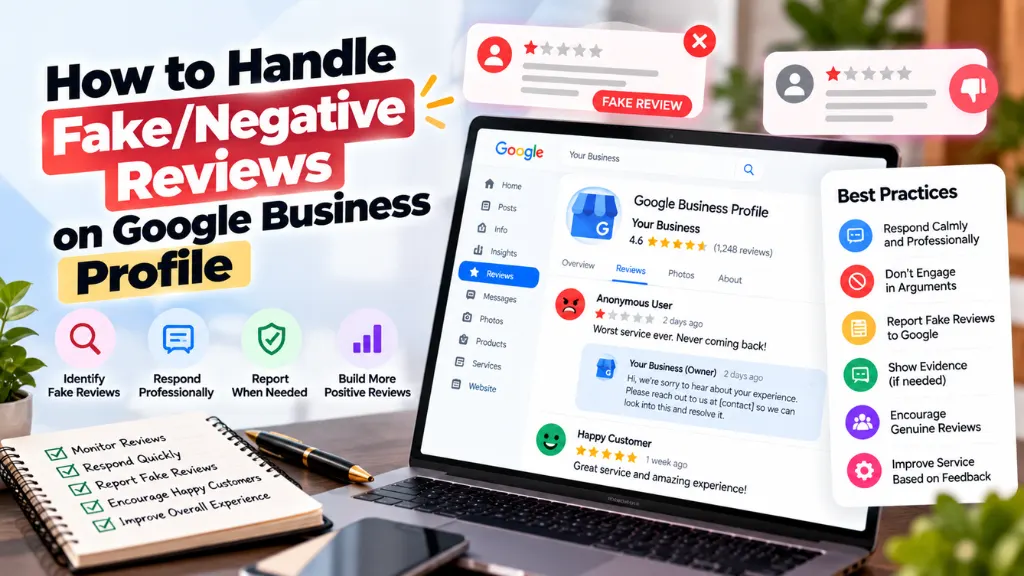
To flag a fake review, open Google Business Profile, go to the Reviews section, find the review, click the three-dot menu, select “Flag as inappropriate,” and choose the specific policy violation it breaches. You can also report a review directly from Google Maps or Google Search without owning the listing, since any Google user can submit a flag.
- Sign in to Google Business Profile and navigate to the Reviews tab for the affected location.
- Locate the review and click the three-dot (⋮) menu next to it.
- Select “Flag as inappropriate.”
- Choose the specific violation category – spam or fake content, conflict of interest, off-topic, harassment, or hate speech – rather than a generic complaint. Citing the exact policy clause gives Google’s automated system a clearer signal than simply disagreeing with the rating.
- Submit and note the confirmation, if one is provided, so you can reference it in any follow-up.
- Escalate if needed. If the automated flag queue produces no result after a reasonable wait, use Google’s “Request review removal” tool through the Business Profile help center, or contact Google Business Profile support directly and describe the documented policy breach in detail.
Vague flags rarely succeed. “This review is fake” without supporting detail competes with millions of other reports in an automated queue. A flag that specifies, for example, that the reviewer’s account has no history, no profile photo, and left the review the same week a competitor opened nearby – citing the conflict-of-interest or fake-engagement policy by name – gives Google’s reviewers (automated or human) something concrete to act on.
The Review Removal Process: What to Expect#
There is no guaranteed timeline for Google to remove a flagged review – some disappear within days through automated detection, while others require weeks if a human reviewer investigates. The typical path looks like this: the review is flagged, Google’s system evaluates it against policy (often automatically first), a decision is issued, and if the flag is rejected, the business can appeal with additional evidence or escalate to Business Profile support.
A few realities worth planning around:
- Not every legitimate-feeling complaint gets removed, and Google will not remove a review simply because it’s negative or because the business disagrees with it.
- Volume matters. A single unsubstantiated flag is unlikely to move quickly; a flag backed by specific, policy-referenced evidence moves faster through both automated and manual review.
- Removal isn’t always permanent proof of wrongdoing on your end. If Google determines a review violates policy, it’s unpublished from the listing – this reflects on the reviewer’s conduct, not your business.
- Repeated abuse from the same source (a competitor posting multiple fake reviews, for instance) is stronger grounds for escalation than a single isolated review, so documenting a pattern helps.
For businesses dealing with a sustained, coordinated attack rather than a single bad review, this kind of reputation damage often overlaps with broader search visibility problems – which is where structured reputation management support becomes more efficient than handling each review in isolation.
Review Response Templates for Fake or Unfair Negative Reviews#
While a flagged review sits in Google’s queue – which can take days or weeks – it remains publicly visible, and prospective customers will read it. A calm, factual public response matters more for the people reading it later than for the original reviewer.
For a suspected fake review (no record of the transaction):
“Thank you for sharing your feedback. We’ve reviewed our records and have no transaction or interaction on file matching this description. We take all feedback seriously and would welcome the chance to look into this further – please reach out to us directly at [contact] with any order or visit details so we can investigate.”
For a review from someone who appears to be a competitor or non-customer:
“We appreciate all feedback, but our records show no account or visit associated with this review. We’ve flagged this for Google’s review to ensure our profile reflects genuine customer experiences. If this is a mistake, we’d welcome more detail so we can resolve it.”
For a legitimate but harsh negative review:
“We’re sorry to hear your experience didn’t meet expectations. This isn’t the standard we aim for, and we’d like to make it right – please contact us at [contact] so we can address this directly.”
Each template does three things: it stays factual rather than defensive, it signals to future readers that the business investigated rather than ignored the issue, and it avoids accusing the reviewer by name, which keeps the response itself policy-compliant. Avoid arguing in the public thread – a back-and-forth comment war reads worse to prospective customers than the original review does.
Reputation Management Beyond the Single Review#
Flagging and responding to individual reviews solves the immediate problem, but it doesn’t address the underlying risk: a profile with a thin review history is far more exposed to one or two bad-faith reviews skewing the overall rating. The most durable defense against fake reviews is a steady flow of genuine ones, which dilutes the impact of anything fraudulent that slips through and gives Google’s systems more legitimate signal to weigh against the fake content.
This is also where review activity and local search visibility intersect. Review volume, recency, and response rate are factors Google’s local algorithm weighs alongside the kind of signals covered in local SEO services, so a business actively managing its review profile is usually also protecting its position in the local map pack. Search Savvy generally advises clients to treat review monitoring as a recurring task – checking weekly rather than only reacting after a damaging review appears – because the policy-citation detail needed for a successful flag is much easier to gather immediately after a review posts than weeks later. Tracking review trends alongside other local visibility metrics is also one of the areas covered under analytics and performance reporting, since a sudden cluster of negative reviews is often the first visible sign of a coordinated attack.
Legal Protection: The FTC’s Fake Reviews Rule#
Beyond Google’s own policy, businesses in the United States have a legal backstop. The FTC’s final rule on fake and misleading reviews, effective since October 2024, makes it illegal to create, buy, sell, or host reviews known or suspected to be fake, and it authorizes civil penalties of nearly $52,000 per violation. The rule also covers undisclosed insider reviews and prohibits using threats to suppress negative but genuine feedback.
This cuts both ways: it gives legitimate businesses firmer ground when documenting that a competitor’s fake review violates not just Google’s policy but federal law, and it means a business’s own review solicitation practices – gating, incentivizing, or pressuring staff to collect name-dropped reviews – now carry real regulatory risk, not just a Google policy violation.
Common Mistakes When Dealing with Fake Reviews#
- Flagging every negative review, not just fake ones. This dilutes your credibility with Google’s system and wastes the limited attention a genuine violation needs.
- Responding emotionally or accusing the reviewer publicly. This almost always reads worse to future customers than the original review.
- Posting fake positive reviews to counteract fake negative ones. This violates both Google’s policy and the FTC rule, and risks the exact profile restrictions you’re trying to avoid.
- Giving up after one flag is rejected. A rejected flag with more supporting detail, or escalation to Business Profile support, often succeeds where the first automated pass didn’t.
- Ignoring the review while it’s pending removal. A public response written for future readers should go up regardless of whether the flag succeeds.
- Treating review management as a one-time cleanup rather than an ongoing process, which leaves the profile exposed the next time a bad-faith review appears.
The Bottom Line#
Fake and malicious reviews on Google Business Profile are a real and growing problem, but they’re also a well-defined one: identify whether a review actually violates policy, flag it with specific, cited evidence rather than a general complaint, respond publicly and factually while it’s pending, and keep building a steady base of genuine reviews so no single fake one can do much damage. Search Savvy treats this as part of the broader local reputation and visibility work businesses need in 2026, not a side task – because how a profile handles a bad-faith review often says as much to prospective customers as the review itself.
Frequently Asked Questions#
Can Google remove a negative review just because it’s unfair? No. Google only removes reviews that violate its content policy – fake engagement, conflict of interest, spam, or offensive content. A harsh but genuine review from an actual customer will not be removed simply for being unflattering.
How long does it take Google to remove a flagged review? There’s no fixed timeline. Some reviews are removed within days through automated detection; others take weeks if a human reviewer investigates, especially for borderline or contested cases.
Can a competitor’s fake review get my Google Business Profile suspended? A single fake review from a third party won’t suspend your profile. Suspensions and restrictions generally follow a pattern of violations tied to the business itself, such as incentivized or insider reviews, not an isolated attack from an outside bad actor.
Is it legal to leave a fake positive review to offset a fake negative one? No. This violates both Google’s fake engagement policy and the FTC’s 2024 fake reviews rule, which carries civil penalties of up to nearly $52,000 per violation in the United States.
What’s the fastest way to report a fake review? Flagging directly from Google Maps or the Google Business Profile dashboard using the three-dot menu is fastest for routine cases. For coordinated attacks or reviews involving legal violations, contacting Google Business Profile support directly with documented evidence tends to move faster than the flag queue alone.
Should I respond to a fake review while it’s still pending removal? Yes. A calm, factual public response protects your reputation with future readers regardless of whether the flag is eventually approved, since the review remains visible during the review process.