Headless CMS vs WordPress: Which Should a Small Business Choose in 2026?
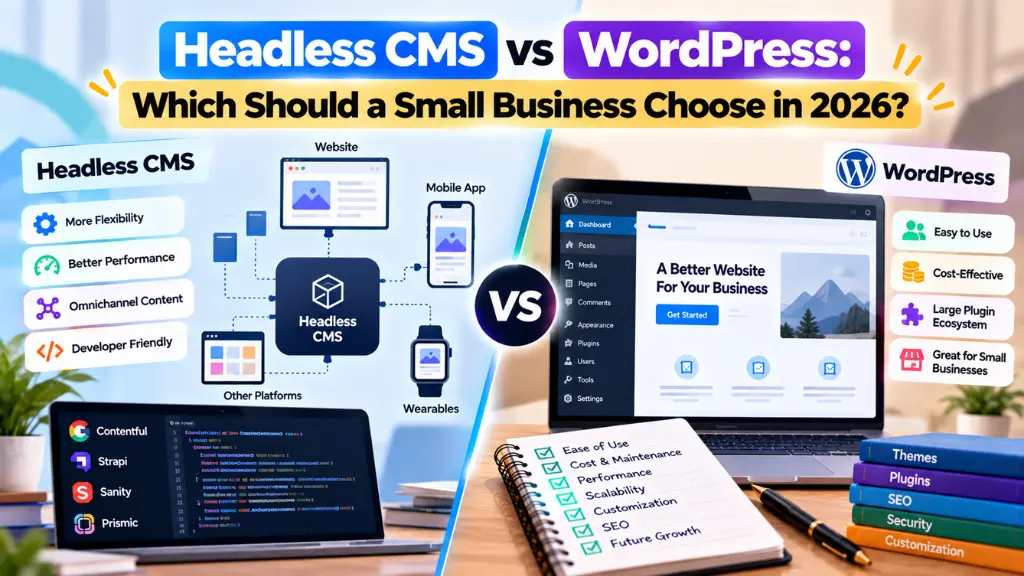

WordPress still runs roughly 41–43% of all websites, according to W3Techs, and remains the default answer whenever someone asks how to build a small business site. But that dominance has slipped for six consecutive quarters, and more developers, marketers, and founders are asking a different question: does a headless CMS make more sense for a business expecting to grow across a website, an app, and channels it hasn’t built yet?
In this article15 sections
There’s no single winner in the “headless CMS vs WordPress” debate. It depends on your team’s technical resources, how fast your content changes, and how many channels you publish to. This guide breaks down the real trade-offs – cost, speed, flexibility, SEO, and maintenance – so the decision reflects your business, not whichever platform a developer happens to prefer.
What Is the Difference Between Headless CMS and WordPress?#
A headless CMS stores and delivers content through an API, with no built-in front-end to render it. Traditional WordPress bundles content management and the website’s presentation layer together, so the CMS both stores your content and displays it as a live webpage.
In practice, that means WordPress gives you a working website the moment you install a theme. A headless CMS gives you a content repository – you (or a developer) still have to build the front-end that pulls that content in, usually with a JavaScript framework like Next.js, Astro, or Gatsby. This is often called a JAMstack architecture (JavaScript, APIs, and Markup), where pre-built, statically generated pages are served from a content delivery network and populated with data fetched from the CMS via API calls.
WordPress can technically run in “headless mode” too – using its REST API or WPGraphQL to feed a separate front-end – but doing so means you keep WordPress’s plugin overhead on the back end while adding the cost of building a custom front-end. Roughly 8% of headless implementations use WordPress this way, according to a 2026 analysis of top JAMstack sites by Enterno.io – a meaningful niche, but far from the norm.
WordPress Limitations Small Businesses Run Into#
WordPress earned its position for good reasons: a five-minute install, a vast plugin library, and hosting that starts at a few dollars a month. But several structural limitations become more painful as a business grows past a basic brochure site.
Security Is an Ongoing Maintenance Burden#
Because WordPress’s flexibility comes from third-party plugins, its attack surface grows with every plugin you add. Patchstack’s State of WordPress Security in 2026 report documented 11,334 new vulnerabilities across the WordPress ecosystem in 2025 – a 42% jump from 2024 – with 91% of those flaws found in plugins rather than WordPress core itself. Nearly half (46%) had no available patch when disclosed, and the weighted median time to mass exploitation was just five hours.
This doesn’t mean WordPress core is insecure – the report found only six vulnerabilities in core software all year, all low severity. It means a site running a dozen plugins inherits a dozen separate maintenance obligations, and skipping updates for even a few weeks creates real exposure.
Performance Degrades as Plugins Accumulate#
Every plugin adds its own database queries, scripts, and stylesheets, and most WordPress sites aren’t built by developers who audit that overhead. This is a major reason WordPress pages routinely underperform on Core Web Vitals compared to statically generated, API-driven sites, which serve pre-built HTML from edge servers instead of assembling pages with PHP and database calls on every request.
Content Is Tied to a Single Presentation Layer#
WordPress structures content around posts and pages designed to be rendered as HTML. If you later want that same content – a product description, a location listing – to power a mobile app or a partner’s site, you’re either duplicating it manually or bolting an API layer onto a system that wasn’t built for one.
What Is a Headless CMS and How Does It Work?#
A headless CMS is a content backend that exposes content through an API – typically REST or GraphQL – with no assumptions about how or where that content will be displayed. Editors manage content in the admin interface much as they would in WordPress, but developers pull that content into whatever front-end framework fits the project, reusing the same content across a website, app, and other channels from one source.
Popular platforms in 2026 include Contentful, Sanity, Strapi (the leading open-source option), Storyblok, and Directus. Salesforce’s June 2026 agreement to acquire Contentful – a platform used by more than 4,800 enterprise brands – signals that composable, API-first content infrastructure is moving from a niche developer preference into mainstream enterprise procurement.
Headless CMS SEO: What Actually Changes#
A headless CMS doesn’t automatically improve SEO – it removes the performance and code-bloat problems that hold SEO back, but you have to build metadata, sitemaps, and structured data yourself instead of relying on a plugin. WordPress plugins like Yoast or Rank Math handle meta tags, XML sitemaps, and schema markup out of the box. A headless setup usually requires a developer to implement these manually within the front-end framework, or through a headless SEO plugin.
Where headless architecture does have a real SEO advantage is page speed. Statically generated pages served from a CDN typically load faster than a database-driven WordPress page, and page speed is a confirmed ranking factor tied to Core Web Vitals. Faster, leaner pages also tend to correlate with better crawl efficiency, which matters more as search engines and AI answer systems both need to retrieve and parse your content quickly. Search Savvy’s technical SEO team sees this trade-off often: if you’re investing in speed and crawlability as a growth lever, the front-end architecture decision you make now will shape how much of that work you’re doing manually later.
Headless CMS vs WordPress: Side-by-Side Comparison#
| Factor | WordPress | Headless CMS |
| Setup speed | Fast – live site in hours | Slower – needs a custom front-end build |
| Upfront cost | Low (hosting + theme, often under $500) | Higher (developer time to build front-end) |
| Ongoing maintenance | Plugin updates, security patching | Fewer moving parts on the back end; front-end still needs upkeep |
| Content reuse across channels | Difficult without custom API work | Native – one content source, multiple front-ends |
| Built-in SEO tools | Strong (Yoast, Rank Math, etc.) | Manual implementation required |
| Performance ceiling | Limited by plugins and PHP rendering | Higher – static/CDN delivery |
| Editor experience | Familiar, low learning curve | Varies by platform; some have a learning curve |
| Best for | Blogs, brochure sites, WooCommerce stores | Multi-channel brands, apps, custom front-ends |
How Much Does CMS Migration Cost?#
Migrating from WordPress to a headless CMS typically costs more upfront than staying on WordPress, because you’re paying for both a new content model and a custom-built front-end rather than a theme. Sanity’s 2025 enterprise guidance estimated that a standard migration from a monolithic CMS to a fully headless setup takes 16–24 weeks for core content-model configuration and integration work – a timeline built around enterprise complexity, but directionally useful for any business estimating the effort involved.
For a small business, the real cost drivers are:
- Content modeling – structuring content types (products, posts, locations) so they work across every channel, not just the current website.
- Front-end development – building and testing the site in a framework like Next.js or Astro, a developer-hours cost WordPress themes largely eliminate.
- Content migration – moving existing posts and media into the new model without breaking URLs or losing SEO equity.
- Ongoing platform fees – many headless CMS platforms charge by API calls, seats, or content volume, which can scale faster than a flat WordPress hosting plan.
- Redirect mapping – protecting rankings during the switch, closely tied to the kind of search visibility recovery work businesses often need after a poorly planned migration.
For most small businesses without a dedicated development team, this cost gap is the single biggest reason to stay on WordPress unless a specific multi-channel need is driving the decision. It’s a conversation Search Savvy has with clients regularly: the platform with the lowest sticker price isn’t always the cheapest one once ongoing developer time is factored in.
Content Management Flexibility: Where Headless Actually Wins#
Content management flexibility means being able to create content once and publish it anywhere – a website, a mobile app, a smart display, a partner integration – without rebuilding it for each channel. This is the core value proposition of headless architecture, and it’s genuinely difficult to replicate in WordPress without significant custom development.
A local restaurant chain publishing a menu update is a useful example. On WordPress, that update typically lives on the website only, and if the business later builds an ordering app, someone has to manually keep both in sync. On a headless CMS, the menu is one content object pulled by the website, the app, and any delivery integration from a single source, so an update in one place propagates everywhere.
This matters more as businesses adopt AI-driven customer touchpoints – chatbots, voice assistants, and AI search overviews all consume structured content through APIs rather than rendered HTML pages, which is part of why AI search optimization increasingly depends on how cleanly your content is structured at the source, not just how it’s formatted on a webpage.
As Bill Gates observed decades ago in a line that has aged well for content strategy: “Content is king.” The platform question is really about how far that content can travel without being rebuilt every time a new channel appears.
When Should a Small Business Choose WordPress?#
Choose WordPress when you need a working site fast, your content lives on one website with no near-term app or channel plans, budget is tight (500–2,000 is realistic against a $10,000+ headless build), or you’re selling online and want WooCommerce’s mature ecommerce ecosystem, which processed an estimated $35 billion in gross merchandise volume in 2025.
When Should a Small Business Choose a Headless CMS?#
A headless CMS makes sense when you’re already planning a mobile app or additional channel within the next 12–18 months, page speed is directly tied to conversion goals (common in ecommerce), you have front-end development resources in-house or through an agency, or you’re scaling internationally with localized content served through multiple front-ends.
Common Mistakes Businesses Make When Choosing a CMS#
- Choosing headless because it sounds modern, not because the business needs it. One website with no multi-channel plan means added cost without a matching benefit.
- Underestimating front-end development time. Businesses often budget for the CMS platform fee but not the weeks of developer time needed to build the site around it.
- Migrating without a redirect and content-mapping plan, which can quietly erase years of accumulated search rankings.
- Assuming WordPress SEO plugins have a headless equivalent by default, then discovering mid-project that metadata, sitemaps, and schema all need manual setup.
- Ignoring plugin hygiene on WordPress – the single biggest driver of the vulnerabilities documented in Patchstack’s research.
The Bottom Line#
For most small businesses running a single website with a modest budget and no dedicated development team, WordPress remains a sound, low-friction choice – its ecosystem, plugin library, and built-in SEO tooling still solve real problems efficiently. A headless CMS earns its higher upfront cost when a business is genuinely multi-channel, performance-sensitive, or scaling toward an app or a custom digital product. The mistake to avoid is picking an architecture based on trend rather than need. At Search Savvy, this is one of the first questions we help clients work through before any website design and development project begins, because the platform decision shapes every SEO and content decision that follows it. If your current site’s technical foundation is already holding back your rankings, that’s usually a stronger signal than platform trends for deciding whether a rebuild – headless or otherwise – is worth the investment.
Frequently Asked Questions#
Is a headless CMS better than WordPress for SEO?
Not automatically. A headless CMS can deliver faster page speeds, which supports Core Web Vitals, but WordPress’s SEO plugins handle metadata, sitemaps, and schema automatically – features you must build manually in a headless setup.
Can WordPress be used as a headless CMS?
Yes. WordPress’s REST API and WPGraphQL plugin let developers use it purely as a content backend for a separate front-end – a real but uncommon setup, used in roughly 8% of headless implementations, per a 2026 platform analysis.
How long does a headless CMS migration take?
Enterprise migrations typically take 16–24 weeks for content modeling and integration, per Sanity’s 2025 enterprise guidance. Small business migrations are usually faster but still take weeks, not days.
Is a headless CMS more expensive than WordPress?
Usually, yes, upfront. WordPress can launch for a few hundred dollars with a theme and hosting, while a headless CMS requires custom front-end development that adds developer costs a small WordPress build avoids.
Do I need a developer to use a headless CMS?
In almost all cases, yes. Unlike WordPress, where a non-technical user can install a theme and start publishing, a headless CMS requires a developer to build the front-end that displays the API content.
What is JAMstack and how does it relate to headless CMS?
JAMstack (JavaScript, APIs, and Markup) pre-builds pages and serves them statically from a CDN, then populates them with content fetched via API – commonly from a headless CMS. It’s the most common front-end pairing for headless content but isn’t required.