Google Search Console vs Bing Webmaster Tools: What Small Businesses Should Track

Every small business with a website should have both Google Search Console and Bing Webmaster Tools connected, and most don’t bother with the second one. That’s understandable given Google’s scale, but it means missing free, direct data about how a real search engine sees your site.
In this article16 sections
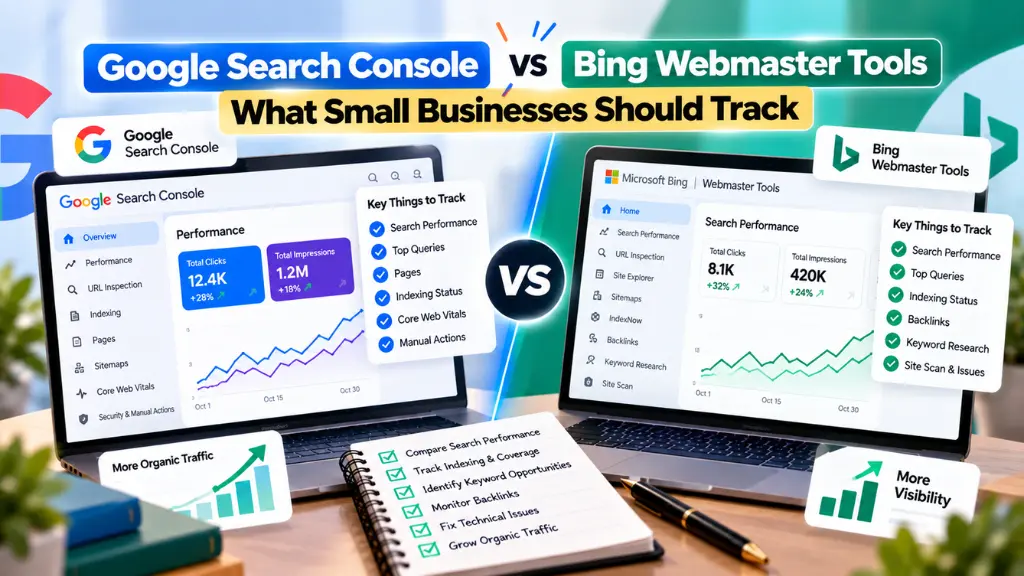
This comparison walks through what each tool actually shows, where they overlap, where Bing genuinely does more than Google, and what a small business with limited time should check weekly or monthly. The short version: Search Console deserves the bulk of your attention, but Bing Webmaster Tools includes a few features, especially IndexNow and its built-in Site Scan, worth the extra ten minutes to set up even if most traffic comes from Google.
Google Search Console vs Bing Webmaster Tools: The Short Answer#
Google Search Console and Bing Webmaster Tools are both free platforms that show how a search engine crawls, indexes and ranks your website, but Search Console reflects Google’s index (roughly 90% of global search traffic) while Bing Webmaster Tools reflects Bing’s much smaller index (single digits globally, higher on desktop and in some countries like the US). For most small businesses, Search Console is the priority tool, and Bing Webmaster Tools is a free addition worth setting up alongside it.
| Google Search Console | Bing Webmaster Tools | |
| Cost | Free | Free |
| Setup time | 5 to 10 minutes | 5 to 10 minutes |
| Core performance report | Clicks, impressions, CTR, average position; up to 16 months in the interface | Clicks, impressions, CTR, average position; up to 16 months, per Bing’s own documentation |
| Index status report | Page Indexing report (renamed from Index Coverage in 2022) | Site Explorer (formerly Index Explorer) |
| Crawl data | Crawl Stats report | Crawl Control, plus crawl data inside Site Explorer |
| Instant crawl notification | Not available in the same form | IndexNow, submits changes for near-instant crawling |
| Backlink data | Links report (your own site only) | Backlinks report, including “Backlinks to Any Site” for competitor analysis |
| Built-in site audit | Not built in | Site Scan tool, checks broken links, missing metadata, duplicate tags |
| AI features reporting | Generative AI performance reports (AI Overviews, AI Mode), rolled out to all sites worldwide as of August 31, 2026 | AI Performance report, tracking visibility in Copilot and other AI features |
| Keyword research tool | Not built in (Performance report shows queries you already rank for) | Built-in keyword research tool with volume estimates |
Where Bing and Google Actually Stand in Search Traffic#
Before deciding how much attention each tool deserves, it helps to know the real split. According to StatCounter Global Stats, cited by Statista and multiple independent trackers, Google held roughly 90 to 91% of worldwide search referrals in mid-2026, with Bing around 4.5 to 5%. The gap narrows on desktop, where Bing’s share has been reported at 9 to 12% worldwide, boosted by its default status in Windows and Edge, and Bing has reportedly reached around 10 to 11% of US search traffic, its highest level on record. In India, Google’s share is reported above 95%, making Bing close to irrelevant there. Exact figures vary by month and tracker, so treat these as a general picture and check current numbers for your specific market.
The practical takeaway: if your business serves mostly Indian customers, Search Console alone likely covers the overwhelming majority of your organic search traffic. If you serve US, UK or other Western markets, or a lot of desktop and enterprise users, Bing’s share is large enough that ignoring it means missing a real, measurable slice of demand.
Search Performance Metrics: How the Two Compare#
Search performance metrics work almost identically on both platforms at the surface level: both report clicks, impressions, click-through rate and average position, both filter by page, query, country and device, and both show roughly 16 months of history through their web interface. The meaningful differences show up underneath that surface.
- Query volume and detail. Because Google has vastly more search volume, its Performance report surfaces a much larger, more granular set of queries than Bing’s version of the same site.
- AI features reporting. Google’s Generative AI performance reports, covering AI Overviews and AI Mode, finished rolling out worldwide by August 31, 2026, but show impressions only, with no click or query data yet. Bing has its own AI Performance report for Copilot. Both are new, so treat either as directional.
- Keyword research. Bing includes a built-in keyword research tool with volume estimates. Search Console has none; it only shows queries you already rank for, not new opportunities.
For most small businesses, the day-to-day habit is the same regardless of platform: check clicks and impressions weekly, watch for sudden drops, and use the query and page breakdowns to see what’s actually driving traffic.
Index Coverage Report vs Site Explorer: Checking What’s Indexed#
The index coverage report, now called the Page Indexing report in Search Console, shows which URLs Google has indexed and why others were excluded, using statuses like “Crawled, currently not indexed” or “Discovered, currently not indexed.” Bing’s equivalent, Site Explorer (previously Index Explorer), gives a navigable view of your site structure as Bing sees it, broken down by indexed, error, warning and excluded pages for any subfolder, alongside clicks, impressions and backlink counts.
Functionally these do the same job: show what’s actually in the index versus what you published. The difference is presentation: Search Console groups pages by exclusion reason site-wide, while Bing’s Site Explorer lets you drill into your folder structure directly, useful for spotting a problem confined to one section, like a blog category that never got crawled.
For a small business, the routine is the same either way: after publishing new content, check that it eventually shows as indexed, and periodically review the excluded list for anything that should be indexed but isn’t. Search Savvy’s website audit services are worth commissioning if either report shows a persistent, unexplained gap between published and indexed pages.
Crawl Stats: What Each Tool Shows About Crawling#
Crawl stats matter more than most small business owners realize, because a site Googlebot or Bingbot can’t crawl efficiently struggles to get indexed and updated in search results. Search Console’s Crawl Stats report shows crawl requests over time, response codes and crawl purpose, letting you spot error spikes or a sudden drop in activity. Bing’s Crawl Control tool goes further for businesses on tighter server resources: it lets you shape when and how aggressively Bingbot crawls your site, useful if shared hosting struggles under heavy bot traffic.
Neither report needs daily attention for a typical small business site. A monthly check, or a check immediately after a major site change like a platform migration or a bulk URL restructure, is usually enough.
Bing IndexNow: The Feature Search Console Doesn’t Have#
Bing IndexNow is arguably the clearest reason a small business should set up Bing Webmaster Tools at all, even with little direct Bing traffic. IndexNow is an open protocol, developed by Microsoft and adopted by Bing and others including Yandex, that instantly notifies search engines the moment a page is published, updated or deleted, rather than waiting for a crawler to discover the change. Without it, Bing’s documentation and independent guides note new pages can otherwise take days to weeks to be crawled naturally.
Most popular WordPress SEO plugins, including Yoast and Rank Math, now support IndexNow natively, pinging Bing automatically the moment you hit publish, so setup is closer to flipping a switch than building anything. Bing has also said IndexNow-driven freshness signals help ground Copilot’s answers in current content, which matters more as AI features pull directly from search indexes.
What Small Businesses Should Actually Track#
Given limited time, here’s a practical priority order:
- Weekly: Search Console’s Performance report. Watch clicks and impressions for key pages; a sudden drop is often the first sign of trouble.
- Weekly, if publishing regularly: Page Indexing report. Confirm new pages get indexed, and check exclusion reasons for anything unexpected.
- Monthly: Crawl Stats and Bing’s Site Explorer. A quick scan for error spikes, not a deep audit every time.
- Set up once: Bing IndexNow via your CMS plugin. A “configure once” task, not an ongoing chore.
- Monthly or quarterly: Bing’s Performance report and Site Scan. Useful, especially with meaningful Windows or Edge traffic.
- As they mature: AI performance reports on both platforms. Check periodically for emerging AI visibility, but don’t treat impressions-only data as a complete picture yet.
Search Savvy’s SEO glossary is a useful reference if terms like canonicalization, crawl budget or CTR need a plain-English definition for someone on your team who isn’t an SEO specialist.
Common Mistakes to Avoid#
- Ignoring Bing entirely, even with meaningful US or desktop-heavy traffic, where Bing’s share is genuinely non-trivial.
- Checking crawl and index reports only when something breaks. A monthly glance catches problems earlier.
- Treating the two tools’ numbers as directly comparable. They measure different indexes of different sizes; a page ranking well on Google may look different on Bing, and that’s expected.
- Never setting up IndexNow. It costs almost nothing through a plugin and removes an avoidable crawl delay.
- Over-indexing on the new AI performance reports. Both are new and impressions-only for now; use them for context, not as the primary metric yet.
Frequently Asked Questions#
Do I Really Need Bing Webmaster Tools If Most of My Traffic Comes From Google?#
It’s still worth the ten minutes it takes to set up, mainly for IndexNow’s faster crawling and the free built-in Site Scan and keyword research tools, none of which Search Console offers. Even a small share of Bing-driven traffic is traffic Search Console can’t show you at all.
What’s the Difference Between the Page Indexing Report and Bing’s Site Explorer?#
Both show which of your pages are indexed and why others are excluded, but Search Console’s Page Indexing report groups pages site-wide by exclusion reason, while Bing’s Site Explorer lets you navigate your site’s actual folder structure to see indexing status section by section.
Is Bing IndexNow Necessary If I Already Submit a Sitemap?#
A sitemap tells search engines your site’s URLs exist, but Bing can still take days or weeks to recrawl and notice changes without it. IndexNow pushes the notification instantly the moment content changes, which is especially useful for time-sensitive updates like price or stock changes.
Which Tool Is Better for Checking Backlinks?#
Bing Webmaster Tools’ Backlinks report is generally more useful for a quick, free check, since it also includes a “Backlinks to Any Site” feature for looking at competitors, something Search Console’s Links report doesn’t offer since it only shows data for your own verified property.
How Often Should a Small Business Check These Tools?#
Weekly for the Performance and Page Indexing reports if you publish regularly, monthly for crawl stats and Bing’s Site Scan, and a one-time setup for IndexNow that then runs automatically. Businesses publishing infrequently can check monthly across the board without missing much.
Do Both Tools Now Show AI Search Visibility?#
Yes. Search Console’s Generative AI performance reports, covering AI Overviews and AI Mode, finished rolling out to all properties worldwide by the end of August 2026, and Bing Webmaster Tools has its own AI Performance report for Copilot and related features. Both currently report impressions only, without click or query-level detail.
The Bottom Line#
Search Console should be the default for any small business, since it reflects the search engine most of your customers actually use, but Bing Webmaster Tools adds real, low-effort value through IndexNow, its built-in Site Scan and keyword tools, and genuine visibility into a search engine that still carries meaningful desktop and US traffic. This week, if you haven’t already, verify your site in both, connect IndexNow through your CMS plugin, and set a recurring monthly reminder to check crawl stats on both platforms. If you’d like a full audit of what either tool is telling you about your site, Search Savvy’s technical SEO services are a practical place to start.