Edge-Side Rendering for SEO: Cloudflare Workers and Vercel Edge Functions Explained

A page that renders perfectly in a browser can still be invisible to the crawlers that decide whether it ranks. That gap – between what a visitor sees and what a crawler actually receives – is exactly what edge-side rendering is built to close, and it’s become one of the more consequential technical SEO decisions for any site built on a modern JavaScript framework. It’s also a gap Search Savvy sees repeatedly when auditing sites that rank poorly despite genuinely strong content.
In this article12 sections
This article explains what edge-side rendering actually does differently from client-side and server-side rendering, why it matters specifically for how Googlebot and AI crawlers process pages, and how Cloudflare Workers and Vercel Edge Functions compare as the two dominant platforms for implementing it.
What Is Edge-Side Rendering?#
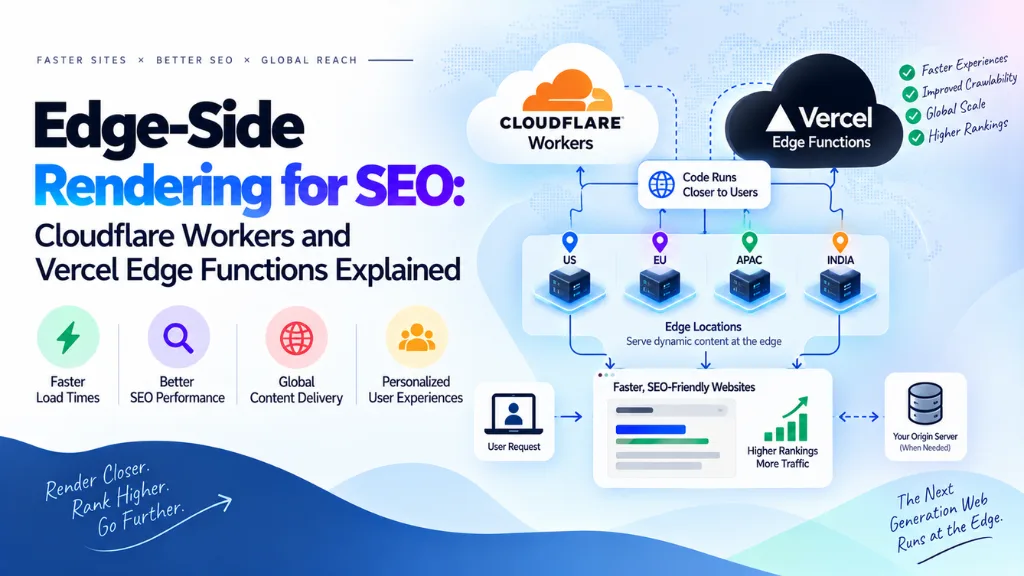
Edge-side rendering generates a page’s final HTML at a CDN location physically close to the visitor, rather than at a single origin server that could be thousands of miles away or in the visitor’s own browser. Instead of the request traveling all the way to a central server, being processed, and traveling back, the rendering logic runs at one of hundreds of distributed edge locations, cutting the physical distance the request has to travel before HTML comes back.
The practical effect is a large reduction in Time to First Byte compared to origin-based rendering, since the computation and network round-trip both happen much closer to the user. Cloudflare Workers, for instance, run JavaScript and WebAssembly across more than 300 global edge locations with cold starts reported under 5 milliseconds, compared to the 200 to 500 milliseconds typical of traditional serverless functions running from a single region.
How Is Edge-Side Rendering Different From Server-Side and Client-Side Rendering?#
Client-side rendering (CSR) sends a mostly empty HTML shell to the browser and builds the page with JavaScript after it loads, which means crawlers that don’t execute JavaScript see nothing useful in the initial response. Server-side rendering (SSR) builds the full HTML on a central origin server before sending it, so crawlers get complete content immediately, but at the cost of a network round-trip to wherever that origin server sits. Edge-side rendering does the same job as SSR – producing complete HTML before it reaches the browser – but runs that rendering logic at a distributed edge location instead of one central server, combining SSR’s crawler-friendly output with meaningfully lower latency.
Why This Matters for SEO Specifically#
Does Googlebot See Content Rendered at the Edge the Same Way as Server-Rendered Content?#
Yes. Googlebot doesn’t distinguish between HTML generated at a central origin server and HTML generated at an edge location – what matters is that the complete, rendered HTML is present in the initial response, before any client-side JavaScript needs to run. Since edge-side rendering produces that complete HTML at the point closest to the request, it satisfies the same crawlability requirement as traditional SSR while also improving load speed.
This distinction matters because Google’s indexing process works in two separate passes. In the first pass, Googlebot fetches the raw HTML response and indexes whatever content, links, and metadata are immediately present, without executing any JavaScript. Pages that depend on client-side JavaScript to populate their content, titles, or canonical tags are queued for a second rendering pass using a headless Chromium browser – and that second pass isn’t immediate; it can take anywhere from hours to weeks, depending on the site’s crawl budget and how much rendering demand Google’s systems are handling. A page relying entirely on client-side rendering can sit with effectively no indexed content until that second pass completes.
Edge and server-side rendering avoid this gap entirely, since the complete HTML – including title tags, meta descriptions, canonical URLs, and body content – is already present in the very first response Googlebot receives, with nothing waiting on a delayed rendering queue.
AI Crawlers Are Even Less Forgiving Than Googlebot#
Most AI crawlers used by systems like ChatGPT and Perplexity don’t execute JavaScript at all, unlike Googlebot’s eventual second-pass rendering. GPTBot and similar crawlers fetch only the raw HTML response and never run scripts, wait for API calls, or interact with the page, which means any content that depends on client-side JavaScript to appear is simply invisible to these systems – there’s no second pass to eventually catch it. For a site that wants to be cited in AI-generated answers as well as rank in classic organic search, having complete content in the initial HTML response isn’t just a Googlebot optimization; it’s a requirement for visibility in AI search at all, which is why edge rendering decisions increasingly get evaluated alongside AI search optimization for AEO and GEO rather than as a purely classic-SEO concern.
Cloudflare Workers vs. Vercel Edge Functions#
Both platforms run JavaScript in V8 isolates at distributed edge locations, but they’re built with different primary use cases in mind.
| Cloudflare Workers | Vercel Edge Functions | |
| Global footprint | 300+ locations | Runs on Vercel’s edge network, tightly integrated with its hosting |
| Cold start | Reported under 5ms | Near-instant via the Edge Runtime |
| Best framework fit | Framework-agnostic; strong support for Hono, Remix, SvelteKit | Deepest integration with Next.js specifically |
| Typical use case | General-purpose edge compute, API gateways, broad framework flexibility | Next.js-based projects wanting tight platform integration |
| Data layer | Cloudflare KV, D1, R2 for edge-native storage | Relies more on external data sources or Vercel’s own storage integrations |
Neither platform is categorically better – the choice mostly comes down to which framework and hosting ecosystem a project is already built around. A team already deployed on Vercel with a Next.js codebase gets the smoothest experience from Vercel Edge Functions, while a team wanting broader framework flexibility or the largest global footprint for general-purpose edge compute tends to lean toward Cloudflare Workers.
What Edge Functions Can Actually Do for SEO#
Beyond raw rendering speed, edge functions are increasingly used for SEO-specific tasks executed before a request even reaches the origin server or CMS:
- Dynamic canonical and hreflang rewriting. Adjusting canonical URLs or inserting hreflang tags based on the visitor’s detected region, without needing origin-level code changes.
- Structured data injection. Adding or modifying JSON-LD schema at the edge for pages where the CMS doesn’t natively support it.
- Redirect management at scale. Handling large redirect rule sets – sometimes tens of thousands of entries stored in an edge key-value store – faster than routing every redirect check through the origin server.
- AI crawler handling. Detecting and appropriately routing requests from AI crawlers, since these bots behave differently from both human visitors and Googlebot and often benefit from being served pre-rendered content directly.
- Geo-based content and currency variation. Serving region-specific pricing, currency, or compliance-driven content variations using the request’s geo headers, without an origin round-trip.
These edge-level SEO interventions are particularly useful for large sites where making the equivalent change in the CMS or origin codebase would require a slower development cycle – a redirect or canonical fix can be deployed at the edge in minutes rather than waiting on a full deployment pipeline.
What Edge Functions Can’t Do#
Edge runtimes are deliberately limited compared to a full server environment. They typically lack a filesystem, run under strict execution time limits, and operate with far less memory than a traditional server process – Vercel Edge Functions, for example, run with limited execution time and around 128MB of RAM, which rules out heavy processing tasks like video rendering or large batch jobs. Edge functions are built for fast, lightweight logic executed on every request – routing, header manipulation, content rewriting – not for the kind of long-running or resource-intensive work that belongs on an origin server or in a background job.
This means a realistic edge architecture is usually hybrid: edge functions handle routing, redirects, and lightweight content rewriting, while heavier application logic and database operations stay on origin infrastructure. Treating the edge as a replacement for the entire backend, rather than a fast layer in front of it, is one of the most common architectural mistakes teams make when adopting this pattern – one that’s easier to avoid with input from a team that’s already scoped a website design and development project around similar constraints.
Implementing Edge-Side Rendering Without Breaking SEO#
- Confirm complete HTML is present in the initial response, including title tags, meta descriptions, canonical URLs, and primary body content – not just a shell waiting on client-side JavaScript.
- Test with a crawler simulator, not just a browser. Tools that fetch raw HTML without executing JavaScript reveal exactly what Googlebot’s first pass and most AI crawlers will actually see.
- Keep canonical and hreflang logic simple and testable at the edge, since errors in edge-level rewriting can silently create duplicate content or incorrect regional targeting across an entire site.
- Monitor cache behavior alongside rendering. Edge rendering often runs alongside edge caching, and incorrect cache keys can serve the wrong region’s or language’s content to visitors or crawlers.
- Audit structured data injected at the edge the same way you would CMS-generated schema, since edge-level JSON-LD is just as visible to Google’s structured data testing tools as any other implementation.
A technical SEO audit is the most reliable way to confirm an edge rendering setup is actually delivering complete, crawlable HTML rather than assuming it works because the visible page looks correct in a browser.
Common Mistakes#
- Assuming edge rendering automatically fixes JavaScript SEO problems. If the edge function itself depends on client-side JavaScript to complete the page, the SEO benefit is lost regardless of where the compute runs.
- Ignoring AI crawler behavior. A setup that satisfies Googlebot’s eventual rendering pass can still be invisible to AI crawlers that never render JavaScript at all.
- Overloading edge functions with logic they weren’t built for. Heavy processing, large dependencies, or long-running tasks routinely hit execution time and memory limits at the edge.
- Misconfiguring cache keys alongside geo-based rendering. Region or language variations rendered at the edge need cache keys that account for that variation, or visitors and crawlers in different locations can see stale or incorrect content.
- Treating Cloudflare Workers and Vercel Edge Functions as interchangeable without checking framework fit. The right platform depends heavily on the existing tech stack, not just raw performance benchmarks.
- Skipping validation after deployment. Edge configurations that work correctly in testing can behave differently under production traffic patterns, particularly around cache invalidation and geo-detection edge cases.
Search Savvy typically reviews edge and rendering configuration as part of a broader website audit, since rendering issues are one of the most common causes of a site with strong content still underperforming in organic search.
Frequently Asked Questions#
Is edge-side rendering better for SEO than traditional server-side rendering? Both produce complete, crawlable HTML in the initial response, which is what matters most for indexing. Edge-side rendering’s advantage is speed – lower latency for visitors around the world – not a fundamentally different SEO outcome from well-implemented SSR.
Does using Cloudflare Workers or Vercel Edge Functions guarantee good SEO? No. The platform only provides the infrastructure; the implementation still needs to ensure complete HTML, correct metadata, and proper canonical and hreflang handling are present in the response these functions generate.
Can AI crawlers see content rendered at the edge? Yes, provided the edge function returns complete HTML in the initial response. Most AI crawlers don’t execute JavaScript, so content that still depends on client-side rendering after the edge response is delivered remains invisible to them.
What’s the biggest risk of moving rendering to the edge? Misconfigured caching alongside dynamic, geo-based, or personalized content is the most common failure mode – serving the wrong region’s or language’s cached page to visitors or crawlers undermines both user experience and SEO.
Should every site move to edge-side rendering? Not necessarily. Sites with a global audience and latency-sensitive pages benefit most. Smaller sites serving a single region with well-implemented server-side rendering may see limited additional SEO benefit from the added architectural complexity.
How do I check if my edge rendering setup is actually crawlable? Use a tool that fetches raw HTML without executing JavaScript and compare it against what a browser renders. If the raw response is missing content, titles, or links that appear in the browser, crawlers relying only on that raw response won’t see them either.
Bottom Line#
Edge-side rendering solves a real problem – the gap between rendering speed and crawler visibility – by moving complete HTML generation as close to the visitor as the network allows. The SEO benefit only materializes if the edge response actually contains finished, crawlable HTML rather than another JavaScript shell, and if canonical tags, metadata, and structured data are handled correctly at that layer. Whether the right platform is Cloudflare Workers or Vercel Edge Functions matters less than confirming, through direct testing, that what Googlebot and AI crawlers receive matches what a visitor actually sees.