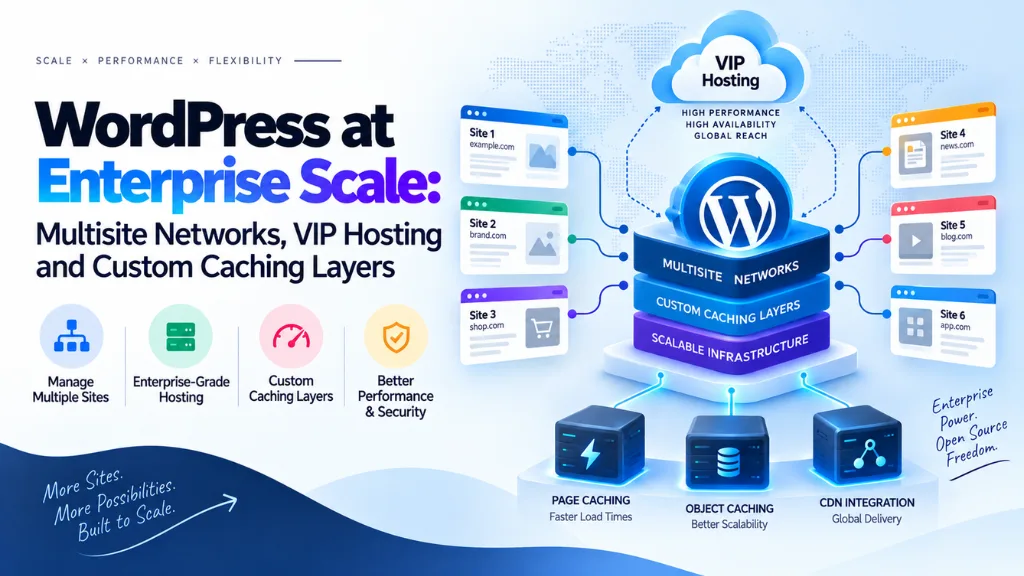
WordPress at Enterprise Scale: Multisite Networks, VIP Hosting and Custom Caching Layers

WordPress powers a large share of the web, but running it at enterprise scale is a fundamentally different discipline than running a single marketing site. Once a WordPress deployment needs to serve dozens or hundreds of brands, survive traffic spikes in the hundreds of millions of requests, and satisfy compliance requirements a shared hosting plan was never built for, the architecture decisions – multisite versus separate installs, managed VIP hosting versus self-hosted infrastructure, and how caching is layered – stop being implementation details and become the foundation the entire platform depends on.
In this article12 sections
This article covers how WordPress multisite networks are architected for enterprise governance, what managed platforms like WordPress VIP actually provide beyond standard hosting, and how a proper multi-layer caching strategy keeps a high-traffic WordPress deployment fast under real load.
What Does “Enterprise Scale” Mean for WordPress?#
Enterprise-scale WordPress typically means managing dozens to thousands of interconnected sites, sustaining traffic that can spike into the hundreds of millions of requests within hours, and meeting security, compliance, and uptime requirements that standard managed hosting isn’t built to guarantee. NASA’s flagship site migration is one of the most publicly documented stress tests in the space: the nasa.gov relaunch moved roughly 68,700 pages and over 104,000 media assets onto WordPress, and during the April 2024 solar eclipse the site reportedly absorbed around one billion requests in four and a half hours while remaining performant – a scale most enterprise deployments will never approach, but a useful upper bound for what the platform can support with the right architecture behind it.
WordPress Multisite: The Governance Layer#
WordPress multisite lets a single WordPress installation run a network of sites that share a codebase, plugins, and themes while maintaining separate content and, in many configurations, separate branding. For enterprises managing multiple regional sites, product lines, or acquired brands, multisite’s core value isn’t convenience – it’s governance: a single admin layer for enforcing plugin standards, theme consistency, and security policy across every site in the network, rather than patching and auditing dozens of independent installs separately.
Centralized vs. Federated Governance#
| Governance Model | How It Works | Best Fit |
| Centralized | A single team controls plugins, themes, and security policy network-wide | Organizations prioritizing compliance and consistency over regional autonomy |
| Federated | Platform-level guardrails are set centrally, but individual site teams retain control over content and some configuration | Organizations with distinct regional or brand teams that need flexibility within shared standards |
Centralized governance reduces duplication and compliance risk but can slow down regional teams waiting on network-wide approval for changes. Federated governance preserves site-level autonomy but requires more discipline to keep security and branding standards consistent across the network. Most large deployments land somewhere between the two, with hard guardrails (security patching, core plugin versions) centralized and softer decisions (page layouts, campaign content) left to individual site teams.
When Multisite Isn’t the Right Fit#
Multisite consolidates shared code and hosting, but it also means every site in the network shares the same core WordPress version, the same plugin codebase, and – in a shared-database configuration – the same database, which can create a single point of failure if not architected carefully. Organizations with sites that need fundamentally different plugin sets, independent update schedules, or strict data isolation for compliance reasons are often better served by separate WordPress installs tied together through a shared design system, rather than forcing incompatible requirements into a single network.
WordPress VIP and Managed Enterprise Hosting#
WordPress VIP is a managed enterprise hosting platform that packages scaling infrastructure, CDN, security monitoring, compliance certifications, and DevOps tooling into a single service, rather than requiring an enterprise to assemble and maintain that infrastructure independently. It’s built specifically for large-scale editorial and multi-brand operations: News Corp Australia’s migration of more than 90 brands across 15 web properties onto WordPress VIP is a commonly cited example, reported as a multi-million dollar project that delivered meaningful savings by eliminating separate licensing and on-premise hardware costs across the consolidated properties.
The core trade-off between managed platforms like WordPress VIP and self-managed infrastructure comes down to control versus operational burden. Managed platforms handle patching, scaling, and compliance certification (including, for government use cases, FedRAMP authorization) as part of the service, which removes significant DevOps overhead but comes with less low-level infrastructure control and a materially higher price point than generic cloud hosting. Self-managed infrastructure offers full control over the stack but requires the enterprise to build and staff the same monitoring, security, and scaling discipline that a managed platform provides out of the box.
Headless and Hybrid Architectures#
A growing share of enterprise WordPress deployments in 2026 use WordPress as a content backend – via the REST API or WPGraphQL – while frontends are built independently in frameworks like React, Next.js, or Astro. This headless approach lets each site or brand scale its frontend independently, adopt different frontend technologies where needed, and often achieve stronger Core Web Vitals through static generation and CDN-first delivery, at the cost of added infrastructure complexity and the loss of some native WordPress theme functionality.
A common middle ground pairs WordPress multisite as a centralized content hub – handling editorial workflows and content governance – with decoupled frontends deployed independently per site or brand. This hybrid model keeps the governance benefits of multisite intact while giving individual properties more flexibility over how content is actually rendered and delivered to visitors.
Custom Caching Layers: The Performance Backbone#
A single caching plugin that works fine on a small business site becomes inadequate almost immediately at enterprise traffic levels. Enterprise WordPress deployments typically run four to five caching layers together, each solving a different bottleneck.
| Cache Layer | What It Caches | Common Tools |
| Browser cache | Static assets on the visitor’s own device | Long cache-control headers on images, CSS, JS |
| Edge / CDN cache | Full pages cached at global points of presence | Cloudflare, Fastly, AWS CloudFront |
| Page cache | Complete rendered HTML for anonymous visitors | Varnish, Nginx FastCGI cache, LiteSpeed Cache |
| Object cache | Database query results, kept in memory | Redis, Memcached |
| Opcode cache | Compiled PHP bytecode, avoiding recompilation per request | OPcache |
Each layer addresses a different point of failure. Page and edge caching remove the need to run WordPress at all for the large majority of anonymous traffic, which is where most of the performance gain comes from on content-heavy sites. Object caching matters most for logged-in users, dynamic pages, and checkout flows – situations where full-page caching can’t apply because the content varies per visitor. Persistent object caching with Redis, in particular, keeps frequently accessed database query results in memory between requests, which is close to essential once a site has meaningful logged-in traffic or a complex plugin stack generating repeated queries.
Cache Invalidation Is the Hard Part#
Layering caches is straightforward; invalidating them correctly when content changes is where most enterprise caching setups run into trouble. A robust setup uses tagged or surrogate-key invalidation – associating cached objects with the specific post, taxonomy, or template that generated them – so that publishing an update purges only the affected cache entries rather than flushing the entire cache network-wide. Flushing everything on every update defeats much of the purpose of caching at scale, since a large site republishing content frequently would spend a meaningful share of its capacity rebuilding cache that didn’t need to be cleared.
Enterprise WordPress and Site Performance for SEO#
Caching architecture isn’t purely a backend concern – it directly affects Core Web Vitals, which remain part of how Google evaluates page experience. A well-layered cache typically drops Largest Contentful Paint meaningfully compared to an uncached or single-layer setup, which matters more at enterprise scale because the traffic volume amplifies the aggregate impact of even small per-page delays. It’s a pattern Search Savvy sees consistently when auditing large sites: performance complaints that look like a content or SEO problem often trace back to a caching layer that was never configured for the traffic the site actually receives. This is one reason enterprise WordPress builds are usually evaluated alongside a broader technical SEO review rather than treated purely as an infrastructure decision, since crawlability, page speed, and rendering all interact with how the multisite and caching architecture is configured.
For organizations managing multiple regional or brand sites within one network, the same governance layer that centralizes plugin and security policy can also enforce consistent enterprise SEO standards – canonical tags, hreflang implementation, and structured data – across every site rather than relying on each regional team to configure them independently.
Common Mistakes#
- Choosing multisite for convenience without evaluating governance needs. Multisite’s real value is centralized control; deployments that don’t need that control often take on shared-database risk for no real benefit.
- Underestimating cache invalidation complexity. A caching setup that flushes everything on every content update loses much of its performance benefit on large, frequently updated sites.
- Treating managed hosting and self-managed infrastructure as interchangeable. The cost difference between generic cloud hosting and a platform like WordPress VIP reflects real operational work (patching, compliance, scaling) that has to happen somewhere – either paid for as a service or staffed internally.
- Skipping object caching because page caching is already in place. Page caching does nothing for logged-in users or dynamic, personalized pages – a meaningful gap on any site with account features or e-commerce functionality.
- Building a headless frontend without a plan for editorial workflows. Decoupling the frontend can improve performance but shouldn’t come at the cost of the content governance multisite was chosen to provide in the first place.
- Ignoring SEO implications of the architecture. Multisite and caching decisions affect canonical URLs, crawl behavior, and page speed; treating these as purely engineering decisions often creates SEO problems that surface only after launch, sometimes not caught until a full website audit is run.
Search Savvy typically reviews these architectural decisions as part of a website design and development engagement, since the SEO and performance implications of a multisite and caching setup are easiest to address before the architecture is finalized rather than after launch.
Frequently Asked Questions#
What is the difference between WordPress multisite and separate WordPress installs? Multisite runs multiple sites from a single WordPress installation with shared core, plugins, and themes, managed through one admin layer. Separate installs give each site full independence but require managing updates, security, and plugins individually across every install.
Is WordPress VIP necessary for every large WordPress deployment? No. WordPress VIP and similar managed platforms are built for organizations that need enterprise SLAs, compliance certifications, and large-scale editorial operations. Smaller enterprise deployments without those specific requirements can often be served well by strong self-managed infrastructure or a less specialized managed host.
How many caching layers does an enterprise WordPress site actually need? Most high-traffic deployments benefit from four to five layers working together: opcode, object, page, edge/CDN, and browser caching. Fewer layers are usually fine for smaller sites, but each additional layer addresses a distinct bottleneck that becomes more relevant as traffic and complexity grow.
Does headless WordPress replace the need for multisite? No. Headless architecture addresses how content is rendered to visitors; multisite addresses how content and governance are managed on the backend. Many enterprise deployments combine both – a multisite backend serving decoupled frontends per site or brand.
What’s the biggest performance risk in enterprise WordPress caching? Incorrect cache invalidation. A setup that doesn’t purge cached content precisely when it changes either serves stale content to visitors or flushes far more than necessary on every update, undermining the performance gains caching was meant to provide.
Can WordPress multisite handle government or highly regulated compliance requirements? Yes, when paired with a platform built for it. Managed hosts offering FedRAMP authorization and similar certifications exist specifically to meet the compliance requirements that self-managed infrastructure would otherwise need to satisfy independently.
Bottom Line#
WordPress at enterprise scale succeeds or fails on architecture decisions made before a single page is built: whether multisite’s governance benefits outweigh its shared-infrastructure risk, whether managed hosting like WordPress VIP is worth its premium over self-managed infrastructure, and whether the caching stack is layered – and invalidated – correctly for the traffic the platform actually needs to handle. Get these right, and WordPress scales to genuinely enormous traffic without buckling. Get them wrong, and no amount of content optimization will compensate for an architecture that wasn’t built for the load it’s carrying.