Server-Side Tagging with GTM: Eliminating Data Loss in a Cookie-Restricted Environment
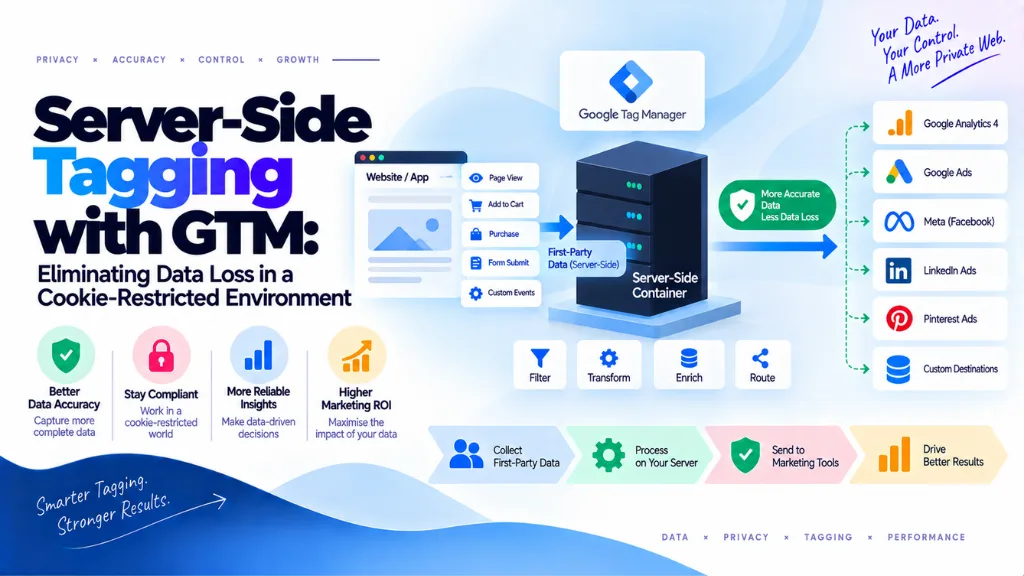

Browser-based ad blockers now strip client-side tags from more than 40% of sessions in key markets like Germany, France, and US tech-heavy audiences, and Safari’s Intelligent Tracking Prevention caps any cookie set through JavaScript at seven days. Client-side Google Tag Manager – a snippet firing directly in the browser to Google Analytics, Meta Pixel, and a dozen other vendor tags – was built for a browser environment that no longer exists. Server-side tagging with GTM moves tag execution from the browser to a server you control, restoring most of that lost visibility, but only when the underlying architecture is actually configured correctly, which is where most implementation guides skip important detail.
In this article10 sections
This article covers what server-side tagging genuinely fixes, the specific technical requirements that determine whether it actually extends cookie life the way teams expect, and – just as importantly – what it doesn’t solve, since treating it as a complete fix for data quality problems that have nothing to do with cookie expiry is a common and costly mistake.
What Is Server-Side Tagging with GTM?#
Server-side tagging with GTM splits tag infrastructure into two containers: a standard client-side web container running in the browser, and a server container running on infrastructure you control, typically Google Cloud Run. The client container sends event data to the server container first; the server container then forwards that data to vendor endpoints like Google Ads, Meta Conversions API, or TikTok’s Events API. The browser makes one request to your own domain instead of firing thirty separate requests directly to different vendors, which is the structural change that makes most of the downstream benefits possible.
The Data Loss Problem Server-Side Tagging Solves#
Server-side tagging directly addresses four distinct causes of client-side data loss, each with a different mechanism.
| Problem | How Client-Side Tagging Fails | How Server-Side Tagging Helps |
| Ad blockers | Blocklists target known vendor domains and script patterns firing directly in the browser | Requests appear to originate from your own first-party domain, avoiding blocklist detection |
| ITP cookie expiry | JavaScript-set cookies are capped at 7 days in Safari, 24 hours if the visit arrived via a tracking link | Cookies set via HTTP Set-Cookie from a first-party subdomain aren’t subject to that cap, potentially persisting up to two years |
| In-app browser interference | In-app browsers (social apps, messaging apps) often restrict or interfere with third-party pixel loading | A single first-party request is less likely to be blocked or altered |
| Third-party cookie decline | Vendor tags relying on third-party cookies lose visibility as browsers restrict or block them | First-party server-to-server connections don’t depend on third-party cookie availability |
The scale of the underlying problem is what makes this worth solving properly: of 100 real conversions, a typical client-side-only setup loses a meaningful share to ad blockers, ITP cookie expiry, and third-party restrictions combined, with server-side tracking recovering roughly 80% of that specific technical loss category once implemented correctly. That recovery figure excludes consent-based rejections, which server-side tagging doesn’t and shouldn’t attempt to recover.
The First-Party Cookie Lifetime Extension: Getting the Technical Details Right#
This is the part of server-side tagging most guides oversimplify. Setting server_container_url to point at a tagging server doesn’t automatically make that connection first-party – whether it’s treated as first-party by Safari’s ITP depends entirely on the specific domain and DNS configuration used, and there are three distinct states here, not a simple binary.
The default Cloud Run URL (ending in .a.run.app) is a third-party domain regardless of how it’s referenced, so it doesn’t unlock the ITP exemption at all. Achieving genuine first-party status requires a custom subdomain on your own root domain – something like metrics.yourdomain.com – correctly mapped through A or AAAA DNS records specifically, not a CNAME. This distinction matters because CNAME-based mapping is subject to ITP’s CNAME-cloaking detection, which was built specifically to catch exactly this kind of workaround and will still treat the connection as third-party if detected.
There’s a second, less commonly known requirement: the tagging server and the web server need to share the same first two octets of their IP address. If they diverge, Safari’s ITP applies its cookie restrictions despite the domain and DNS configuration otherwise being correct. Get both requirements right, and a server-set cookie on that first-party subdomain can persist for up to two years instead of Safari’s seven-day cap on JavaScript-set cookies – though it’s worth noting that’s a request lifetime, not a guarantee, since cookies still clear when users clear browser data, switch devices, or browse privately.
Does Server-Side Tagging Exempt a Business From Consent Requirements?#
No. Server-side tagging is a data transport and durability improvement, not a consent mechanism. GDPR, CCPA, and ePrivacy Directive requirements still apply in full, and server-side infrastructure still needs to honor and propagate consent signals correctly – a server-side setup that fires tags for users who declined consent is a compliance problem regardless of how technically sound the underlying architecture is.
What Server-Side Tagging Does Not Fix#
Server-side tagging solves a specific, narrow category of technical data loss. It does not solve:
- UTM hygiene. Inconsistent, malformed, or missing UTM parameters remain exactly as broken after a server-side migration as before it – bad inputs processed server-side are still bad inputs.
- Consent compliance. As covered above, this remains a separate, mandatory requirement regardless of tagging architecture.
- In-platform vs. GA4 reporting disagreements. Discrepancies between a platform’s own reported conversions and what GA4 shows typically stem from different attribution models and lookback windows, not from the transport layer server-side tagging addresses.
Teams that migrate to server-side tagging expecting it to resolve these separate issues are usually disappointed – not because the migration failed, but because it was never designed to fix problems outside its actual scope. Search Savvy’s technical SEO services typically address UTM taxonomy and tracking hygiene as a distinct project alongside any server-side tagging migration, rather than assuming one solves the other.
Architecture Choices: sGTM vs. Managed vs. Custom Edge Worker#
Several architectural options exist in 2026, and the right choice depends heavily on team composition rather than a universally “best” answer.
| Approach | Best Fit | Trade-off |
| Self-hosted GTM server-side (sGTM) on Cloud Run | Teams with existing GCP familiarity wanting full control | Requires ongoing infrastructure management and cost monitoring |
| Managed sGTM (e.g., Stape) | Marketing operations teams wanting a familiar tag-manager UI without managing infrastructure | Recurring subscription cost, typically starting around $20–22/month for entry tiers |
| Event-pipeline CDP (RudderStack, Snowplow) | Teams needing broader data pipeline capabilities beyond tag management alone | Higher setup complexity and cost than a tag-manager-centric approach |
| Custom edge worker | Teams with a senior engineering group that already owns production services | Cheaper and more flexible, but a poor fit without dedicated engineering ownership |
The wrong choice, according to practitioners who’ve run this migration repeatedly, is a half-built custom stack that engineering never budgeted the ongoing time to maintain. A managed or self-hosted sGTM container that a marketing operations team can actually own day-to-day is often the more durable choice, even if a custom edge worker looks more elegant on paper.
Practical Setup Steps#
- Clean up the client-side data layer and UTM taxonomy first. Most teams find server-side migration only pays off once these foundational inputs are already reliable – migrating messy data onto better infrastructure just produces faster-arriving messy data.
- Provision a custom first-party subdomain, not the default Cloud Run URL, and map it using A or AAAA DNS records rather than a CNAME.
- Verify the IP-octet requirement between the tagging server and the web server, since this is easy to overlook and silently defeats the ITP exemption even when the DNS configuration is otherwise correct.
- Configure consent signal propagation explicitly in the server container, rather than assuming server-side infrastructure handles this automatically.
- Migrate tags incrementally, validating conversion volume against the previous client-side setup before fully cutting over, so any configuration issue surfaces as a discrepancy rather than a silent data gap.
- Monitor conversion recovery specifically, comparing pre- and post-migration technical loss rates, rather than assuming the migration worked based on the absence of errors alone.
Search Savvy’s performance marketing services build server-side tagging validation directly into campaign measurement setups, confirming actual conversion recovery rather than treating a completed migration as automatically successful.
Common Mistakes in Server-Side Tagging with GTM#
- Assuming any custom domain qualifies as first-party. The DNS record type (A/AAAA versus CNAME) and matching IP octets both determine whether Safari’s ITP actually grants the exemption.
- Expecting server-side tagging to fix UTM or attribution problems. These are separate issues that a transport-layer improvement doesn’t address.
- Skipping consent signal propagation in the server container. Server-side infrastructure still needs explicit configuration to honor consent choices; it isn’t automatic.
- Choosing a custom edge worker without dedicated engineering ownership. This is consistently the architecture choice practitioners flag as most likely to end up half-maintained.
- Migrating without a validation period. Cutting over fully before confirming conversion volume matches expectations risks a silent data gap that’s harder to diagnose after the client-side fallback is already removed.
The Bottom Line#
Server-side tagging with GTM genuinely solves a specific, well-defined set of technical data loss problems – ad blocker interference, ITP cookie expiry, and third-party cookie decline – but only when the underlying DNS and IP configuration is correct, and only for the categories of loss it was designed to address. Getting the first-party subdomain requirements exactly right, choosing an architecture the team can actually maintain, and validating conversion recovery after migration separates a genuinely successful implementation from one that looks complete but quietly leaves the same gaps it was meant to close.
The practical next step is auditing your current client-side tagging setup for its actual technical loss rate before committing to a migration, so you can validate the recovery afterward rather than assuming it happened. Search Savvy’s tracking infrastructure audits and website audit services help teams assess this baseline and choose the right server-side architecture for their actual team composition, rather than defaulting to whichever option looks most sophisticated on paper.
Frequently Asked Questions#
What is server-side tagging with GTM? It’s an architecture that splits tag execution into a client-side web container and a server-side container running on infrastructure you control, so the browser sends data to your own domain first before it’s forwarded to vendor endpoints like Google Ads or Meta.
Does server-side tagging actually extend cookie lifetimes? Yes, but only under specific conditions. Cookies set via HTTP Set-Cookie from a genuinely first-party subdomain – mapped through A/AAAA DNS records with matching IP octets between the tagging and web servers – aren’t subject to Safari ITP’s 7-day cap on JavaScript-set cookies, and can persist up to two years.
Why doesn’t using a custom domain automatically make server-side tagging first-party? Safari’s ITP applies CNAME-cloaking detection specifically to catch this workaround, so a CNAME-mapped custom domain can still be treated as third-party. Genuine first-party status requires A or AAAA DNS records, plus matching the first two IP octets between the tagging server and the web server.
Does server-side tagging solve GDPR or consent compliance requirements? No. It’s a data transport and durability improvement, not a consent mechanism. Consent requirements under GDPR, CCPA, and ePrivacy still apply in full, and the server container must be explicitly configured to honor and propagate consent signals correctly.
Should I build a custom server-side tagging solution or use a managed platform? It depends on team composition. A custom edge worker is cheaper and more flexible for teams with dedicated engineering ownership, while a managed or self-hosted sGTM container is usually more durable for marketing operations teams without that ongoing engineering support.
Will server-side tagging fix discrepancies between GA4 and platform-reported conversions? Not directly. Those discrepancies typically stem from different attribution models and lookback windows between platforms, not from the technical transport layer server-side tagging addresses. It can improve overall data completeness, but it doesn’t reconcile differing attribution methodologies.