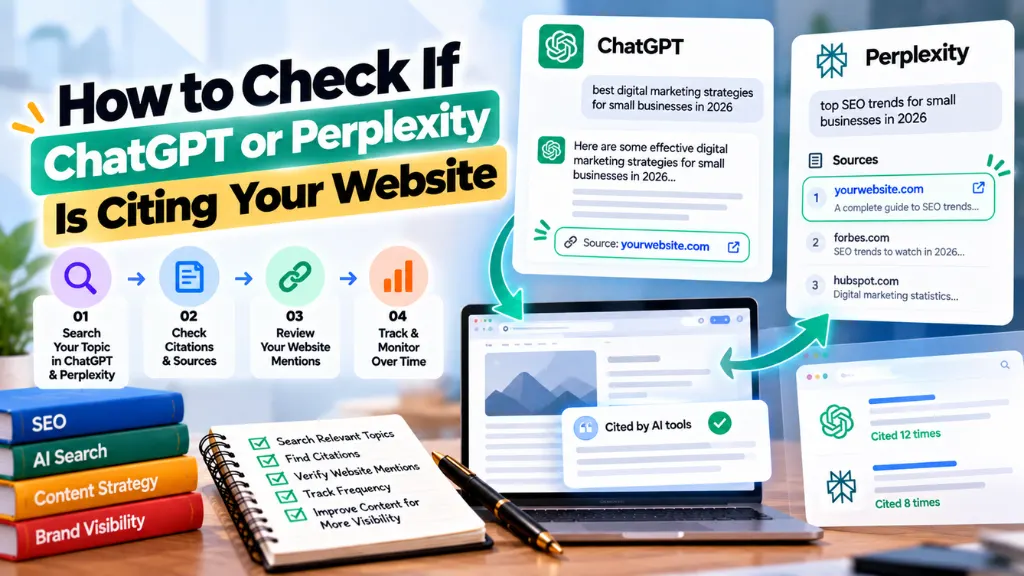
How to Check If ChatGPT or Perplexity Is Citing Your Website

If your direct traffic has crept up lately for no obvious reason, there’s a reasonable chance some of it isn’t direct at all – it’s AI referral traffic that Google Analytics simply can’t classify correctly. Most AI platforms either strip referrer data entirely or route visitors through channels GA4 was never built to recognize, which means a meaningful slice of your AI-driven traffic is almost certainly hiding in plain sight, logged as “Direct” or buried inside generic “Referral” numbers.
In this article10 sections
Checking whether ChatGPT or Perplexity is citing your website isn’t one task – it’s four related but different checks: whether AI crawlers are even reading your site, whether visitors are clicking through from an AI answer, whether your brand is actually named in AI-generated responses, and whether you’re being cited as a source with a link. This guide walks through all four, with the specific tools and steps for each.
Why This Is Harder to Check Than Google Rankings#
Checking AI citations is harder than checking search rankings because there’s no single dashboard that shows them – citations happen inside a conversational response that isn’t indexed or searchable the way a SERP position is, and much of the resulting traffic never carries data your analytics platform can read. A Google ranking is a fixed, checkable fact for a given keyword at a given moment. An AI citation is generated live, in response to a specific prompt, phrased differently every time, and often never clicked at all.
This last point matters more than it sounds. Industry analysis of Perplexity citation behavior has found that only an estimated 12–18% of citations actually result in a click-through to the source – meaning the large majority of times your site is cited, no referral traffic is ever generated to prove it happened. If you’re only watching your analytics for signs of AI visibility, you’re missing most of the picture by design, not by a tracking mistake.
Method 1: Check Whether AI Crawlers Are Reading Your Site#
Before your content can be cited, an AI crawler has to read it – checking your server logs for bot user-agents like GPTBot, ClaudeBot, PerplexityBot, and OAI-SearchBot tells you whether that’s even happening, independent of whether any citation ever results. This is the most direct, tool-free way to confirm baseline visibility, and it doesn’t require waiting for referral traffic to show up.
- Pull your raw access logs, not just your analytics dashboard – AI crawler requests are server-level events that don’t execute JavaScript and won’t register in GA4 at all. If your site sits behind a CDN, check the edge logs there, since an origin server often only sees requests that bypassed the cache.
- Search for known AI crawler user-agents. On a Linux or Mac server, a command like grep -iE “GPTBot|ClaudeBot|PerplexityBot|OAI-SearchBot|ChatGPT-User|Google-Extended” access.log will surface matching requests across the major platforms.
- Cross-check against robots.txt. View yourdomain.com/robots.txt directly and confirm you haven’t accidentally disallowed a crawler you want indexing you – a single blocking line can quietly remove you from a model’s training or retrieval pipeline without any obvious symptom elsewhere.
- Note which pages get hit. Crawler activity concentrated on a handful of pages, while the rest of your site goes untouched, often points to internal linking or sitemap gaps worth fixing – an area that overlaps directly with standard technical SEO hygiene.
Crawling isn’t a guarantee of citation, and being crawled doesn’t mean you’ll be cited for any specific query – but a site that’s never crawled by these bots has effectively no path to being cited at all, so this check establishes the floor before anything else is worth investigating.
Method 2: Run Manual Prompt Tests#
The simplest way to check AI citations directly is to ask ChatGPT and Perplexity the exact questions your customers would ask, using your own browser, and record whether your brand or URL appears in the response. This costs nothing and takes a few minutes, though it only captures a single snapshot – AI responses vary by session, by phrasing, and over time, so a one-off check shouldn’t be treated as definitive.
A reasonably thorough manual check looks like this:
- Build a list of 10–20 realistic prompts your actual customers might type – not just your brand name, but the problems, comparisons, and questions that would naturally lead someone to your site if they searched Google instead. This list overlaps heavily with the question-based terms good keyword research already surfaces, so an existing keyword list is a faster starting point than building prompts from scratch.
- Run each prompt in ChatGPT and Perplexity separately, since the two platforms draw from different retrieval systems and frequently produce different results for the same question. Perplexity in particular surfaces visible source links for nearly every claim, making it easier to confirm a direct citation.
- Record three outcomes for each prompt: no mention at all, a brand mention with no linked source (meaning the model is likely recalling your brand from training data rather than retrieving current content), or a direct citation with a link to your page.
- Repeat the same prompt set periodically, ideally on a fixed schedule, since AI answers shift as models update and as competitors publish new content that outranks or out-cites yours.
This method has a real limitation worth naming honestly: it doesn’t scale, and it misses the far larger number of unique phrasings real users type that you’d never think to test manually. Search Savvy treats manual prompt testing as a useful first pass for clients curious about AI visibility, but not as a substitute for the more systematic methods below – it’s a good starting point, not a complete citation tracking system.
Method 3: Set Up GA4 to Catch AI Referral Traffic#
Google Analytics 4 has no dedicated default category for AI-driven traffic, so ChatGPT and Perplexity referrals are typically scattered across “Referral,” “Direct,” or “(not set)” unless you build a custom channel group to isolate them. Since mid-2025, ChatGPT has appended utm_source=chatgpt.com to many citation links, which helps GA4 attribute that traffic correctly – but Perplexity and most other platforms still don’t add UTM parameters consistently as of 2026, so a chunk of that traffic still needs to be caught manually.
To build the custom channel group:
- In GA4, go to Admin → Data display → Channel groups, and create a new custom channel named something like “AI Assistants.”
- Add a rule where Session source matches a regex pattern covering the major platforms, for example: chatgpt\.com|perplexity\.ai|claude\.ai|gemini\.google\.com|copilot\.microsoft\.com.
- Place this custom rule above the default Referral channel in the rule order, so matching sessions are captured here rather than falling into the generic bucket.
- Check Reports → Acquisition → Traffic acquisition, switch the channel group selector to your new grouping, and review sessions, engagement, and conversions attributed to AI sources.
- As a manual cross-check, search the existing Referral channel directly for chatgpt.com and perplexity.ai as session sources – this catches historical traffic from before your custom channel group was created.
Even with this set up correctly, treat the resulting numbers as a floor, not a ceiling. Mobile app traffic from AI assistants, and any session where the referrer header is stripped before it reaches your server, will still land in Direct no matter how the channel group is configured.
Method 4: Use a Dedicated LLM Citation Tracking Tool#
For ongoing, repeatable citation tracking at a scale manual prompt testing can’t match, a dedicated LLM citation tracking tool runs a scheduled library of prompts against multiple AI platforms and reports mention rate, citation rate, and competitor comparisons automatically. This category of software has grown quickly through 2025 and 2026, and several platforms now offer entry-level plans accessible to small businesses rather than only enterprise budgets.
Commonly cited options in this space include Otterly.AI, Peec AI, Profound, and Semrush’s AI visibility tracking, each covering a different mix of ChatGPT, Perplexity, Gemini, Copilot, and Google AI Overviews, with pricing and engine coverage varying significantly between them – it’s worth checking each vendor’s current pricing and engine list directly, since this is a fast-moving category where coverage changes often.
A distinction worth understanding before choosing a tool: mention rate (your brand’s name appearing in a response) and citation rate (a linked source pointing to your page) measure different things. A high mention rate paired with a low citation rate usually means the model recognizes your brand from its training data but isn’t actively retrieving your current content – which is a useful diagnostic signal in its own right, since it points toward a content freshness or crawlability problem rather than a brand-awareness one.
Comparing the Four Methods#
| Method | What It Tells You | Effort | Cost |
| Server log / crawler check | Whether AI bots can access your content at all | Low (one-time setup, recurring check) | Free |
| Manual prompt testing | Spot-check of current citation behavior for specific queries | Low per check, doesn’t scale | Free |
| GA4 custom channel tracking | Click-through traffic from AI platforms that pass referrer data | Moderate (one-time setup) | Free |
| Dedicated citation tracking tool | Scheduled, scaled tracking of mentions, citations, and competitors | Low ongoing, ongoing subscription | Paid (entry tiers often under $50/month) |
No single method tells the whole story on its own. Crawler logs confirm access without confirming citation; manual prompts confirm citation without confirming scale; GA4 confirms clicks without confirming the much larger share of citations that never produce one; and paid tools confirm scale and trend but add a recurring cost. Most businesses get a reasonably complete picture by combining the free methods first and adding a paid tool only once AI visibility becomes a meaningful enough channel to justify ongoing monitoring.
What to Do If You Find You’re Not Being Cited#
If your checks come back largely empty, the fix usually isn’t a single switch to flip – it’s the same foundation that supports traditional SEO, applied with AI retrieval in mind. Content that answers specific questions directly and early, carries clear structured data, and demonstrates real expertise tends to get cited more consistently than generic overviews competing with dozens of similar pages. This is a large part of why AI search optimization has become its own discipline rather than an afterthought bolted onto traditional SEO – the signals that earn a citation overlap with, but aren’t identical to, the signals that earn a ranking.
Search Savvy treats AI citation visibility as a measurement problem first and an optimization problem second: you can’t reliably improve what you aren’t actually checking, and most businesses underestimate how much of their AI visibility is currently invisible to them simply because they’ve only ever looked at Google Analytics.
Common Mistakes When Checking AI Citations#
- Relying only on Google Analytics and concluding AI isn’t sending traffic, when most AI referral traffic is miscategorized as Direct or buried in generic Referral data by default.
- Running a single manual prompt test and treating the result as permanent, when AI responses shift with model updates, content changes, and even the exact phrasing of the prompt.
- Confusing a brand mention with a citation. Being named without a linked source means the model is recalling training data, not retrieving your current site – a meaningfully different signal.
- Blocking AI crawlers in robots.txt without realizing it, often inherited from a security-focused configuration that wasn’t reviewed for AI-specific implications.
- Assuming citation tracking tools are only for large enterprises, when several platforms now offer accessible entry-level pricing suited to small business budgets.
The Bottom Line#
Checking whether ChatGPT or Perplexity is citing your website takes more than a glance at Google Analytics – it means confirming AI crawlers can reach your content, running manual prompt checks, properly configuring GA4 to catch what click-through traffic does exist, and, for businesses that want ongoing visibility, adding a dedicated citation tracking tool rather than relying on spot-checks. The uncomfortable truth most businesses need to accept is that the majority of AI citations never produce a click at all, so traffic numbers alone will always understate your actual AI visibility. Search Savvy increasingly builds this kind of layered citation check into AI search optimization work, because a business that only measures clicks is working from an incomplete picture of how it’s actually being found in 2026.
Frequently Asked Questions#
Can I see exactly which ChatGPT conversations cited my website? No. OpenAI doesn’t provide individual conversation-level citation data to website owners. The closest proxy is referral traffic with a chatgpt.com UTM parameter, server logs showing crawler activity, or a third-party citation tracking tool running scheduled prompt tests.
Why does my direct traffic keep going up with no obvious cause? This is a common symptom of unattributed AI referral traffic. When an AI platform strips referrer data before a click reaches your server, Google Analytics has no information to work with and defaults to classifying the session as Direct.
Does being crawled by GPTBot mean I’ll be cited in ChatGPT? No. Crawling only confirms your content is accessible and potentially eligible for use – it doesn’t guarantee a citation for any specific query, since citation also depends on content relevance, structure, and how it compares to competing sources for that prompt.
Is it worth paying for an AI citation tracking tool as a small business? It depends on how much of your traffic already comes from search and how much AI visibility matters to your specific industry. Several tools now offer entry-level pricing under $50 a month, which can be worthwhile once manual prompt checks start feeling too limited to track trends reliably.
Should I block AI crawlers like GPTBot from my site? That’s a business decision with trade-offs. Blocking a crawler in robots.txt removes any chance of being cited by that platform, while allowing it means your content could be used to generate answers without a guaranteed click back to your site. There’s no universally correct answer – it depends on whether AI visibility or content control matters more for your business.
Does Perplexity cite sources more reliably than ChatGPT? Perplexity is generally more transparent about sourcing, typically showing visible citation links for most claims in its responses, which makes it easier to directly confirm a citation. ChatGPT’s citation behavior varies more by query type and whether browsing or search features are active.