How to Start a Blog in India in 2026 (Step-by-Step for Beginners)

India had 886 million active internet users in 2024, and rural India accounted for 488 million of them, according to the IAMAI–Kantar Internet in India report. Nearly all users (98%) accessed content in Indic languages. Readers are not the scarce resource. What is scarce is a blog that answers their questions with real experience.
In this article21 sections
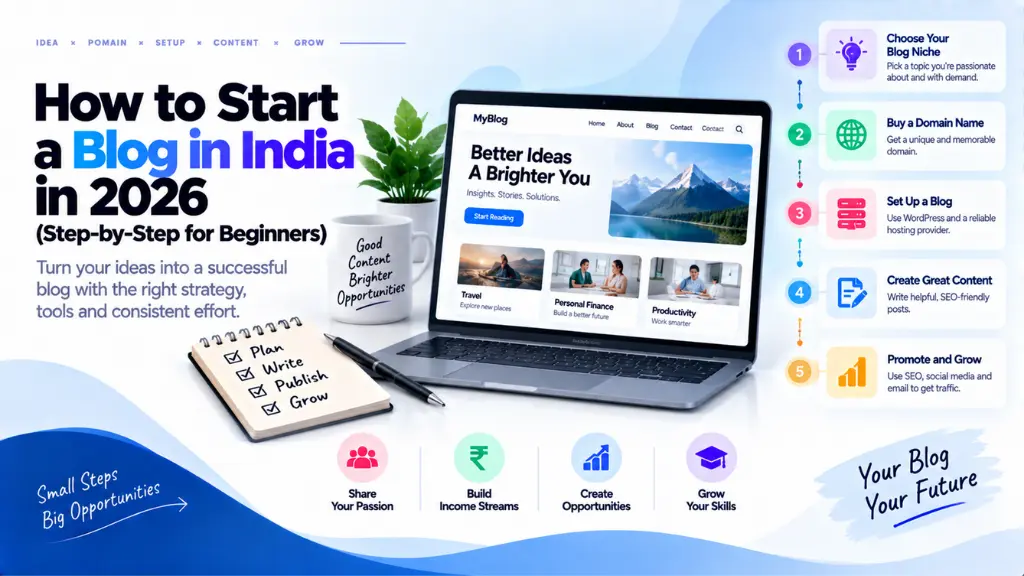
To start a blog in India, you need six things: a topic, a platform, a domain name, hosting, a few trust pages, and your first useful posts. The technical setup is small. What decides whether the blog goes anywhere is the topic you pick and the quality of what you publish. This guide covers each step in order, plus the India-specific details on domains, disclosure, privacy law, and tax that generic guides skip.
How Do You Start a Blog in India? The 7 Steps#
To start a blog in India, choose a focused topic, pick a platform, register a domain, buy hosting, install WordPress with HTTPS, add trust pages, and publish your first posts while connecting Google Search Console. The technical setup can often be done in a day; earning takes longer.
- Choose a focused topic.
- Pick a platform.
- Register a domain name.
- Buy hosting.
- Install WordPress and secure it.
- Add the pages that build trust.
- Publish, connect Google, and get indexed.
Step 1: Choose a focused topic#
Pick something you can write about from experience, narrow enough that you can cover it better than a generic site. Broad “what is X” explainers are the most exposed to AI summaries: a Pew Research Center study of U.S. adults found people clicked a traditional result in 8% of visits with an AI summary versus 15% without. Check demand by reading Google autocomplete, “People also ask” boxes, and Google Trends. If you would rather have specialists map it, Search Savvy offers keyword research services.
Step 2: Pick a platform#
WordPress powers about 41% of all websites and 59% of those with a known content management system, per W3Techs in August 2026, so themes, tutorials, and developers are easy to find.
| Platform | How you pay | Control | Fits |
| WordPress.org (self-hosted) | Free software; you pay for a domain and hosting | Full control of themes, plugins, and code | Most beginners who plan to earn |
| WordPress.com | Hosted service with free and paid plans | Limited by plan; check current terms | People who want no server management |
| Blogger | Free, owned by Google | Basic customisation | Low-cost experiments |
Google’s AdSense eligibility page says you need access to the HTML source of the site you submit, so confirm any platform allows it before you commit.
Steps 3 and 4: Register a domain and choose hosting#
Choose a short, easy-to-spell domain without hyphens or numbers, and avoid other companies’ trademarks. A .in domain signals an India focus, while .com suits a global audience. Registrars price .in domains very differently, and renewal can cost more than year one, so compare both.
For hosting, WordPress recommends hosts that support PHP 8.3 or greater, MariaDB 10.11+ or MySQL 8.0+, and HTTPS. Also ask about daily backups, support hours in your time zone, and the renewal price. Treat “free domain” offers as a discount, not a reason to choose a host.
Step 5: Install WordPress and secure it#
Use your host’s one-click installer, switch on HTTPS, and set post-name permalinks. Choose a lightweight theme and a handful of plugins for caching, backups, and security. Turn on two-factor login. Then test speed on a mid-range phone, not just your laptop. Google’s Core Web Vitals targets are LCP of 2.5 seconds or less, INP of 200 milliseconds or less, and CLS of 0.1 or less.
Step 6: Add the pages that build trust#
Publish an About page with your real name and background, a Contact page, a Privacy Policy, and a disclosure statement. Google’s people-first content guidance asks whether readers can find background on the author or site.
India’s Digital Personal Data Protection Rules were notified in November 2025, and the notice-and-consent provisions phase in over 18 months. Write a plain-language policy explaining what you collect, such as contact forms, email sign-ups, analytics, and cookies, and why. This is not legal advice.
Step 7: Publish, connect Google, and get indexed#
Write ten posts before promoting anything. Answer one specific question in each opening paragraph, and show the author and date. Google’s SEO Starter Guide is a solid reference.
Add your site to Google Search Console and submit a sitemap. If your setup does not create one, Search Savvy’s free sitemap XML generator can. A free article schema generator can add Article markup to posts. Google notes there is no guarantee any site will be indexed, so track impressions before expecting clicks.
What Should Your First 10 Posts Cover?#
Mix formats so you can see what earns impressions. Aim for three or four how-to answers to questions beginners actually ask, two or three comparison or decision posts, and two posts built on your own experience, such as a cost breakdown of something you have done. Finish with one pillar guide that links to the rest. For a budget-travel blog, that might be a first-hand cost breakdown of your last overnight train trip, a sleeper-versus-AC comparison, and a guide to planning a week in one region. Each post should target one clear intent, so you can tell later which topics readers responded to.
How Much Does It Cost to Start a Blog in India?#
The unavoidable costs are a domain name and hosting, both billed yearly or monthly and priced very differently across providers. Blogger and free WordPress.com plans cost nothing but limit control. Compare renewal prices, not just first-year offers, and budget separately for optional extras such as a premium theme or email tool.
- Domain: billed yearly, and renewal may exceed the first-year price.
- Hosting: billed monthly or yearly, and promotional pricing often applies only to the first term.
- Optional extras: premium theme, email service, and backup storage.
Can You Start a Blog in India for Free?#
Yes. Blogger and free WordPress.com plans let you publish at no cost, usually on a subdomain with less control. Free suits testing. If you plan to earn, move to your own domain, because you own it and can change hosts without losing your address.
How Do Blogs Earn Money in India, and What About Tax?#
The main routes are display ads, affiliate links, sponsored posts, and your own services or products. For AdSense, Google requires original, high-quality content, policy compliance, and an applicant aged 18 or over. Affiliate commissions vary by programme and category, so read each programme’s current terms instead of trusting a listicle’s numbers.
Disclosure matters. ASCI found that 69% of India’s top 100 digital stars fell short of disclosure rules in its February 2025 scorecard. The rules target influencers, but a plain note beside every affiliate link is safe practice for blogs.
Blog income is taxable in India. GST treatment of ad income paid from abroad is where published advice differs, particularly on registration thresholds. Speak to a chartered accountant before revenue begins.
How Do You Grow a Blog After Launch?#
Depth beats breadth. Build clusters of posts around one theme, refresh them when facts change, and open each answer directly so it can be quoted by Google and by AI answer engines such as ChatGPT, Gemini, Perplexity, and Copilot. Search Savvy lists content strategy and topical authority and AI search optimisation (AEO and GEO) services for anyone who wants help planning that structure. Google’s guidance on AI-generated content is worth reading before you use writing tools.
Common Mistakes When You Start a Blog in India#
- Covering five unrelated topics, which makes it hard for readers and search engines to see what the site is about.
- Launching without an About page, privacy policy, or disclosure.
- Publishing bulk AI drafts or copied text with no first-hand input.
- Ignoring speed and layout on mobile phones.
- Skipping backups until something breaks.
- Expecting income within weeks, then quitting before the blog has enough posts to show a pattern.
The Bottom Line#
Pick a narrow topic you know, use self-hosted WordPress unless you only want a low-cost experiment, and set up the trust pages before you publish. Then write ten genuinely useful posts, connect Search Console, and judge progress by impressions and queries. This week, choose your topic, reserve the domain, and draft your About page. Once you are live, the free tools and guides at Search Savvy (searchsavvy.in) can help with the technical SEO details.
Frequently Asked Questions#
Do I need coding skills to start a blog?#
No. WordPress installs in a few clicks, and themes and plugins handle most design and features. Basic comfort with dashboards and settings is enough. You may want a developer later for custom features.
Should I blog in English or a regional language?#
Use the language you write best and your readers use. English reaches a national and global audience but faces heavy competition. Hindi and regional languages serve a large audience, since 98% of Indian internet users consume Indic content, and page one may be less crowded.
How long does it take to get traffic?#
There is no dependable timeline. Google says no site is guaranteed to be indexed, and rankings depend on competition and quality. Track impressions, indexed pages, and query variety over several months rather than expecting quick visits.
Do I need a company registration or GST to start blogging?#
You can generally start as an individual, but tax and GST obligations depend on your income and how it is received. Confirm the position with a chartered accountant before you earn.
How many posts do I need before applying for AdSense?#
Google’s eligibility page gives no minimum post count. It asks for original, high-quality content that attracts an audience, policy compliance, and an applicant aged 18 or over. Guides quoting fixed waiting periods are not citing that page.
Can I use AI tools to write blog posts?#
Yes, with care. Google’s guidance says appropriate use is acceptable, but generating many pages without adding value may breach its spam policy. Add first-hand experience, check every fact, and have a named person review each post.