How to Run Google Ads for Beginners (Step-by-Step 2026 Guide)
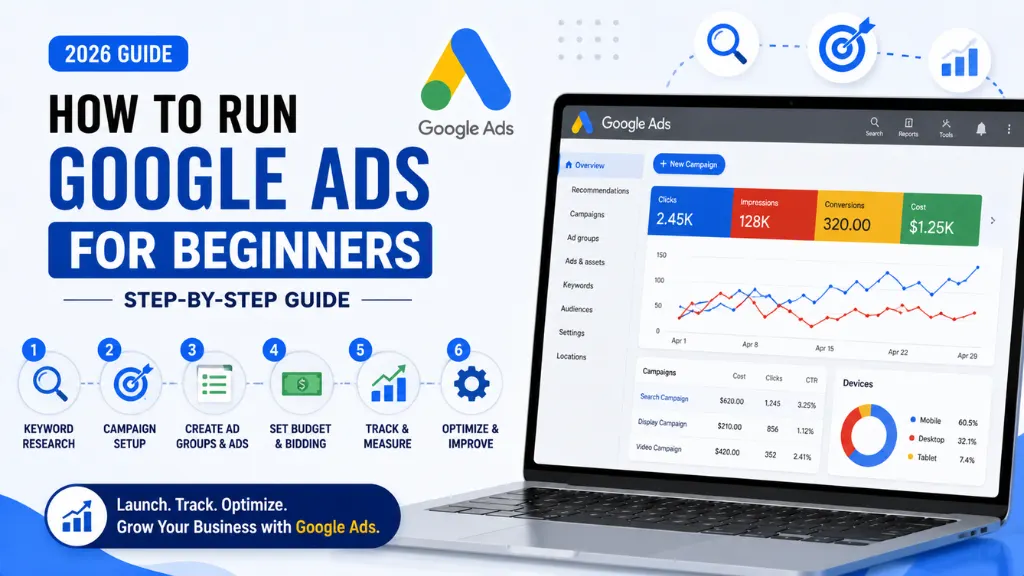

Setting up your first campaign does not have to feel intimidating, even though the platform has grown considerably more complex since Google Ads first launched. The account creation process itself takes less than 10 minutes when you know exactly what to do – it is everything after launch that trips most beginners up.
In this article8 sections
Google Ads for beginners in 2026 means navigating a platform that pushes automation harder than ever before. Performance Max now drives roughly 45% of all Google Ads conversions, and Google’s guided setup nudges new advertisers toward AI-managed “Smart” modes by default, according to Digital Applied’s 2026 Performance Max guide. Knowing when to accept that automation and when to take manual control is the real skill.
At Search Savvy, we onboard first-time advertisers onto Google Ads every month, and the businesses that succeed are the ones who follow a structured setup process rather than clicking through Google’s defaults. This guide walks through exactly that process, step by step, with 2026-current guidance throughout.
Why Is Google Ads Still Worth Learning in 2026?#
Google Ads for beginners remains one of the highest-leverage marketing skills to learn because it puts your business in front of people at the exact moment they are searching for what you offer – intent no other channel fully replicates.
Google Ads works by connecting you with high-intent customers actively searching for your products or services, rather than interrupting people who were not looking for you at all, according to Zenmarketers’ 2026 Google Ads guide. That intent-driven model is why search ads convert more reliably than most social advertising, even when the cost per click runs higher.
Google Ads for beginners also matters because the platform’s learning curve has shifted. It is no longer just about picking keywords – it now involves understanding automation, conversion tracking, and asset groups from day one, since Google steers new accounts toward AI-powered campaign types automatically.
People Also Ask: Is Google Ads still worth it for small businesses in 2026? Short Answer: Yes. Google Ads connects you with people actively searching for your product or service, which typically converts at a higher rate than interruption-based advertising. The key is proper setup and realistic budgeting from the start.
How Do You Set Up Your First Google Ads Account?#
Google Ads for beginners starts with account creation, and getting a few early choices right saves significant cleanup work later.
Visit ads.google.com and sign in with a Google account – ideally the one you plan to use permanently for your business, since switching later is more complicated than starting correctly. Google will prompt you to enter your business name and website URL, according to Cattix’s 2026 account setup guide. If you do not have a website yet, Google still allows advertising using just a phone number or Google Business Profile.
Here is the core setup sequence:
- Go to ads.google.com and sign in or create a Google account for your business
- Enter your business name and website URL – Google uses this to pre-fill campaign details
- Switch to Expert Mode – look for the small link to skip Google’s simplified “Smart Mode,” which limits your control over targeting, keywords, and reporting
- Link relevant accounts – Google Analytics, Google Business Profile, and Merchant Center if you sell products, though all of these can be linked later
- Add billing information and submit your account for verification
People Also Ask: Should beginners use Google Ads Smart Mode or Expert Mode? Short Answer: Expert Mode, in almost all cases. Smart Mode simplifies setup but hides campaign types, targeting options, and reporting detail that most businesses need to actually manage performance and control spend effectively.
Which Google Ads Campaign Type Should Beginners Choose First?#
Google Ads for beginners gets confusing fast because the platform now offers seven active campaign types, and choosing the wrong one changes the fundamental economics of your spend.
As of 2026, Google Ads offers Search, Performance Max, Shopping, Demand Gen, Video, App, and Local as core active types, according to ROA Marketing’s 2026 campaign type breakdown. For most beginners, the choice comes down to two starting points: Search campaigns for service-based businesses capturing direct intent, or Performance Max for e-commerce businesses with a product feed who want automated, cross-channel reach.
Here is a simple beginner decision guide:
- Search campaigns – best if you offer a service people actively search for (“plumber near me,” “digital marketing agency Mumbai”); gives full keyword and targeting control
- Performance Max – best for e-commerce with a product feed; runs across Search, YouTube, Gmail, Display, and Maps from a single campaign using Google’s AI
- Avoid starting with Display or Video alone – these are awareness formats, not conversion-first formats, and rarely deliver direct sales for a brand-new account
People Also Ask: What is the best Google Ads campaign type for beginners? Short Answer: Search campaigns for service businesses seeking direct leads, or Performance Max for e-commerce brands with a product feed. Most other campaign types (Display, Video, App) work better as a second step once your account has established conversion data.
How Does Google Ads Bidding Actually Work for New Accounts?#
Google Ads for beginners often stumbles at bidding, because Smart Bidding strategies need conversion data to work properly – and new accounts simply do not have any yet.
New campaigns with limited conversion history should start on a Maximum Conversions bidding strategy to gather data, only moving to Target CPA or Target ROAS once the account has accumulated 30 or more conversions, according to Groas’s 2026 Smart Bidding guide. Launching directly into an aggressive Target CPA with no historical data is one of the most common and costly mistakes beginners make.
A few practical rules for early bidding:
- Start with Maximum Conversions and a bid cap to control runaway costs during the learning phase
- Do not touch the campaign for the first one to two weeks – budget or target changes reset the learning period and delay reliable performance
- Move to Target CPA only after 30–50 conversions, setting the target near your actual average cost per conversion rather than an aspirational lower number
- Adjust targets gradually, in increments of 10–15%, waiting for performance to stabilise between changes
People Also Ask: Why shouldn’t beginners set an aggressive Target CPA immediately? Short Answer: Because Smart Bidding needs real conversion data to optimise accurately. An aggressive target set without historical data forces the algorithm to guess, often resulting in restricted reach and wasted budget during the learning phase.
How Much Budget Do Beginners Need to Start Google Ads in India?#
Google Ads for beginners in India needs a realistic budget expectation from day one, because underfunding a campaign produces too little data to optimise anything meaningfully.
A monthly budget of ₹15,000–₹30,000 is generally considered the minimum for meaningful results in most industries, according to VGraple’s 2026 Google Ads India cost guide. Cost per click in India varies enormously by industry – local services typically run ₹5–₹25, e-commerce ₹15–₹40, and competitive verticals like finance or legal can exceed ₹150–₹500 per click, per StartUpMandi’s 2026 CPC breakdown.
Before setting your first budget, work through this quick formula:
- Monthly ad spend ÷ average CPC = estimated clicks per month
- Clicks × expected conversion rate (2–5% is a reasonable starting estimate) = leads
- Leads × your close rate = new customers
- New customers × average order value = expected revenue
People Also Ask: What is the minimum Google Ads budget for a small business in India? Short Answer: ₹15,000–₹30,000 per month is a reasonable starting point for most industries, though highly competitive verticals like finance or legal may need a larger budget to gather enough data for optimisation.
What Setup Steps Do Beginners Most Often Skip?#
Google Ads for beginners frequently fails not because of bad targeting, but because a handful of essential setup steps get skipped entirely in the rush to launch a first campaign.
Without conversion tracking installed, you cannot measure whether your ads actually generate business results – form submissions, calls, or purchases simply go unrecorded, according to Cattix’s 2026 setup guide. This single oversight makes every later optimisation decision a guess rather than a data-informed choice.
Here are the steps beginners skip most often:
- Conversion tracking – install the Google Ads tag or connect Google Analytics before launching, not after
- Negative keywords – without them, your ads show for irrelevant searches and waste budget on clicks that were never going to convert
- A dedicated landing page – always send traffic to a focused, relevant page rather than your homepage, since specific pages convert meaningfully better
- Account structure – a clean, organised campaign and ad group structure improves Quality Score, which directly lowers your cost per click over time
People Also Ask: Why is conversion tracking so important for Google Ads beginners? Short Answer: Without conversion tracking, you cannot see which clicks actually turned into leads or sales. Every optimisation decision afterward becomes a guess, and Smart Bidding strategies cannot function properly without accurate conversion data.
How Should Beginners Approach Their First 30 Days?#
Google Ads for beginners works best as a structured 30-day testing period rather than a set-it-and-forget-it launch – the first month is about gathering reliable data, not chasing instant results.
According to Search Savvy’s insights from onboarding first-time advertisers, most early frustration comes from checking performance too frequently and making changes before the algorithm has had time to learn. Define one clear business goal, choose the appropriate campaign type, and commit to a 30-day testing period before making major structural changes.
A simple first-30-days framework:
- Week 1 – launch with Maximum Conversions bidding; do not touch budget or targeting
- Week 2 – monitor search terms report; add negative keywords for irrelevant queries
- Week 3 – review landing page conversion rate; test one variable if performance is weak
- Week 4 – assess total conversions; if 30+, consider shifting to Target CPA bidding
At Search Savvy, we recommend treating this first month as a diagnostic phase – the goal is clean, trustworthy data, not maximum results on day one.
FAQ: Google Ads for Beginners#
Q1: How long does it take to see results from Google Ads as a beginner? A: Basic traffic can appear within hours of launch, but meaningful, optimisable performance data typically takes two to four weeks. Smart Bidding strategies specifically need 30–50 conversions before they perform reliably.
Q2: Do I need a website to run Google Ads? A: Not necessarily. Google Ads allows advertising using just a phone number or Google Business Profile for local businesses, though a dedicated landing page generally converts better than a call-only or profile-only setup.
Q3: What is the biggest mistake beginners make with Google Ads? A: Choosing the wrong campaign type for their goal – running Display campaigns when they need immediate sales, or setting an aggressive Target CPA with no conversion history. Matching the campaign type and bidding strategy to your actual funnel stage matters more than budget size.
Q4: Should beginners manage Google Ads themselves or hire an agency? A: It depends on time and budget. Google’s guided setup and certifications make self-management feasible for small, simple accounts. Larger budgets or competitive industries often benefit from professional management to avoid costly early mistakes.
Q5: Is Performance Max good for beginners? A: It can be, particularly for e-commerce businesses with a product feed. However, Performance Max requires accurate conversion tracking and strong creative assets from day one, since it gives less manual control than a traditional Search campaign.
Q6: How do beginners know when to increase their Google Ads budget? A: Once a campaign consistently hits its daily budget limit before the day ends and is generating profitable conversions, that is a strong signal you are leaving demand – and revenue – on the table by staying at the current budget.
Want help launching your first Google Ads campaign the right way? Visit Search Savvy to speak with a paid media expert who can set up and manage your campaigns from day one.