Email List Segmentation Strategies That Improve Open Rates
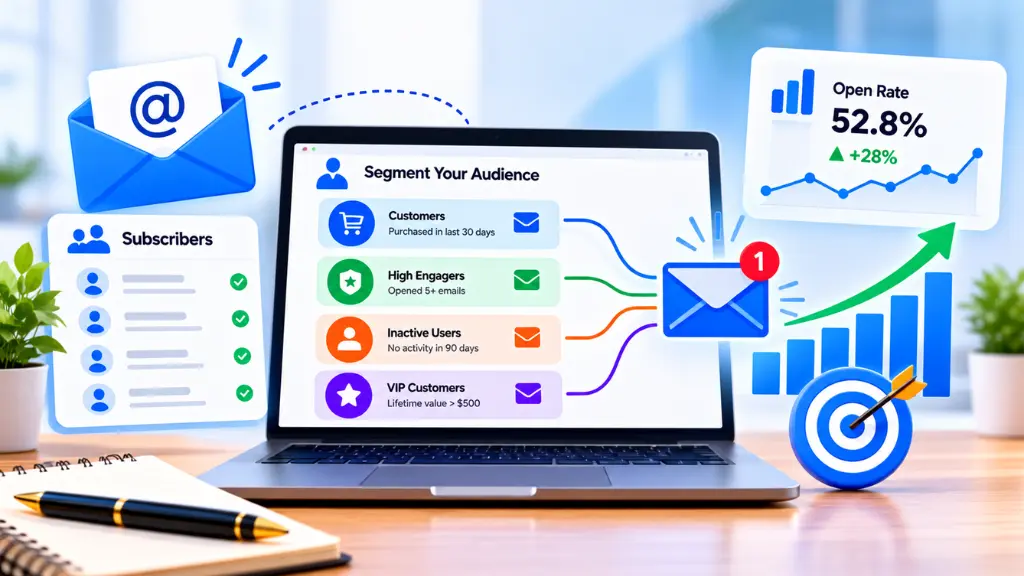

Email list segmentation means dividing subscribers into groups based on who they are, what they have done, or what they have asked for, then sending each group content that fits. It is one of the most dependable ways to make email more relevant. The caution is that “open rate” is now a shaky yardstick, so the strongest programs measure clicks and conversions alongside opens.
In this article21 sections
This guide covers the main segmentation strategies, how to set them up with subscriber tagging, how list hygiene supports the whole effort, and how to test results honestly.
What Is Email List Segmentation?#
Short answer: Email list segmentation is the practice of splitting your subscriber list into smaller groups using shared characteristics, such as purchase history, behavior, location, or interests, so each group receives targeted email campaigns instead of one generic message.
A segment is a saved filter, not a separate list. A subscriber can belong to several segments at once, for example “bought in the last 90 days” and “interested in running shoes.” Most email platforms let you build segments from fields, tags, and activity data, then update membership automatically.
Does Segmentation Actually Improve Open Rates?#
Short answer: Evidence suggests it helps, but treat headline numbers with care. In Mailchimp’s analysis of about 11,000 segmented campaigns from roughly 2,000 customers, segmented campaigns showed opens 14.31% higher, unique opens 10.64% higher, and clicks 100.95% higher than non-segmented campaigns.
Read that result with its limits in mind:
- It comes from one vendor’s customers, and the figures were published as an update in 2017, so they predate current privacy changes.
- It compares campaigns from the same senders, but it is correlational. Brands that segment may also write better emails.
- The same analysis found uneven results by segment type. Segmenting by subscriber activity, for instance, showed higher opens and clicks but also higher abuse reports and unsubscribes, a reminder that targeting the least engaged subscribers carries risk.
The reliable takeaway is directional: relevance tends to lift engagement. Your own tests should confirm the size of the effect for your list.
Why Open Rates Are Harder to Trust Now#
Apple Mail Privacy Protection can preload tracking pixels, which registers an “open” even when nobody read the message. Reviews from email platforms and universities describe the result as inflated, artificial open rates for senders with many Apple Mail users.
What this means in practice:
- Do not judge a segment only by opens. A segment with an 80% open rate and almost no clicks may be mostly machine activity.
- Track click rate, click-to-open rate, conversions, revenue per recipient, and unsubscribe and complaint rates.
- Compare segments against your own previous sends, not against a generic industry average.
What Are the Best Email List Segmentation Strategies?#
Short answer: Start with behavior, lifecycle stage, and stated interests. Add demographic or firmographic segments when they change what you would actually send.
| Segmentation type | Based on | Example segment | Example message change |
| Behavioral segmentation | Clicks, page visits, purchases, cart activity | Clicked pricing page in the last 14 days | Send a comparison guide or case study |
| Lifecycle stage | Where the subscriber is in the journey | New subscriber, first-time buyer, repeat buyer, lapsed | Welcome series, replenishment reminder, win-back |
| Interest or preference | Topics chosen at signup or inferred from clicks | “Local SEO” vs “technical SEO” readers | Topic-specific newsletters |
| Purchase history | Products, order value, frequency | Customers who bought product A | Complementary product education |
| Engagement level | Recent opens and clicks | Active vs 90 days inactive | Reduced frequency or re-permission campaign |
| Demographic or firmographic | Role, industry, company size, location | Marketing managers at small firms | Role-specific examples |
| Geographic and time zone | Location | Subscribers in India vs the US | Local events, time-appropriate send times |
| Acquisition source | How they joined | Webinar signups vs lead magnet downloads | Context-matched follow-up |
Behavioral segmentation#
Behavior is usually the strongest signal because it shows current intent. Typical triggers include clicking a link on a specific topic, viewing a product repeatedly, abandoning a cart, or attending a webinar. Build segments around actions that suggest a next step, then match the follow-up email to that step.
Lifecycle segmentation#
Subscribers at different stages need different content. A new subscriber needs orientation and a clear first win. A long-term customer may need advanced tips or loyalty offers. A lapsed customer may respond to a simple “what changed” update. Mapping these stages first prevents sending sales content to people who are not ready for it.
Preference-based segmentation#
Ask directly. A short preference form at signup, or a preference center, lets subscribers choose topics and frequency. Self-declared interests are often more accurate than inferred ones, and they build trust.
How Does Subscriber Tagging Work?#
Short answer: Subscriber tagging adds simple labels to contacts, such as “webinar-attendee” or “interested-local-seo,” so you can build and combine segments quickly without relying on rigid database fields.
Good tagging habits:
- Create a naming convention. Use lowercase, consistent patterns, such as interest-email, source-webinar, status-customer.
- Tag from real actions. Apply tags when someone clicks a topic link, submits a form, or purchases.
- Limit tag types. Keep separate prefixes for interest, source, and status to avoid chaos.
- Document tags. Keep a shared sheet that lists each tag’s meaning and trigger.
- Audit quarterly. Delete unused tags and merge duplicates.
Platform features differ, so check how your tool handles tags, groups, and custom fields before designing your structure. Search Savvy’s email marketing glossary defines common terms if you are new to the vocabulary, and its marketing automation glossary covers the workflow concepts behind tag-based triggers.
How Does Email Personalization Fit In?#
Email personalization goes beyond inserting a first name. Segment-driven personalization changes the substance of the message:
- Subject lines that reference the segment’s interest or recent action.
- Content blocks that swap based on tag or purchase history.
- Offers matched to lifecycle stage.
- Send time adjusted to time zone or past engagement.
Avoid personalization that feels invasive, such as referencing browsing details the subscriber would not expect you to track. Relevance should feel helpful, not watched.
Why Does List Hygiene Matter for Segmentation?#
Short answer: Segments built on dirty data produce misleading results. List hygiene, meaning removing invalid, duplicate, and long-inactive addresses, keeps your metrics accurate and protects deliverability.
Mailbox providers also enforce complaint thresholds. According to a summary of the guidelines, Google tells senders to keep spam rates in Postmaster Tools below 0.10% and avoid ever reaching 0.30%, and Yahoo asks senders to stay under 0.3%. Sending irrelevant mail to everyone is a direct route to higher complaints.
A simple hygiene routine:
- Remove hard bounces immediately.
- Suppress unsubscribes and complaints across all lists.
- Create an inactive segment (for example, no clicks in 6 months) and run a re-engagement campaign. Remove those who still do not respond.
- Verify new signups with double opt-in or validation where appropriate.
- Honor one-click unsubscribe and process requests promptly.
- Never buy lists. Purchased contacts lack consent and damage reputation.
How Do You Build Your First Segments? A Step-by-Step Plan#
- Define a goal for each segment, such as increasing course signups or recovering lapsed customers.
- Audit your data. List the fields, tags, and activity data you already collect.
- Pick two or three segments you can act on this month: for example, new subscribers, recent clickers, and inactive contacts.
- Write distinct content for each. If the message would be identical, the segment is not worth creating.
- Set a baseline using your last five sends to that group.
- Launch and compare click rate, conversions, and unsubscribes, not just opens.
- Iterate. Expand to more segments only after the first ones prove useful.
How Do You Test Segmentation Results Fairly?#
Use a holdout approach where possible. Send the segmented version to a portion of the segment and a general version to a comparable control group. Keep the send time, offer, and design consistent so only the targeting changes. Wait long enough to capture clicks and conversions, and record results in a simple log.
Beware of small samples. A segment of 200 people can swing widely from one send to the next, so treat early results as hints, not proof.
If you want help connecting email results to wider campaign measurement, Search Savvy’s analytics and reporting glossary explains common metrics, and its performance marketing services page outlines how results-focused campaigns are approached.
Common Email List Segmentation Mistakes#
- Over-segmenting. Too many tiny segments create content workload that you cannot sustain.
- Segmenting without different content. The segment should change the message.
- Relying on opens alone. Privacy features distort open data.
- Ignoring consent. Segment only contacts who agreed to receive that type of email.
- Setting and forgetting. Behavior changes, so segments need review.
- Emailing inactive contacts too long. This risks complaints and reputation.
- Inconsistent tagging. Messy labels make segments unreliable.
Frequently Asked Questions#
How many segments should a small business start with?#
Two to four is a practical start. For example: new subscribers, customers, and inactive contacts. Add more only when you can create distinct content for each.
What is the difference between a list and a segment?#
A list is a stored group of contacts. A segment is a filtered view of that list based on rules, such as location, behavior, or tags. One contact can appear in multiple segments.
Does segmentation improve deliverability?#
It can, indirectly. More relevant emails tend to reduce complaints and unsubscribes, which helps sender reputation. Poor list hygiene can still harm deliverability regardless of segmentation.
Is behavioral segmentation better than demographic segmentation?#
Behavioral data usually reflects current intent, so it often performs well. Demographic data is useful when it changes what you would say. The best programs combine both.
How often should I clean my email list?#
Review engagement and bounces monthly, and run a deeper cleanup and re-engagement campaign at least quarterly or twice a year, depending on volume.
What metrics should I track instead of open rate?#
Click rate, click-to-open rate, conversion rate, revenue per recipient, unsubscribe rate, and spam complaint rate give a more reliable picture than opens alone.
The Practical Takeaway#
Start with a few behavior and lifecycle segments, build a clean tagging system, and keep your list healthy. Measure clicks and conversions, not just opens, and compare against your own history.
If you want to plan email alongside the rest of your content, Search Savvy’s content marketing services can help connect what you publish with what you send.