What Is Structured Data and How to Add It to Your Website?
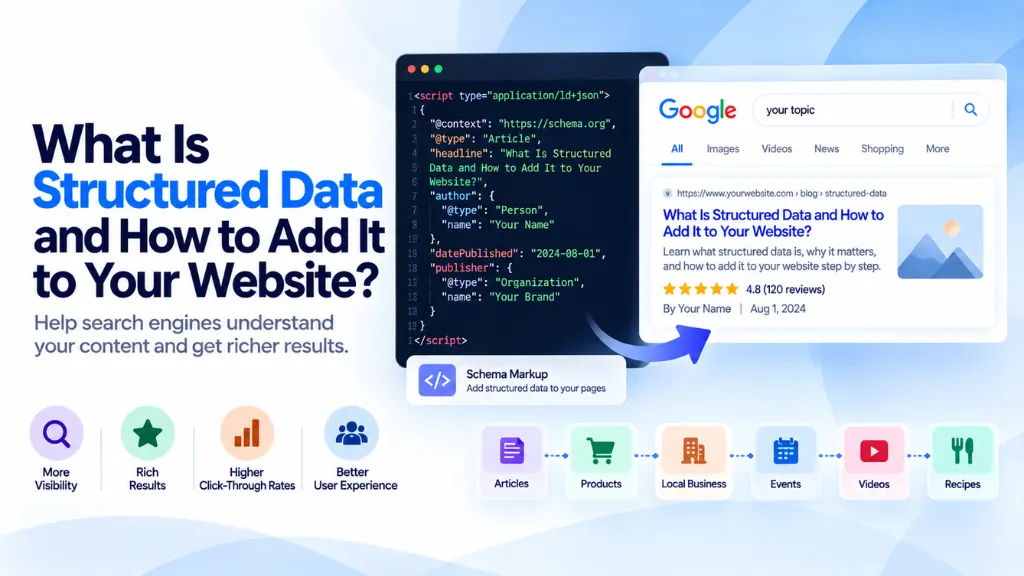

Search engines don’t read your page the way people do. Without extra help, Googlebot sees a block of text and has to guess whether a number is a price, a rating, or a phone number. Structured data removes the guesswork by explicitly labeling what each piece of content means, using a shared vocabulary search engines and other machines already understand.
In this article9 sections
This guide explains what structured data actually is, which schema types are worth implementing in 2026, how to add JSON-LD to your site step by step, and how to verify it’s working – including a few features Google has quietly retired that many older guides still recommend.
What Is Structured Data?#
Structured data is standardized code, based on the schema.org vocabulary, that you add to a webpage to explicitly describe its content to search engines – identifying a block of text as an article’s headline, a number as a product’s price, or a name as an organization rather than just visible text on the page.
Google supports three formats for structured data: JSON-LD, Microdata, and RDFa. JSON-LD is the format Google recommends, because it lives in a self-contained script block separate from your visible HTML, which makes it far easier to add, edit, or remove without touching your page template.
Does Structured Data Improve Rankings?#
No. Structured data is not a direct ranking factor. What it does is make a page eligible for certain rich results – enhanced search listings with star ratings, prices, breadcrumbs, or event details – which can improve click-through rate even at the same ranking position. Valid markup does not guarantee a rich result will appear; Google’s own guidelines are explicit that eligibility also depends on content quality and meeting each feature’s specific requirements.
This distinction matters because it’s the source of most disappointment with structured data: adding a schema type and seeing no visible change in search results usually means the markup is valid but the page didn’t clear the additional eligibility bar Google applies on top of it – not that the code is broken.
How Search Engines Use Structured Data#
Structured data turns page content into explicit entities and relationships rather than plain text. A page that just says “written by Priya Sharma, published July 2026” requires inference; the equivalent Article schema states outright that “Priya Sharma” is a Person who is the author, and the date is datePublished – removing ambiguity for any system parsing the page, not only Google’s classic search index.
Structured data must accurately reflect what’s visible on the page. Marking up reviews, prices, or ratings that don’t actually appear to visitors – or marking up only some of several visible reviews – violates Google’s structured data guidelines and can lead to the markup being ignored or, in cases of deliberate manipulation, manual action against the site.
Structured Data Types Worth Implementing in 2026#
Google’s structured data gallery currently supports around two dozen distinct rich result features. The table below covers the types most relevant to a typical business website, along with their current status.
| Schema Type | What It Enables | Current Status |
| Article | Headline, author, and date display for news and blog content | Fully supported |
| Product | Price, availability, and merchant listings for e-commerce pages | Fully supported, with sub-features for variants and reviews |
| Organization | Logo, name, and social profiles in Knowledge Panel-style results | Fully supported |
| LocalBusiness | Address, hours, and location details for local search | Fully supported |
| BreadcrumbList | Breadcrumb trail shown in place of a raw URL in search results | Fully supported |
| Review / AggregateRating | Star ratings shown alongside a listing | Fully supported, with strict requirements that ratings reflect genuine, visible reviews |
| Recipe | Cook time, ratings, and ingredients in recipe-specific results | Fully supported |
| VideoObject | Video thumbnails and duration in search results | Fully supported |
| JobPosting | Job listings in Google’s dedicated jobs search experience | Fully supported |
| FAQPage | Previously produced expandable Q&A dropdowns under a listing | Rich result deprecated as of May 7, 2026 – the schema itself remains valid but no longer changes how a page appears in search |
| HowTo | Previously produced step-by-step rich results | Deprecated – no longer produces a rich result |
The FAQPage and HowTo deprecations are worth flagging specifically because a large amount of SEO advice published before 2026 still recommends both as reliable rich-result tactics. Google restricted FAQ rich results to a small set of authoritative government and health sites back in 2023, then removed the feature from search results entirely in May 2026, with related Search Console reporting scheduled for removal by August 2026. The underlying FAQPage markup isn’t harmful to keep on a page, and Google has indicated it may still use structured data generally to understand page content, but it no longer produces the visible accordion in search results for any site.
The practical takeaway: structure your FAQ and how-to content as genuinely useful, question-based headings for readers and AI answer engines, rather than adding the schema purely in pursuit of a SERP feature that no longer exists.
How to Add Structured Data to Your Website: Step by Step#
- Identify what the page actually is. A product page, a blog article, a local business location page, and a recipe each call for a different schema type – don’t apply a type that doesn’t match the page’s real content.
- Write the JSON-LD block. Structured data in JSON-LD format goes inside a <script type=”application/ld+json”> tag, most commonly placed in the <head> of the page. A minimal Article example looks like this:
{
“@context”: “https://schema.org”,
“@type”: “Article”,
“headline”: “Your Article Title”,
“author”: {
“@type”: “Person”,
“name”: “Author Name”
},
“datePublished”: “2026-09-01”,
“publisher”: {
“@type”: “Organization”,
“name”: “Your Company Name”
}
}
- Fill in every required property for the type, and add recommended properties only where the corresponding information genuinely exists on the page. Never invent a rating, price, or date to complete the markup – this violates Google’s structured data policies.
- Match the markup to visible content exactly. If the page shows four reviews, mark up all four, not a selective subset that inflates the average rating.
- Deploy the script tag either directly in your page template, through your CMS’s structured data fields, or via a plugin, depending on your platform.
- Validate before publishing using the Rich Results Test, which checks whether the markup is both valid and eligible for a specific rich result.
- Monitor ongoing performance in Search Console’s structured data and enhancement reports, which flag errors and warnings across the whole site over time, not just on a single page.
Common Mistakes to Avoid#
- Marking up content that isn’t visible to users. Structured data should describe what a visitor actually sees on the page, not what you wish were there.
- Using a single LocalBusiness schema for multiple locations. Each physical address needs its own markup instance rather than one schema block listing several addresses.
- Chasing deprecated rich results. Investing implementation time in FAQPage or HowTo markup specifically for a SERP rich result that no longer exists is effort better spent elsewhere.
- Leaving required properties blank or filled with placeholder values. Incomplete markup can fail validation entirely, and placeholder values (a fake price, a generic date) create the exact misrepresentation Google’s guidelines prohibit.
- Assuming valid markup guarantees a rich result. Passing the Rich Results Test confirms eligibility, not appearance – Google still applies its own judgment about whether to display the enhanced listing.
- Forgetting to update markup when page content changes. A product’s price or availability schema left stale after a real-world change can misrepresent the page to both users and search engines.
Structured Data and AI Search#
Google’s own guidance states that AI Overviews and AI Mode have no special structured data requirements beyond a page’s normal eligibility for standard search results and snippets. Structured data still has value in this context – it supplies explicit, unambiguous facts about entities and relationships that a well-written page might only imply – but it functions as one signal among many rather than a guaranteed lever for AI citation. Clear, direct, well-organized content continues to matter more than any single schema type for how these systems select and summarize sources.
Frequently Asked Questions#
What is the difference between schema markup and structured data? Structured data is the general concept of machine-readable page annotation; schema markup specifically refers to using the schema.org vocabulary to implement it. In practice, the two terms are used interchangeably in most SEO contexts.
Which structured data format should I use: JSON-LD, Microdata, or RDFa? JSON-LD, because it’s separated from your HTML in its own script block, making it easier to maintain, test, and update without touching page templates – the reason Google recommends it over the alternatives.
Do I need structured data on every page of my website? No. Apply schema types only where they genuinely match the page’s content and purpose – a product page benefits from Product schema, but a generic informational page with no product, event, or review content doesn’t need to force one in.
Will adding structured data guarantee my page gets a rich result? No. Valid, complete markup makes a page eligible for a rich result, but Google separately evaluates content quality and other factors before deciding whether to display the enhanced listing.
Is FAQ schema still worth adding to my pages in 2026? The FAQPage rich result no longer appears in Google Search as of May 2026, so it won’t produce the expandable accordion it once did. Structuring genuine FAQ content as clear, question-based headings with direct answers still helps readers and search engines understand the page, independent of the schema markup itself.
How do I check if my structured data is working correctly? Use Google’s Rich Results Test to validate a single page, and Search Console’s enhancement reports to monitor structured data errors and warnings across your entire site over time.
The Bottom Line#
Structured data won’t move your rankings on its own, but it does the quiet, necessary work of telling search engines and AI systems exactly what your content means – which schema types are worth your time changes as Google’s supported feature list evolves, so implementations built around outdated advice, like FAQ or HowTo rich results, need revisiting. Start with the schema types that match your actual content, validate before publishing, and check Search Console periodically rather than assuming a one-time implementation stays correct forever. Search Savvy’s schema markup validator and free schema markup generator are useful starting points for building and checking JSON-LD before it goes live, and for sites with more complex structured data needs across many templates, Search Savvy’s technical SEO services team handles this kind of implementation as part of broader technical audits.