What Is Log File Analysis and How It Helps Technical SEO?

Here is the technical SEO data source that Google Search Console cannot give you, that Screaming Frog cannot give you, and that most site owners have never looked at despite it being generated automatically by their server every single day: server log files.
In this article19 sections
Log file analysis is the process of examining the raw access logs your web server generates with every request it receives – including every request from Googlebot, every AI crawler, every real user, and every bot that has ever visited your site. While other SEO tools show you what Google says it found, log files show you what actually happened at the server level, with millisecond-precise timestamps and definitive HTTP status codes.
Log file analysis reveals the truth behind crawl budget questions that Search Console can only approximate. Which pages is Googlebot actually visiting, and how frequently? Which pages is it ignoring entirely? Which pages return errors that Search Console hasn’t flagged? Which AI crawlers are hitting your server and at what volume? None of this is available from any other data source.
Log file analysis is not new, but its role in technical SEO has expanded considerably in 2026. The arrival of dozens of new AI crawlers – GPTBot, OAI-SearchBot, ClaudeBot, PerplexityBot, Google-Extended – means server logs now contain more strategically valuable bot activity than at any previous point. Understanding what these crawlers are doing on your server is not optional for any brand that cares about AI search visibility.
At Search Savvy, log file analysis is part of every comprehensive technical SEO audit we conduct, because it is the only data source that shows us what search engines are actually doing on a site rather than what they are reporting through their own filtered interfaces. This guide explains exactly what it is and how to use it.
What Is a Server Log File?#
Log file analysis begins with understanding what is being analysed. A server log file is a text file automatically generated by a web server that records every request the server receives, including who requested it, what was requested, when, and what the server returned in response.
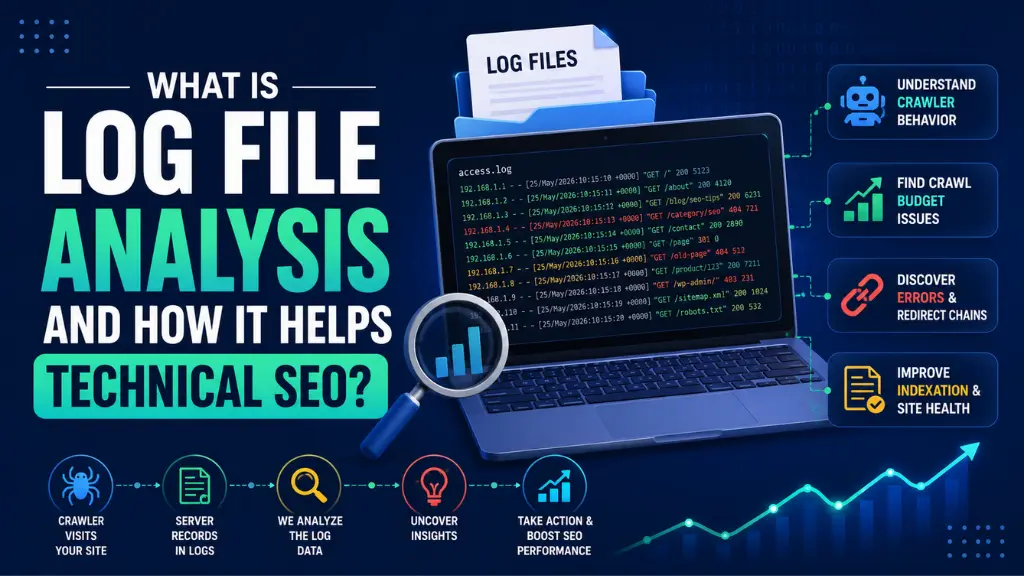
Log file analysis works from this raw data, which typically looks like:
66.249.72.14 – – [15/Jul/2026:04:23:17 +0000]
“GET /blog/seo-guide/ HTTP/1.1” 200 45231
“-” “Mozilla/5.0 (compatible; Googlebot/2.1;
+http://www.google.com/bot.html)”
Each line in a server log records: the IP address of the visitor, the timestamp of the request, the HTTP method and URL requested, the HTTP status code returned, the number of bytes transferred, and the user agent string that identifies who or what made the request.
Log file analysis processes thousands or millions of these lines to extract meaningful patterns – which URLs are being crawled most, which return errors, which are being ignored, and which bots are generating the most server load.
People Also Ask: What is the difference between server log files and Google Search Console crawl data? Short Answer: Google Search Console shows what Google chooses to report through its own filtered interface – a curated view of crawl activity. Server log files show the ground truth: every request that actually reached the server, regardless of whether Google surfaces it in any reporting interface. Log files catch errors, crawl patterns, and bot activity that Search Console never surfaces, making them a genuinely different and more complete data source rather than just another way to see the same information.
How Does Log File Analysis Work?#
Log file analysis works by parsing raw server log data through a dedicated tool that structures the unformatted text into filterable, analysable records.
Log file analysis tools – including Screaming Frog Log Analyser, JetOctopus, Botify, OnCrawl, and Sitebulb’s Log File Analyser – import raw log files and produce structured reports showing: crawl frequency by URL, bot activity distribution, HTTP response code patterns, crawl sessions by date and time, and resource type breakdowns (HTML, CSS, JavaScript, images).
Log file analysis is then applied to specific diagnostic questions:
- Crawl efficiency: What percentage of Googlebot’s visits go to pages that are actually indexed versus low-value pages that return errors, redirects, or thin content?
- Crawl distribution: Which sections of the site is Googlebot prioritising, and do those sections match the pages that matter most for rankings?
- Crawl frequency patterns: How often does Googlebot return to different page types, and does the frequency match those pages’ update schedules?
- AI crawler volume: Which AI bots are visiting the site, and is the combined bot traffic consuming meaningful server resources?
Why Is Log File Analysis Important in 2026?#
Log file analysis matters more in 2026 than at any previous point for two specific reasons that have emerged over the past 12 to 18 months.
The first is the proliferation of AI crawlers. As of mid-2026, a typical enterprise website’s server logs contain requests from Googlebot, Google-Extended, OAI-SearchBot, GPTBot, ClaudeBot, Claude-SearchBot, PerplexityBot, CCBot, ByteSpider, and dozens of additional bots. A JetOctopus log analysis of a 500,000-page e-commerce site published in 2025 documented Googlebot crawl coverage improving from 40% to 70% of important pages after crawl budget issues were identified and fixed through log analysis – a 30-percentage-point improvement that came entirely from infrastructure work, not content creation.
The second is the refinement of crawl budget understanding. Google’s own guidance confirms that Googlebot operates within a crawl budget per site – a finite number of pages it will crawl within a timeframe based on server responsiveness and perceived content quality. Log file analysis is the only way to directly measure how that budget is being spent, specifically identifying which URLs are consuming Googlebot’s time without contributing to indexing outcomes.
- Googlebot crawl coverage improved from 40% to 70% for one large e-commerce site after log-driven crawl budget fixes (JetOctopus, 2025)
- Most enterprise sites have 20 to 40% of Googlebot visits going to URLs returning 3xx, 4xx, or 5xx status codes
- Large-site Googlebot visits to error pages directly reduce crawl frequency for important content pages
- AI crawlers including GPTBot and PerplexityBot now represent meaningful server load on many sites and can be specifically managed through log-informed robots.txt configurations
People Also Ask: Does log file analysis reveal AI crawler activity? Short Answer: Yes. Server logs record every bot visit regardless of whether the bot is Google’s Googlebot, OpenAI’s GPTBot, Anthropic’s ClaudeBot, Perplexity’s PerplexityBot, or any other crawler. Log file analysis shows exactly which AI bots are visiting, which URLs they access, how frequently, and what HTTP response codes they receive – giving site owners the precise data needed to make informed decisions about bot access policies and AI search visibility.
What Technical SEO Problems Does Log File Analysis Diagnose?#
Log file analysis surfaces eight categories of technical SEO problems that no other tool reveals with the same specificity.
Problem 1: Crawl Budget Waste#
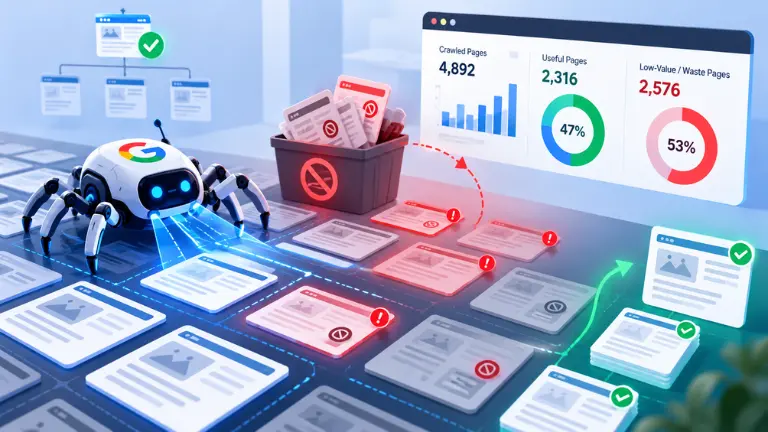
Log file analysis shows precisely how much of Googlebot’s crawl time is consumed by pages that generate no indexing value – redirected URLs, parameter combinations, error pages, thin content, and blocked resources. On large e-commerce sites, this waste commonly reaches 30 to 50% of all Googlebot visits, directly reducing crawl frequency for priority product and category pages.
Fix: Block parameter URL patterns in robots.txt after confirming log data shows they receive significant Googlebot visits without corresponding indexing. The crawl budget freed by blocking these patterns is reallocated to priority content automatically.
Problem 2: Orphan Pages Not Discoverable by Sitemaps#
Log file analysis combined with a crawl tool comparison reveals orphan pages – pages that receive Googlebot visits via external links or historical crawl cache but are not linked from anywhere in the current site. These pages may be indexed through legacy discovery but will never be reliably recrawled unless internal links are added.
Problem 3: Redirect Chains#
Log file analysis reveals multi-hop redirect chains that may not appear in a standard site audit, because the log shows every individual HTTP response in the chain. A URL showing three consecutive 3xx responses in the log before reaching a 200 is consuming three crawl requests for one piece of content.
Fix: Flatten every redirect chain to a single direct 301 from the original URL to the final destination.
Problem 4: Pages Returning Inconsistent Status Codes#
Log file analysis over time reveals pages that intermittently return 200 responses on some visits and 5xx errors on others – a server instability problem that Search Console typically misses because it only reports the most recent crawl status. Intermittent server errors trigger crawl rate reduction without producing a consistent error in any reporting dashboard.
Problem 5: Critical Pages With Insufficient Crawl Frequency#
Log file analysis shows how often Googlebot visits specific page types. If product pages on a large e-commerce site are being crawled only once every 30 days despite daily inventory and price changes, log analysis quantifies this gap and points to the crawl budget waste that is causing it.
Problem 6: Disavowed or Blocked Resources Googlebot Is Still Accessing#
Log file analysis sometimes reveals that scripts, CSS files, or image directories specified as disallowed in robots.txt are still being accessed by Googlebot – indicating robots.txt syntax errors, inheritance issues, or version mismatches between the live robots.txt and what was intended. The log data is definitive; if Googlebot visits are recorded, the resource is not effectively blocked.
Problem 7: AI Crawler Volume Consuming Disproportionate Server Resources#
Log file analysis in 2026 increasingly reveals that AI crawlers – particularly CCBot and ByteSpider – are consuming significant server bandwidth without a clear corresponding benefit. Some documented cases show these crawlers generating 1 to 10 terabytes of monthly server traffic on large sites.
Fix: Review log data to identify which AI crawlers are generating disproportionate load, then apply targeted robots.txt rules to manage access for training-oriented crawlers while maintaining access for search-oriented crawlers like OAI-SearchBot and PerplexityBot.
People Also Ask: How often should log file analysis be performed? Short Answer: For large e-commerce sites and enterprise platforms, continuous log analysis through a dedicated tool is the standard. For mid-sized sites, a monthly log analysis export and review is sufficient, with a deep analysis after any significant site change – a migration, CMS upgrade, or major content restructure. For smaller sites, quarterly analysis is typically adequate unless a specific technical problem triggers an urgent investigation.
How Do You Perform Log File Analysis Step by Step?#
Log file analysis is more accessible than most technical SEOs expect, because the raw data is generated automatically and the primary decision point is which tool to use for analysis.
Step 1: Locate and Access Your Server Log Files#
Log file analysis starts with requesting log files from your hosting provider or server administrator. On Apache and Nginx servers – the most common web server configurations – log files are typically stored in /var/log/apache2/ or /var/log/nginx/ directories. On cloud hosting like AWS, Google Cloud, or Azure, logs are accessed through each platform’s storage or logging interface.
Most hosting providers allow log files to be downloaded directly from a hosting control panel like cPanel, Plesk, or Kinsta’s admin interface.
Step 2: Choose an Analysis Tool#
Log file analysis tools range from free to enterprise-level:
- Screaming Frog Log File Analyser – the most accessible option for most SEO teams; available separately from the standard Screaming Frog SEO Spider, capable of processing millions of log lines with bot-specific filtering
- JetOctopus – cloud-based with strong visualisation; particularly well- suited for large sites where processing millions of log lines locally would be slow
- Botify – enterprise-level platform with real-time log streaming; the most comprehensive option for very large sites but requires significant investment
- Sitebulb – visual log analysis with integration into its standard site audit workflow; useful for auditors who already use Sitebulb for crawl analysis
For smaller sites and one-off investigations, importing filtered log data into a spreadsheet and applying basic filters is viable, though labour-intensive for any file larger than a few thousand lines.
Step 3: Filter for the Bots That Matter#
Log file analysis should be segmented by user agent before any other analysis begins. Mixing Googlebot requests with human visitors, other search engine bots, and unidentified crawlers in the same view produces misleading patterns.
Key segments to create:
- Googlebot (web crawl)
- Google-Extended (AI training)
- GPTBot / OAI-SearchBot (OpenAI)
- ClaudeBot / Claude-SearchBot (Anthropic)
- PerplexityBot
- CCBot (Common Crawl)
- All verified bots combined
- Human user sessions (for comparison)
Step 4: Run the Diagnostic Questions#
Log file analysis produces actionable findings when interrogated with specific diagnostic questions rather than browsed as a general report:
- Which pages receive the most Googlebot visits? Do these match your priority pages?
- What percentage of Googlebot visits return a 200 status code (actually serving content)?
- What percentage return 3xx, 4xx, or 5xx codes (crawl waste)?
- Which URL patterns receive visits out of proportion to their content value?
- How frequently are your most important pages being revisited?
How Should Indian Websites Approach Log File Analysis?#
Log file analysis is particularly valuable for Indian e-commerce sites and large content publishers, where parameter URL proliferation from filtering, sorting, and currency or language switching generates significant crawl waste.
Log file analysis for Indian websites on shared hosting environments deserves attention to the hosting provider’s log retention policy, since many budget Indian hosting providers retain logs for only 7 to 30 days – making regular log exports essential if the data is to be available for meaningful trend analysis.
According to Search Savvy’s insights from conducting log file analysis for Indian e-commerce and service websites, the most consistently discovered issue is Googlebot allocating a disproportionate share of its crawl budget to URL parameter variations generated by search filters, product sorting, and currency selection – a combination that creates thousands of near-duplicate URLs competing for crawl attention that should be directed at core product and category pages.
Conclusion: The Ground Truth of Technical SEO#
Log file analysis is not a replacement for Google Search Console or a standard site crawl – it is the layer beneath them that explains what is actually happening at the server level when all other diagnostic tools report that nothing is wrong.
Search Savvy includes log file analysis in every technical audit engagement where site size and server access make it feasible, because there is no other data source that reveals crawl budget waste, AI crawler activity, and indexation bottlenecks with the same precision and completeness.
FAQ: Log File Analysis – Your Questions Answered#
Q1: How large are server log files and how long does analysis take? Log file size varies enormously by site traffic and bot activity. A mid-sized website might generate 50 to 500MB of log data per month; an enterprise e-commerce site can generate several gigabytes daily. Analysis time depends on the tool and file size – Screaming Frog Log File Analyser typically processes a month of logs for a mid-sized site in 5 to 15 minutes.
Q2: Is log file analysis only useful for large websites? Not exclusively. Log file analysis provides the most dramatic improvements for large sites with complex URL structures, but smaller sites benefit from seeing Googlebot’s actual crawl priorities versus their intended priorities. Any site with known indexation problems, slow indexing of new content, or unexplained ranking fluctuations can benefit from even a basic one-month log file review.
Q3: Can log file analysis show me which of my pages ChatGPT is using? Log files record visits from OAI-SearchBot and GPTBot – OpenAI’s search and training crawlers respectively. This shows which pages these bots access and how frequently. However, which specific pages are actually cited in ChatGPT responses is determined by model inference, not directly by crawl activity – so log data shows access, not citation.
Q4: How is log file analysis different from Google Search Console’s crawl stats report? Google Search Console’s crawl stats show a summary of what Google reports it has crawled, filtered through Google’s own interfaces. Log files show every request that reached the server, regardless of what Google reports. Log analysis catches intermittent errors, redirect chains, and crawl patterns that Search Console never surfaces, making the two sources complementary rather than redundant.
Q5: What is the most common finding in a log file analysis? Crawl budget waste – specifically, a significant percentage of Googlebot visits going to URL variants (parameter pages, session IDs, redirect chains) that return non-200 status codes or near-duplicate content. This is found on the majority of large websites that have not previously conducted a log analysis, often accounting for 20 to 50% of all Googlebot requests that would be better allocated to priority content.
Q6: Do I need developer access to perform log file analysis? You need access to the raw log files, which typically requires either server-level access or a request to your hosting provider. Once the files are downloaded, analysis can be performed in a dedicated tool like Screaming Frog Log File Analyser without any further developer involvement. For cloud-hosted sites, a developer may need to configure log export to a storage bucket before files are accessible for analysis.
Suspecting that Googlebot is spending time on the wrong pages – or seeing new content take weeks to index on a large site? Visit Search Savvy for a technical SEO audit that includes log file analysis to pinpoint exactly where crawl budget is going and what needs to change to improve indexing speed and efficiency.