What Is a Canonical Tag and When Should You Use It?

Here is a technical SEO problem that is almost invisible until it costs you rankings: two or more URLs on your site showing essentially identical content, with Google unsure which one it should index and rank.
In this article19 sections
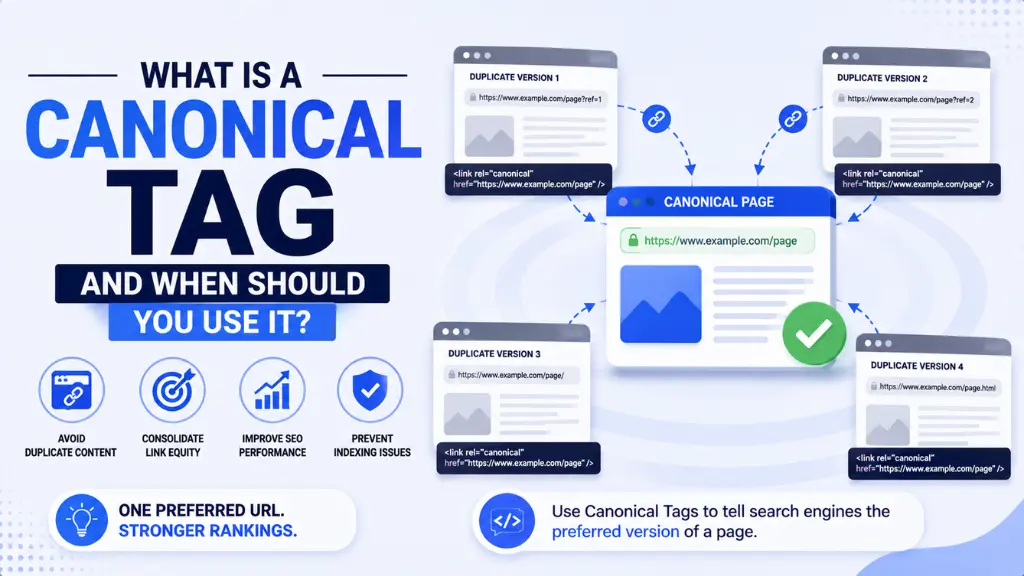
A canonical tag is the HTML signal that resolves this ambiguity before it becomes a ranking problem. It tells Google and other search engines which version of a page is the “preferred” or “canonical” one – the version that should receive all indexing authority and ranking credit, rather than having that credit split across duplicates.
A canonical tag sounds like advanced technical SEO, but it applies to almost every website. E-commerce sites generating multiple URLs for the same product through filter combinations, blogs syndicated on external platforms, pages accessible with and without trailing slashes – all of these are canonical tag situations that exist quietly on millions of sites without the owner ever noticing.
A canonical tag issue left unaddressed does not cause a dramatic, visible ranking collapse. It causes a slow, quiet dilution of authority that makes pages rank lower than they should and takes longer to diagnose because the page technically exists and technically shows up in search.
At Search Savvy, a canonical tag audit is part of every technical SEO review we run, because this is one of the most consistently misunderstood and most commonly misimplemented elements on real websites in 2026. This guide covers exactly what it is, when to use it, and the mistakes that make it worse instead of better.
What Is a Canonical Tag?#
A canonical tag is a line of HTML code placed in the head section of a webpage that tells search engines which version of that page is the definitive, preferred one when multiple URLs contain the same or very similar content.
A canonical tag looks like this in the page’s HTML head:
<link rel=”canonical” href=”https://example.com/preferred-page-url/” />
A canonical tag is not a redirect. The duplicate or variant URLs still exist and are still accessible to users. The canonical tag simply tells Google: “For ranking purposes, treat this page as equivalent to the URL I have specified, and consolidate any ranking signals there rather than splitting them.”
People Also Ask: Is a canonical tag the same as a 301 redirect? Short Answer: No. A 301 redirect permanently forwards both users and crawlers from one URL to another, removing the original URL from circulation entirely. A canonical tag leaves both URLs accessible but tells search engines which one should receive indexing authority and ranking credit. Use a 301 redirect when the old URL should no longer exist; use a canonical tag when multiple versions of the same content need to coexist but one should be treated as definitive.
How Does a Canonical Tag Work?#
A canonical tag works by consolidating what SEOs call “link equity” – the ranking authority and signals that backlinks, internal links, and user engagement carry – onto a single preferred URL rather than allowing it to be spread across multiple versions of the same page.
A canonical tag is interpreted by Google as a “hint” rather than a hard directive, which is an important distinction. Unlike a noindex tag or a robots.txt disallow rule, which Google generally follows strictly, a canonical tag can be overridden if Google’s systems determine the specified canonical does not make sense based on other signals.
A canonical tag is followed reliably when it is consistent – meaning the canonical URL itself also has a self-referencing canonical tag pointing to itself, and the internal linking structure of the site reinforces the same URL as the preferred version.
People Also Ask: Does Google always follow a canonical tag? Short Answer: Not always. Google treats canonical tags as strong hints rather than hard instructions. If the specified canonical URL is slow, blocked in robots.txt, returns a non-200 status code, or contradicts other signals on the site, Google may override the canonical tag and choose a different URL to index. This is why canonical tags must be paired with consistent internal linking and a technically clean preferred URL.
When Should You Use a Canonical Tag?#
A canonical tag is needed whenever two or more URLs on your site serve content that is identical or substantially similar. The most common situations where this occurs in 2026 are below.
Situation 1: E-Commerce Filter and Sort URLs#
A canonical tag is essential on e-commerce sites where product category pages generate additional URLs through filter combinations, sort parameters, or pagination. A URL like:
/shoes/trainers?colour=black&size=9&sort=price-asc
contains the same core product content as:
/shoes/trainers
A canonical tag on the filtered version pointing to the main category URL tells Google to consolidate authority on the primary category page rather than spreading it across hundreds of parameter combinations that serve no unique ranking purpose.
Situation 2: HTTP vs HTTPS and WWW vs Non-WWW#
A canonical tag should be used wherever a site is accessible through multiple protocol or subdomain variations – http://example.com, https://example.com, http://www.example.com, and https://www.example.com could all technically serve the same content. While 301 redirects are the stronger fix, a canonical tag on each accessible variant pointing to the definitive HTTPS version provides an additional signal.
Situation 3: Syndicated Content#
A canonical tag is specifically designed for content syndication scenarios. When a blog post is published on your own site and then republished in full on a third-party platform like Medium, LinkedIn, or an industry publication, the syndicated version should carry a canonical tag pointing back to the original URL on your domain.
This tells Google which version is the source of truth and ensures your site receives the ranking credit rather than the syndication platform. The syndication partner must be willing to add the canonical tag on their end for this to work.
Situation 4: Printer-Friendly or AMP Versions#
A canonical tag handles alternative format pages, such as printer-friendly versions or AMP (Accelerated Mobile Pages) versions of content. Both should carry canonical tags pointing to the standard, full version of the page.
Situation 5: Session IDs and Tracking Parameters#
A canonical tag resolves URL variation caused by session IDs, UTM parameters, or affiliate tracking codes that append themselves to URLs:
/product/blue-trainers?sessionid=abc123&utm_source=newsletter
These tracking-appended URLs are functionally identical to the base product URL but create new URL strings that can fragment crawl budget and split authority if not addressed with a canonical tag pointing to the clean base URL.
People Also Ask: Should every page on a website have a canonical tag? Short Answer: Yes. Best practice in 2026 is for every page to have a self- referencing canonical tag – a canonical tag pointing to its own URL. This reinforces the preferred URL for that page, prevents confusion if it is scraped and republished elsewhere, and signals clearly to Google which version is definitive. Pages without any canonical tag leave Google to make its own choice, which may not align with your preferred URL structure.
Why Is the Canonical Tag Important in 2026?#
A canonical tag matters more in 2026 than in previous years because crawl budget efficiency has become a sharper priority as websites grow larger and AI crawlers join traditional search bots in visiting sites.
A canonical tag directly affects crawl budget – how many pages Google is willing and able to crawl on a given site within a timeframe. Duplicate or near-duplicate URLs without canonical resolution waste crawl budget on pages that add no new information, reducing how frequently Google crawls and indexes the pages that actually matter for rankings.
A canonical tag also affects AI search visibility. AI crawlers including GPTBot, OAI-SearchBot, ClaudeBot, and PerplexityBot evaluate page content and authority signals in ways that parallel traditional search crawling. Duplicate content without canonical resolution can confuse AI systems about which version of content to trust and cite, reducing the likelihood of AI Overview and LLM citations on affected topic clusters.
- Sites with large volumes of unresolved duplicate URLs see measurably slower indexing of new content as crawl budget is diverted
- Authority dilution across duplicate URLs weakens ranking potential for all versions – none ranks as well as a single canonical version would
- Google’s guidance on duplicate content through Google Search Central lists canonical tags as the preferred solution for content consolidation when 301 redirects are not practical
What Are the Most Common Canonical Tag Mistakes?#
A canonical tag is easy to get wrong, and the consequences of the most common mistakes are significant enough that they regularly appear as findings in technical SEO audits.
Mistake 1: Canonical Tag Pointing to the Wrong URL#
A canonical tag that specifies a URL which is itself redirected, returns a 404, or is blocked in robots.txt sends contradictory signals. Google cannot treat a blocked or erroring URL as canonical and will likely ignore the tag entirely, leaving duplicate content unresolved.
Always verify that the canonical URL:
- Returns a 200 HTTP status code
- Is not blocked in robots.txt
- Is not itself marked noindex
- Has a self-referencing canonical tag on the destination page
Mistake 2: Multiple Conflicting Canonical Tags#
A canonical tag loses authority when multiple canonical tags appear on the same page – either through competing tags in the head section or through an HTTP header canonical that conflicts with an in-page tag. Most CMS plugins and site builders can create this problem automatically if not configured carefully.
Use a technical crawler like Screaming Frog or Google Search Console’s URL Inspection tool to check for conflicting canonical signals before assuming your implementation is clean.
Mistake 3: All Pages Canonicalising to the Homepage#
A canonical tag that incorrectly points every page on a site to the homepage – a common bug in some CMS configurations – effectively deindexes all individual pages by telling Google that the homepage is the canonical version of every URL. This wipes out individual page authority and is one of the most damaging canonical errors possible.
Mistake 4: Using Canonical Tags Instead of 301 Redirects#
A canonical tag is not a substitute for a 301 redirect in cases where the old URL should be permanently retired. When a page moves permanently, a 301 redirect is more reliable because it is a hard directive rather than a hint – Google follows it consistently rather than evaluating whether to override it.
Mistake 5: Inconsistent Internal Linking to Canonical URLs#
A canonical tag is weakened when internal links throughout the site point to non-canonical URL variants rather than the canonical version. If your canonical tag specifies /shoes/trainers/ but your navigation and product pages link to /shoes/trainers (without a trailing slash), Google receives conflicting signals about which version is actually preferred.
People Also Ask: What happens if I don’t use a canonical tag on duplicate pages? Short Answer: Without a canonical tag, Google makes its own choice about which version of the duplicate to index and rank – and its choice may not be the URL you prefer. Authority from backlinks and internal links gets split across variants rather than consolidated. Over time, this means weaker rankings for all versions than a properly canonicalised single URL would achieve.
How Do You Check Whether Your Canonical Tags Are Working?#
A canonical tag implementation should be verified at the individual URL level and audited across the full site on a regular basis.
For individual pages: Right-click any page, select View Page Source, and search for rel=”canonical” in the head section. The URL in the href attribute is what search engines are being told to treat as the preferred version. Alternatively, use Google Search Console’s URL Inspection tool – it shows the canonical URL Google has detected and, separately, the canonical URL Google has actually chosen, which may differ if Google has overridden your specified tag.
For site-wide audits: Use Screaming Frog’s canonical tag report to see every canonical tag across the site, flag conflicts, identify self-referencing versus cross-page canonicals, and surface any canonicals pointing to non-200 URLs.
How Should Indian Websites Use Canonical Tags?#
A canonical tag is particularly important for Indian e-commerce websites and multilingual content sites, both of which generate high volumes of URL variants that fragment authority without careful canonical management.
A canonical tag situation common in Indian e-commerce: a product available in multiple colours and sizes generating dozens of filtered URL combinations, each technically a new URL but containing the same core product page. Without canonical tags on these filter URLs pointing to the main product or category page, every filter combination competes with every other for indexing authority – and all of them compete with the main page.
According to Search Savvy’s insights from auditing Indian D2C and marketplace websites, the most common canonical tag issue found is not missing tags entirely but incorrect implementation – canonical tags generated by CMS plugins that point to the wrong URL structure, particularly when HTTPS migration or a domain change was performed without updating canonical tag configurations across the whole site.
Conclusion: Small Tag, Significant Impact#
A canonical tag is a single line of HTML that has a disproportionate impact on how authority is distributed across a website, how efficiently Google crawls it, and ultimately how well individual pages rank. Getting it right means a single, clean source of truth for every piece of content. Getting it wrong means quietly splitting authority that should be concentrated.
Search Savvy includes canonical tag auditing in every technical SEO engagement because this element consistently produces measurable ranking improvements when corrected – particularly on e-commerce sites and any website that has undergone a migration or CMS change without a comprehensive technical review.
FAQ: Canonical Tag – Your Questions Answered#
Q1: Does a canonical tag pass link equity (backlinks) to the preferred URL? Yes. One of the primary purposes of a canonical tag is to consolidate link equity from backlinks pointing to duplicate or variant URLs onto the specified canonical URL. This is why properly implementing canonical tags on e-commerce filter pages or syndicated content consistently produces measurable improvements in the ranking authority of the preferred URL.
Q2: Can I use a canonical tag across different domains? Yes. Cross-domain canonical tags are specifically designed for content syndication – if your content appears in full on a third-party domain, a canonical tag on that external version pointing back to your domain tells Google which site is the original source. The partner site must implement the tag on their end; you cannot add it to content hosted on someone else’s domain.
Q3: How is a canonical tag different from a noindex tag? A canonical tag tells Google which URL is the preferred version to index and rank, while consolidating authority from duplicates. A noindex tag tells Google not to index a page at all. Use canonical tags when you want authority consolidated on a preferred version; use noindex when a page should not appear in search results under any circumstances.
Q4: Do I need a canonical tag on every single page of my website? Best practice is yes – every page should have a self-referencing canonical tag pointing to its own URL. This prevents confusion if the page is scraped or linked to with parameter variants, reinforces your preferred URL structure, and is the cleanest signal to both traditional search crawlers and AI crawlers about which version of the page is definitive.
Q5: What is a self-referencing canonical tag and why does it matter? A self-referencing canonical tag is a canonical tag on a page that points to that same page’s own URL. It reinforces that the page is itself the canonical version – not a duplicate of something else. It also prevents third-party scrapers or content aggregators who copy your content from overriding your canonical by adding their own tags to copied versions.
Q6: Will fixing canonical tag errors improve my Google rankings? In most cases, yes – particularly for websites with significant duplicate URL volumes. Consolidating authority from fragmented duplicate URLs onto canonical versions produces measurable improvements in ranking for the preferred pages over a 4 to 8 week period as Google recrawls and re-evaluates the consolidated authority signals. The improvement is proportional to how much authority was previously being split.
Not sure whether your website has canonical tag issues silently splitting your ranking authority – or concerned that a CMS update or domain migration may have broken your canonical configuration? Visit Search Savvy for a technical SEO audit that checks your canonical tag implementation across every URL type on your site.