How to Improve Core Web Vitals: LCP, CLS and INP Explained
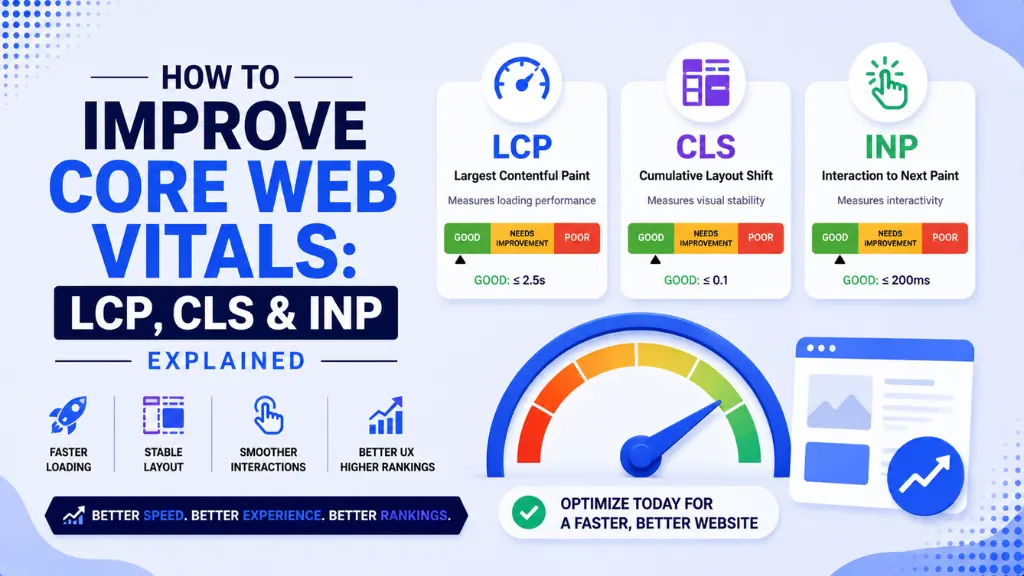

Here is the performance problem hiding on most websites in 2026: a Google Search Console dashboard showing pages marked “Poor” or “Needs Improvement” on metrics most site owners have never looked at closely enough to fix.
In this article13 sections
Core Web Vitals are the three performance metrics Google uses to measure real user experience – loading speed, visual stability, and interactivity – and they are confirmed Google ranking signals. As of May 2026 CrUX data, only 55.9% of all tracked web origins globally pass all three thresholds. That means 44% of websites are failing on at least one metric that directly influences both search rankings and conversion rates.
Core Web Vitals are also not simply a technical SEO checkbox. A one-second delay in load time reduces conversions by 7%. Pages loading in under two seconds show a 9% bounce rate; the same pages exceeding five seconds show a 38% bounce rate. For an e-commerce site generating $100,000 per month in revenue, a one-second LCP delay represents $84,000 in lost annual revenue – a number that converts a technical conversation into a financial one very quickly.
Core Web Vitals matter in 2026 not just for traditional search but for AI Overview eligibility too. Fast, stable, well-structured pages are easier for Google’s Gemini-powered AI systems to render and parse – making Core Web Vitals performance part of the same technical foundation that determines AI search citation eligibility.
At Search Savvy, a Core Web Vitals audit is part of every technical SEO engagement we run, because fixing a failing INP or LCP score consistently produces measurable ranking and conversion improvements faster than most other SEO interventions. This guide explains all three metrics clearly, with the specific fixes that produce the highest impact.
What Are Core Web Vitals and How Does Google Measure Them?#
Core Web Vitals are three specific performance metrics – Largest Contentful Paint (LCP), Cumulative Layout Shift (CLS), and Interaction to Next Paint (INP) – that Google uses to evaluate the real-world user experience of a web page on actual user devices and connections.
Core Web Vitals are measured using field data from the Chrome User Experience Report (CrUX), which collects real performance data from Chrome users who have opted into sharing usage statistics. A page passes a Core Web Vital when at least 75% of real user visits achieve a “good” score on that metric – not the average or the median, but the 75th percentile.
A page passes Core Web Vitals overall only when all three metrics are simultaneously in the “good” band at the 75th percentile. One failing metric sinks the overall assessment regardless of how the other two perform.
People Also Ask: Do Lighthouse lab scores determine Core Web Vitals ratings in Google Search Console? Short Answer: No. Google’s Core Web Vitals assessment is based entirely on real field data from the Chrome User Experience Report (CrUX), not Lighthouse lab scores. Lighthouse is a useful diagnostic tool for identifying issues, but a perfect Lighthouse score in developer tools does not guarantee a passing CrUX-based assessment – real users on real devices and real network conditions determine the actual result.
What Are the Current Core Web Vitals Thresholds in 2026?#
Core Web Vitals thresholds for 2026 are unchanged from their previous values – Google has confirmed the targets remain the same, and sources claiming the LCP threshold dropped to 2.0 seconds in 2026 are incorrect.
| Metric | Good | Needs Improvement | Poor |
| LCP | Under 2.5 seconds | 2.5 to 4.0 seconds | Above 4.0 seconds |
| INP | Under 200 milliseconds | 200 to 500ms | Above 500ms |
| CLS | Under 0.1 | 0.1 to 0.25 | Above 0.25 |
Core Web Vitals must all be met simultaneously at the 75th percentile of real Chrome user sessions over a rolling 28-day window. Individual metric pass rates as of May 2026 CrUX data are: 68.6% good LCP, 81.3% good CLS, and 86.6% good INP – with the combined pass rate of 55.9% reflecting how many sites fail at least one of the three.
What Is LCP and How Do You Fix It?#
Core Web Vitals start with Largest Contentful Paint – the time it takes for the largest visible element on the page to load and become visible to the user. The LCP element is typically a hero image, a large text block, or a video above the fold.
Core Web Vitals LCP is the metric most likely to be the reason a site fails its overall assessment, since 68.6% pass rate means 31.4% of origins are still failing it. LCP is primarily a resource problem – slow servers, unoptimised images, and render-blocking resources are the three leading causes.
People Also Ask: What is the most common cause of a slow LCP score? Short Answer: Unoptimised hero images are the most common LCP failure cause. Large images served without compression, without modern formats like WebP or AVIF, and without preloading instructions make the browser discover and download the largest page element late in the loading sequence. A documented e-commerce fix – compressing images from 3MB to optimised WebP and adding a hero image preload tag – moved LCP from 5.2 seconds to 1.8 seconds, producing an 18% decrease in bounce rate.
Top LCP Fixes in Priority Order#
1. Preload the LCP image
Add a preload tag in the document head specifically for the largest above-fold image, so the browser begins downloading it immediately rather than discovering it during rendering:
<link rel=”preload” href=”/hero.webp” as=”image”
type=”image/webp” fetchpriority=”high”>
2. Convert images to WebP or AVIF format
WebP files are 25 to 35% smaller than JPEG or PNG with no visible quality difference. AVIF achieves even greater compression for compatible browsers. Both formats reduce the raw download size of the LCP element directly.
3. Inline critical CSS
CSS files loaded externally block rendering until they download. Moving the CSS required to display above-fold content into a style block in the document head removes this render-blocking delay for the LCP element.
4. Improve Time to First Byte (TTFB)
A slow server response delays every subsequent loading step, including LCP. Target TTFB under 800ms. Using a Content Delivery Network (CDN) to serve assets from a geographically closer server location reduces latency for users in different regions.
5. Remove render-blocking JavaScript
Add defer or async attributes to non-critical JavaScript tags so they do not block HTML parsing and LCP element rendering.
What Is INP and How Do You Fix It?#
Core Web Vitals Interaction to Next Paint replaced First Input Delay (FID) as the official responsiveness metric in March 2024 and remains the hardest of the three metrics to fix in 2026. INP measures the time between a user interaction – a click, tap, or keypress – and the next visual frame the browser can paint in response, capturing every interaction during a full page visit rather than just the first one.
Core Web Vitals INP is the most commonly failed metric on a per-fix-difficulty basis. While 86.6% of origins pass INP globally, 43% of sites fail the 200ms threshold when measured across real interaction patterns rather than initial load alone – and fixing INP failures requires JavaScript architecture changes rather than simple asset optimisation.
People Also Ask: Why is INP harder to fix than LCP or CLS? Short Answer: LCP fixes target resource loading – compress the image, preload it, improve the server. CLS fixes target layout dimensions – add width and height attributes. INP fixes target JavaScript architecture – how long tasks are broken up, how event listeners are structured, and how much third-party script runs on the main thread. You cannot fix INP by compressing an asset or adding an HTML attribute; it requires reviewing and rethinking how JavaScript handles user interactions.
Top INP Fixes in Priority Order#
1. Identify long tasks blocking the main thread
JavaScript tasks exceeding 50 milliseconds block the browser’s main thread and prevent it from responding to user input. Open Chrome DevTools, navigate to the Performance tab, and record a session while interacting with the page to identify which tasks are running long.
2. Break long tasks into smaller chunks
Use requestIdleCallback() or the newer scheduler.yield() to break heavy JavaScript work into smaller pieces the browser can process between user interactions rather than in one continuous block that prevents input handling.
3. Audit third-party scripts
Analytics platforms, chat widgets, ad scripts, and marketing tags all run JavaScript on the main thread. Audit every third-party script, remove those not actively providing value, and defer or lazy-load those that remain.
4. Apply code splitting
Load only the JavaScript required for the current page view rather than delivering the full application bundle. Modern frameworks like Next.js and Nuxt.js support code splitting natively; custom implementations can use dynamic imports to achieve the same result.
5. Remove expensive event listeners
Event listeners attached to every scroll, every mousemove, or every keypress with heavy processing logic inside them directly cause INP failures. Throttle, debounce, or restructure these listeners to reduce computational cost per interaction.
What Is CLS and How Do You Fix It?#
Core Web Vitals Cumulative Layout Shift measures how much visible content unexpectedly moves during page loading – the frustrating experience of tapping a button on mobile only for it to shift position as an image loads above it, causing an accidental click on the wrong element.
Core Web Vitals CLS is the easiest of the three metrics to achieve a “good” score on – 81.3% of origins pass it globally – but failures are among the most damaging to user experience because they cause direct interaction errors rather than just delays.
Top CLS Fixes in Priority Order#
1. Add explicit dimensions to all images, videos, and iframes
The most common CLS cause is images and media without declared width and height attributes in HTML. When the browser does not know how large an element will be before it loads, it cannot reserve space for it – causing content below to jump when the element appears.
<img src=”hero.webp” width=”1200″ height=”600″ alt=”Hero image”>
2. Reserve space for ads, banners, and dynamic content
Ad slots and dynamically injected content that appear after initial page load cause significant layout shifts. Reserve space using CSS with defined minimum heights for ad containers so surrounding content does not move when ads load.
3. Use font-display: swap for web fonts
When a web font loads late, browsers using default font settings shift all text that uses it. The font-display: swap CSS property tells the browser to show fallback text immediately and swap to the web font when it loads, preventing layout shifts caused by invisible text during font loading.
4. Avoid inserting content above existing content after load
Banners, cookie notices, or promotional bars that appear above existing content after the initial render push all existing content downward, generating large CLS scores. These elements should either be part of the initial layout or appear in a fixed position that does not displace other content.
People Also Ask: Can cookie consent banners cause CLS failures? Short Answer: Yes. Cookie consent banners that appear after the initial page render and push page content downward are a direct cause of CLS failures. The fix is to include the banner’s reserved space in the initial layout so surrounding content does not shift when it appears, or to design the banner as an overlay that does not displace existing content.
How Do You Measure Core Web Vitals for Your Site?#
Core Web Vitals should be measured using field data from real users rather than only lab simulations, since Google’s ranking assessment uses field data exclusively.
Primary tools:
- Google Search Console – the Core Web Vitals report under “Experience” shows pages classified as “Poor,” “Needs Improvement,” or “Good” based on real CrUX field data, segmented by mobile and desktop separately
- PageSpeed Insights – shows both lab data (Lighthouse) and field data (CrUX) for individual URLs; use the field data for actual assessment and the lab data for diagnosing specific issues
- Chrome DevTools – the Performance tab for profiling INP failures and identifying long tasks; the Lighthouse tab for page-level diagnostic scoring
Measurement priority: Fix the metric in the “poor” band first, then INP (hardest and deepest architectural change), then LCP (highest commercial impact from improvement), then CLS (usually the fastest to resolve once the fix pattern is clear). Allow 28 days after each fix before evaluating the CrUX field data update, since scores reflect a rolling 28-day window.
Why Are Core Web Vitals More Important in 2026?#
Core Web Vitals matter more in 2026 because Google’s March 2026 core update specifically strengthened the weight of performance signals in ranking evaluation. Sites passing all three thresholds see 24% lower bounce rates and measurably higher engagement – and e-commerce sites improving from poor to good thresholds see conversion improvements of 15% to 30%.
Core Web Vitals also connect directly to AI Overview eligibility. AI crawlers and Google’s Gemini-powered search systems evaluate page rendering quality as part of content assessment. A slow or visually unstable page is harder for AI systems to render and parse accurately – making Core Web Vitals performance part of the same foundation that supports AI search citation.
Additionally, Google uses mobile field data as the primary signal for both mobile and desktop rankings under mobile-first indexing. In India and other mobile- dominant markets, this has a particularly strong impact since most organic traffic arrives on mid-range Android devices over variable network connections.
How Should Indian Websites Approach Core Web Vitals?#
Core Web Vitals for Indian websites deserve a mobile-first lens from the start. Over 60% of global Google searches happen on mobile, and India’s search traffic skews even more heavily toward mobile – particularly on mid-range Android devices with 4G connections that experience more network latency than desktop users on fibre.
Core Web Vitals LCP performance on mid-range Android devices over 4G is typically worse than lab scores on desktop suggest, meaning CrUX field data often surfaces failing scores that Lighthouse lab tests miss entirely. Testing with mobile throttling enabled in PageSpeed Insights gives a more accurate preview of actual field data performance before it appears in Search Console.
According to Search Savvy’s insights from auditing Core Web Vitals for Indian D2C and e-commerce clients, the highest-impact single fix is almost always image optimisation – converting hero and product images to WebP with compressed file sizes, combined with explicit width and height attributes that also resolve CLS at the same time. This single set of changes frequently moves two metrics simultaneously from “Needs Improvement” to “Good.”
Conclusion: Performance Is a Ranking and Revenue Decision#
Core Web Vitals are not a set of abstract technical numbers on a dashboard. They are direct measures of whether your website is fast enough, stable enough, and responsive enough to hold user attention – and Google’s systems use them to rank pages and determine AI Overview eligibility simultaneously.
Search Savvy treats Core Web Vitals optimisation as a core SEO and conversion priority, not a secondary technical task, because the sites consistently passing all three metrics outperform failing competitors in both rankings and revenue metrics in a way that compounds over time.
FAQ: Core Web Vitals – Your Questions Answered#
Q1: Do Core Web Vitals directly affect Google rankings? Yes, they are confirmed Google ranking signals, though they act alongside content quality and relevance rather than replacing them. Google itself describes CWV as a tie-breaker between pages of similar relevance – but for many competitive categories where multiple pages have equivalent content quality, Core Web Vitals performance is what determines which one ranks higher.
Q2: What is the difference between INP and the old FID metric? First Input Delay (FID) measured only the delay before the browser processed the first user interaction on a page. Interaction to Next Paint (INP), which replaced FID in March 2024, measures the responsiveness of every interaction throughout the full page visit and reports the worst one – making it a far stricter and more representative measure of how a page actually feels to use.
Q3: Can I improve Core Web Vitals without a developer? Partially. CLS fixes like adding image dimensions and enabling font-display swap can often be applied through CMS settings or plugins (particularly on WordPress and Shopify). LCP and INP improvements that involve server configuration, JavaScript architecture changes, and code splitting typically require developer involvement, especially on custom-built sites.
Q4: Why does my Lighthouse score look good but Search Console shows failures? Lighthouse generates scores in a controlled lab environment on simulated conditions. Google Search Console shows CrUX field data from real users on real devices and networks. A high Lighthouse score on a fast desktop connection does not predict how the page performs for a real user on a mid-range mobile device on a 4G connection – and the CrUX data is what Google actually uses for ranking.
Q5: How long does it take for Core Web Vitals improvements to show in rankings? CrUX data updates on a 28-day rolling window, so allow at least 28 days after implementing fixes before expecting the Search Console Core Web Vitals report to reflect improvements. Ranking changes that result from improved scores typically follow the CrUX update by a further one to three weeks as Google re-evaluates page experience signals.
Q6: Should I fix Core Web Vitals on all pages or just the most important ones? Prioritise by fixing at the template level rather than the URL level. A single template fix applies across every page built on that template – meaning fixing the product page template on an e-commerce site improves LCP, CLS, or INP for hundreds or thousands of product URLs simultaneously, making template-level optimisation far more efficient than page-by-page fixes.
Not sure which Core Web Vital is failing your site or where to start with fixes on a site with thousands of URLs? Visit Search Savvy for a technical SEO audit that diagnoses your CWV failures by template type, prioritises them by traffic impact, and maps a clear fix sequence for your specific tech stack.