Web Performance Budgeting: Enforcing Speed Constraints in CI/CD Pipelines
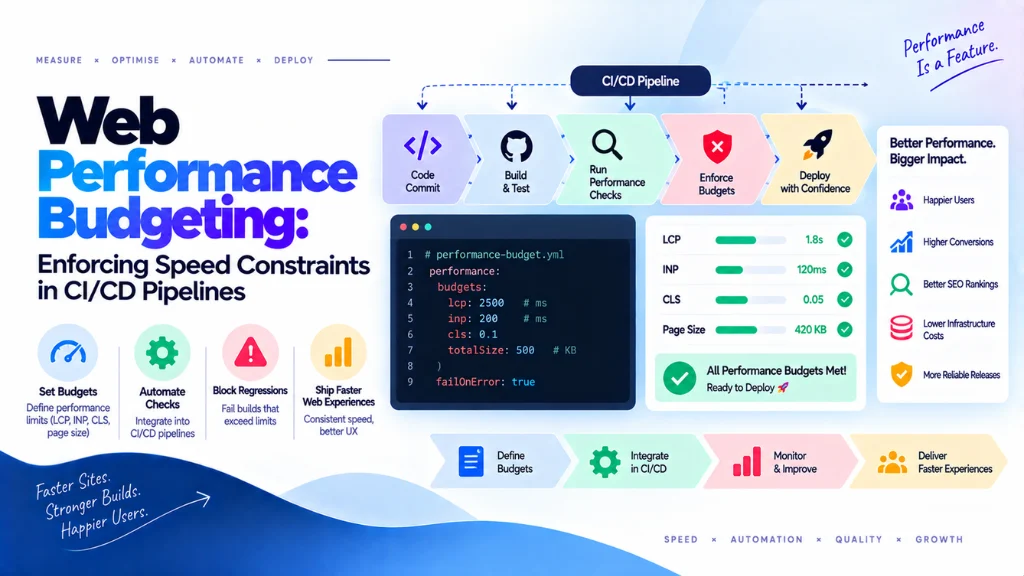

Sites rarely slow down overnight. What actually happens is more mundane: a date picker adds 38KB, marketing ships a heavier hero image, a helpful SDK pulls in three dependencies nobody reviewed, and six months later a page that used to load in under two seconds takes four. Web performance budgeting is the practice of setting explicit, enforced ceilings on metrics like bundle size, Lighthouse score, and Core Web Vitals proxies, then wiring those ceilings directly into the CI/CD pipeline so a regression fails the build before it ever reaches production – rather than being noticed weeks later in a monitoring dashboard.
In this article10 sections
This article covers what a performance budget actually is, the distinct categories worth enforcing, and the practical setup for wiring them into a pipeline so speed becomes a build-time constraint rather than an ongoing negotiation.
What Is Web Performance Budgeting?#
A performance budget is a line a team refuses to cross – a numeric ceiling on JavaScript weight, image bytes, or a Lighthouse score floor that a build must satisfy before it can merge or deploy. In production, that line represents a commitment to users; in CI, it’s the same line enforced automatically before a change ever ships, so the team fixes a regression in the branch rather than discovering it after release.
Tammy Everts, co-founder at SpeedCurve, draws a distinction worth keeping precise: goals describe where a team wants to end up, while budgets are the practical ceilings that prevent things from getting worse on the way there. A goal might be a 1.5-second LCP eighteen months from now; a budget is the enforced constraint today that stops the team from drifting further from that goal with every sprint.
Why Budgets Matter More Than Good Intentions#
Addy Osmani, Engineering Lead at Google Chrome, has observed that performance tends to regress as soon as teams return to normal feature work – which is precisely why budgets matter: they force the trade-off decision to happen earlier, at the point a heavy dependency or a large image is about to be added, rather than after it’s already shipped and someone has to justify removing it. Katie Hempenius, formerly on Google’s web performance education team, has described Lighthouse-based budgets as a practical mechanism for catching both metric regressions and outright resource bloat before a release goes out, rather than relying on manual review to catch either.
The broader data backs up why this discipline is still necessary rather than solved by default: recent Web Almanac findings show many sites still fail to achieve “good” Core Web Vitals consistently, particularly on mobile, meaning fast and stable experiences remain a competitive differentiator rather than a baseline every site has already achieved.
The Three Categories of Budgets to Enforce#
A complete CI performance budget setup typically enforces three distinct categories, each catching a different kind of regression.
| Budget Category | What It Enforces | Example Threshold |
| Lab metrics (Lighthouse assertions) | Performance score, LCP, TBT, CLS, INP where field data is available | Performance score ≥ 0.85–0.90, LCP ≤ 2,500ms, TBT ≤ 200–300ms |
| Resource budgets | Caps on JavaScript, CSS, image bytes, or request counts | JS bundle under 200–220KB gzipped, images under 500–550KB |
| Custom thresholds | Project-specific constraints tied to a feature’s actual weight | A mapping library, dashboard chart, or third-party widget budgeted individually |
These categories are complementary rather than redundant. A slow-LCP fix might legitimately add twenty kilobytes of code and still improve the user experience overall – resource budgets shouldn’t automatically block that trade-off. But a green Lighthouse run sitting on top of a nine-hundred-kilobyte main JavaScript bundle is still fragile, since lab metrics can pass today while JavaScript weight quietly creeps up sprint after sprint underneath a passing score. Enforcing both catches problems that either one alone would miss.
Wiring Budgets Into CI/CD: The Practical Setup#
The mechanics are consistent across most CI providers – GitHub Actions, GitLab CI, CircleCI, or Buildkite all support the same basic pattern: install dependencies, build the application, wait for a deployed preview URL, then run an automated Lighthouse audit against it with assertions configured to fail the job when a threshold is breached.
A critical invariant that’s easy to get wrong: Lighthouse needs to run against the exact artifact users will actually receive, not a partially built development tree. Testing against a dev server with hot-reload middleware or unminified assets produces numbers that don’t reflect production reality, making the budget enforcement essentially theater. Many teams split their preview deployment and Lighthouse CI run across separate pipeline stages specifically to guarantee this – waiting for the real preview deployment to complete before running any performance assertions against it.
Resource budgets typically run as a separate, faster check alongside the Lighthouse job, using tools that compare a build’s output against configured size limits and fail immediately if a bundle exceeds its ceiling – catching a bloated dependency in seconds, well before the slower full Lighthouse audit even completes. Pairing a fast resource-size gate with a slightly slower Lighthouse assertion run gives teams rapid feedback on the most common regression (accidental bundle growth) without waiting for a full audit every time.
Should Performance Budgets Warn or Fail the Build?#
Budgets that only print a warning get ignored within a few sprints. A performance budget in CI needs to actually fail the pipeline when a threshold is exceeded, the same way a failing test suite blocks a merge – a warning-only configuration effectively becomes a budget in name only, since nothing stops a team from merging past it under deadline pressure.
Setting the Right Baseline: The “Freeze, Then Reduce” Approach#
One of the most common mistakes when introducing performance budgets is setting tomorrow’s dream target as today’s enforced ceiling. If a checkout page currently ships 210KB of compressed JavaScript, 480KB of images, and scores 88 in Lighthouse on a representative preview environment, the right first budget isn’t an aggressive target nobody currently meets – it’s a ceiling set slightly above today’s stable baseline, such as 220KB JS, 550KB images, and a Lighthouse floor of 85.
Once the team has held that line successfully for a few sprints, the budget can be ratcheted down incrementally. This “freeze, then reduce” approach is consistently more durable than setting an aggressive target from day one, because a budget nobody believes is achievable gets bypassed or disabled the first time it blocks a deadline-sensitive release. A budget the team can realistically hold, tightened gradually, builds the habit of respecting the constraint rather than treating it as an obstacle to route around.
A structural review of current bundle composition and Lighthouse scores is usually the right starting point before setting any baseline, since guessing at a reasonable ceiling without real data produces either an unenforceable target or one so loose it catches nothing. This is precisely the kind of diagnostic work Search Savvy runs before recommending a CI setup for any client. Search Savvy’s technical SEO services include this kind of performance baseline audit as part of a broader Core Web Vitals assessment, establishing realistic starting budgets rather than importing a generic threshold that doesn’t reflect a site’s actual constraints.
A Practical Setup Checklist#
- Establish the current baseline before setting any budget, measuring actual bundle size, Lighthouse score, and Core Web Vitals proxies on a representative page rather than guessing.
- Set the ceiling slightly above the current stable baseline, not at an aspirational target the team hasn’t yet demonstrated it can hit consistently.
- Enforce lab metrics and resource budgets as separate, complementary gates, since either alone misses regressions the other catches.
- Run Lighthouse against the real production-equivalent artifact, not a development build, to keep the enforced numbers meaningful.
- Fail the build, don’t just warn, since warning-only budgets get bypassed under deadline pressure within a few sprints.
- Store budget thresholds in version control, so changes to the enforced ceiling are explicit, reviewable, and visible in the same history as the code they govern.
- Review thresholds quarterly and ratchet down, once the team has held the current line successfully for a sustained period.
Common Mistakes in Web Performance Budgeting#
- Setting an aspirational target as the first enforced ceiling. A budget nobody can currently meet gets disabled or bypassed the first time it blocks a release.
- Testing against a development build instead of the production artifact. Numbers gathered against unminified, non-production code don’t reflect what users actually experience.
- Enforcing only Lighthouse scores without a resource budget. JavaScript weight can creep up gradually while a Lighthouse score stays green, until a single additional dependency finally tips it over.
- Configuring budgets to warn instead of fail. A warning that doesn’t block a merge is a suggestion, not a budget, and teams under deadline pressure will merge past it.
- Never revisiting thresholds after the initial setup. Budgets that never tighten as the codebase improves eventually stop providing any real constraint at all.
The Bottom Line#
Web performance budgeting turns speed from an ongoing negotiation into an enforced build-time constraint, catching the small, individually reasonable changes – a heavier image here, a new SDK there – before they compound into a genuine regression. The setup that actually holds combines lab-metric and resource-size gates that fail the build rather than warn, tested against real production artifacts, starting from a realistic baseline and ratcheting down over time rather than aiming for an aspirational target from day one.
The practical next step is measuring your current bundle size and Lighthouse score on a representative page today, then setting your first budget just above that baseline rather than at an ideal you haven’t yet proven the team can hold. Search Savvy’s website audit services establish exactly this kind of realistic performance baseline, and its website design and development services can implement the CI pipeline changes needed to enforce it, so a CI budget reflects a constraint the team can actually sustain rather than one it will quietly disable under the next deadline.
Frequently Asked Questions#
What is a web performance budget? It’s an explicit, enforced ceiling on a metric like JavaScript bundle size, image weight, or Lighthouse score, wired into the build or deployment pipeline so a regression fails the build automatically rather than being discovered later in production monitoring.
What’s the difference between a performance goal and a performance budget? A goal describes where a team ultimately wants to end up, such as a target LCP months from now. A budget is the practical, currently enforced ceiling that prevents things from getting worse in the meantime, serving as a guardrail on the way toward that longer-term goal.
Should performance budgets fail the build or just show a warning? Budgets should fail the build. A warning-only configuration doesn’t actually block a merge, and teams under deadline pressure will consistently bypass a threshold that isn’t enforced as a hard gate.
How should a team set its first performance budget? Start by measuring the current stable baseline – actual bundle size, Lighthouse score, and Core Web Vitals proxies – then set the ceiling slightly above that baseline rather than at an aspirational target. Once the team holds the line for a few sprints, ratchet the budget down incrementally.
Why do resource budgets matter if Lighthouse scores are already passing? JavaScript and image weight can creep up gradually while a Lighthouse score remains green, since lab metrics measure a snapshot rather than tracking cumulative growth. A dedicated resource budget catches this kind of gradual bloat that a passing Lighthouse score alone would miss.
What’s the most common mistake when wiring budgets into CI/CD? Testing Lighthouse against a partially built development tree instead of the actual production artifact users will receive. This produces numbers that look fine in CI but don’t reflect real-world performance, making the enforced budget effectively meaningless.