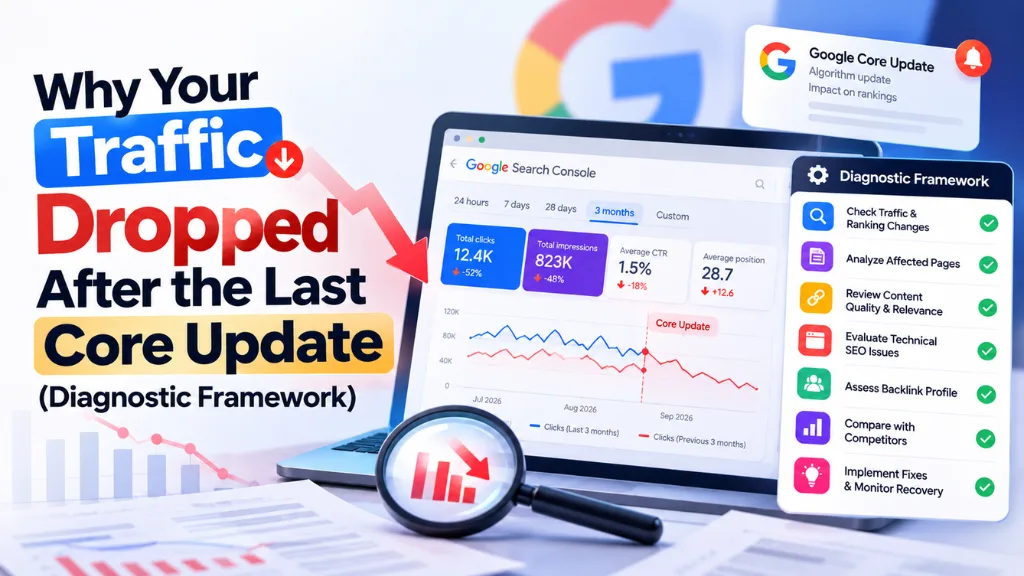
Why Your Traffic Dropped After the Last Core Update (Diagnostic Framework)

Google’s most recent confirmed core update ran from 21 May to 2 June 2026. Since then it has confirmed two spam updates, so a traffic drop that started after the core update may not be a core update problem at all. Technical faults, seasonality, unconfirmed ranking volatility and AI-generated answers can all produce the same organic traffic decline.
In this article20 sections
This guide gives you a seven-step framework for diagnosing a traffic drop after a core update: confirm the drop, date it, rule out non-algorithmic causes, read the Search Console pattern, segment the losses, then decide whether to act or wait. The short version: match your drop to the right update, and change nothing until you know what you are fixing.
Which Update Was “the Last Core Update”?#
The most recent confirmed Google core update is the May 2026 core update, which rolled out from 21 May to 2 June 2026. Since then Google has confirmed only spam updates, in June and August, and as of 10 September it had announced no new core update.
| Update | Type | Rollout dates (2026) |
| Discover core update | Core (Discover only) | 5 to 27 Feb |
| March spam update | Spam | 24 to 25 Mar |
| March core update | Core | 27 Mar to 8 Apr |
| May core update | Core | 21 May to 2 Jun |
| June spam update | Spam | 24 to 26 Jun |
| August spam update | Spam | 18 to 21 Aug |
Sources: Search Engine Journal, Search Engine Roundtable and Search Engine Watch. Confirm dates on Google’s Search Status Dashboard, which is the authoritative record.
Volatility also occurs without a confirmed update. Search Engine Watch reported unusual movement in early August while the dashboard logged no ranking incident, so drops in that window cannot be pinned on a named update.
Traffic Drop After Core Update: The 7-Step Diagnostic Framework#
Work in this order, cheapest checks first. Google’s own guide to debugging traffic drops follows the same logic.
Step 1: Confirm the Drop Is Real#
Compare Search Console with your analytics, and check the Search Console Data Anomalies page for logging or processing changes. A tracking or consent-banner change can mimic a ranking loss. If only analytics fell, the problem is measurement.
Step 2: Date the Drop Against the Dashboard#
Google advises confirming the update has finished, then waiting at least a full week before analyzing. According to its core update guidance, you should compare the week before the rollout began with the week after a one-week buffer. For the May update, that means the week before 21 May against the week after 9 June.
Then classify the drop:
- Started 21 May to 2 June: consistent with the core update.
- Started 24 to 26 June or 18 to 21 August: consistent with a spam update.
- Started anywhere else: look harder at Steps 3 to 6.
Search Savvy’s Google algorithm update tracker is a handy reference for matching your drop date to confirmed updates.
Step 3: Rule Out Technical, Security and Manual Action Causes#
Check the Crawl Stats and Page Indexing reports for a matching spike in errors, then the Security Issues and Manual Actions reports. A misplaced noindex tag produces a slower decline because it depends on recrawling. If URLs changed recently, remember that Google says a medium-sized site can take a few weeks to settle after a move. A technical SEO audit helps when the causes are not obvious.
Step 4: Rule Out Seasonality and Demand#
Set the Performance report to the last 16 months and check whether the same dip occurred last year. Then test your top queries in Google Trends. If interest fell across the web, your rankings may be fine.
Step 5: Read the Pattern in Search Console#
Google Search Console traffic analysis starts with the main Performance chart. Whether impressions, clicks or both moved tells you where to look next.
| What you see | Likely meaning | Next move |
| Impressions and clicks both fall sharply, site-wide | Algorithmic update, spam, security or technical issue | Steps 3 and 7 |
| Impressions flat, clicks down | Weaker title or snippet, richer rival results, or AI answers | Review titles; check AI feature reports |
| Small position drop (2 to 4) | Normal movement | Leave the page alone |
| Large position drop (4 to 29) across many queries | Core update reassessment | Site-wide quality assessment |
| One folder or page group | Page-level issue | URL Inspection, indexing checks |
| Same dip last year | Seasonality | No fix needed |
Flat impressions with falling clicks deserve special attention in 2026. Pew Research found people clicked a traditional result in 8% of visits with an AI summary versus 15% without. Google’s Generative AI performance reports, which reached all sites on 31 August 2026, show impressions in AI Overviews and AI Mode. If titles look weak, test them with Search Savvy’s free Google SERP preview tool.
Step 6: Segment to Find Winners and Losers#
Split the loss by search type, country, device, branded versus non-branded queries, page type and search intent. Then sort pages by clicks lost and review what now ranks above you. Often the winners answer the query differently, not better.
Step 7: Decide Whether to Act or Wait#
If the drop is small, Google recommends not changing content that already performs well. If it is large, assess the whole site. If no cause emerged, keep monitoring; unexplained drops sometimes reverse.
Algorithm Update Checklist (Quick Version)#
Use this algorithm update checklist to log your progress:
- [ ] Drop confirmed in both Search Console and analytics
- [ ] Update dates verified on the Search Status Dashboard, plus one full week after rollout
- [ ] Technical, security and manual action reports checked
- [ ] 16-month view and Google Trends reviewed for seasonality
- [ ] Impressions, clicks and position compared with the pre-update week
- [ ] Losses segmented by page group, query type, device and country
- [ ] Decision recorded: act, wait or investigate further
What Should You Do After a Core Update Drop?#
Assess your site as a whole against Google’s helpful, reliable, people-first content questions, improve the most affected pages in meaningful ways, and avoid quick fixes. Expect delays: changes can show in days or take months, and full recovery may need a later core update.
Google’s core update page explains the logic with a restaurant list analogy: “restaurants that move down aren’t necessarily ‘bad.'” Rankings shift because other pages now serve the searcher better, not always because yours got worse.
A practical core update recovery plan:
- Prioritize by lost clicks. Fix ten important pages before touching a thousand.
- Re-check intent. Compare each page with the results now ranking; an intent-led keyword research refresh shows what searchers want.
- Add original value. First-hand experience, clearer explanations, evidence and updated facts matter more than length.
- Strengthen topic coverage. A coherent content strategy connects related pages instead of scattering thin ones.
- Delete only as a last resort. Google says deletion is for content that cannot be salvaged.
- Measure for weeks. Track clicks, impressions and positions against your baseline.
If your drop lines up with a spam update, review Google’s spam policies instead. Google says sites may improve if its systems learn over a period of months that they comply, and lost link-spam benefits cannot be regained. SE Ranking found 16.71% of previously top-10 URLs fell beyond position 100 during the August update versus 9.2% in July, reported by Search Engine Land, so the spam updates hit harder than usual.
Common Mistakes to Avoid#
- Analyzing mid-rollout. Data during an update is noisy.
- Rewriting the whole site. Broad changes make results impossible to interpret.
- Chasing unconfirmed volatility. Check the dashboard before assuming an update.
- Skipping the boring checks. Noindex tags and tracking breaks cause many “core update” drops.
- Judging by clicks alone. Impressions and position show whether the cause is rankings or click-through.
Frequently Asked Questions#
Is a Core Update a Penalty?#
No. Google says core updates are broad changes that do not target specific sites or pages. A penalty-like action is a separate manual action, which appears in the Manual Actions report in Search Console.
When Should I Check Search Console After a Core Update?#
Wait until the rollout is complete, then at least a full week more. Compare the week before the update began with the week after that buffer, so temporary rollout fluctuations do not mislead you.
Can I Recover Without Waiting for the Next Core Update?#
Sometimes. Google says some improvements can register within days, and smaller, unannounced core updates also run continuously. But if months pass with no change, recovery may need the next announced core update, and Google gives no guarantees.
How Do I Tell a Core Update From a Spam Update?#
Check the update type and dates on the Search Status Dashboard, then compare with your drop date. Core updates prompt a helpful-content assessment; spam updates prompt a review of Google’s spam policies.
Should I Delete Low-Traffic Pages After a Drop?#
Generally no. Google calls deletion a last resort for content that cannot be improved. Improve, consolidate or update pages first, and delete only when they clearly serve no reader.
Could AI Overviews Explain My Traffic Drop?#
Possibly. If impressions held steady but clicks fell, AI answers may be absorbing clicks. Check the Generative AI performance report, and remember that AI features and core updates can overlap.
The Bottom Line#
A traffic drop after a core update is a diagnosis problem before it is a content problem. Date the drop, rule out technical, seasonal and measurement causes, read the Search Console pattern, and only then improve the pages that lost the most. Your next step is to open the last 16 months of Performance data today and mark the 21 May to 2 June window against your drop. If the picture stays unclear, Search Savvy’s search engine recovery services are a sensible place to get a second opinion.