Resource Prioritisation Strategies: LCP, FID and CLS Engineering for Sub-1s Load Times
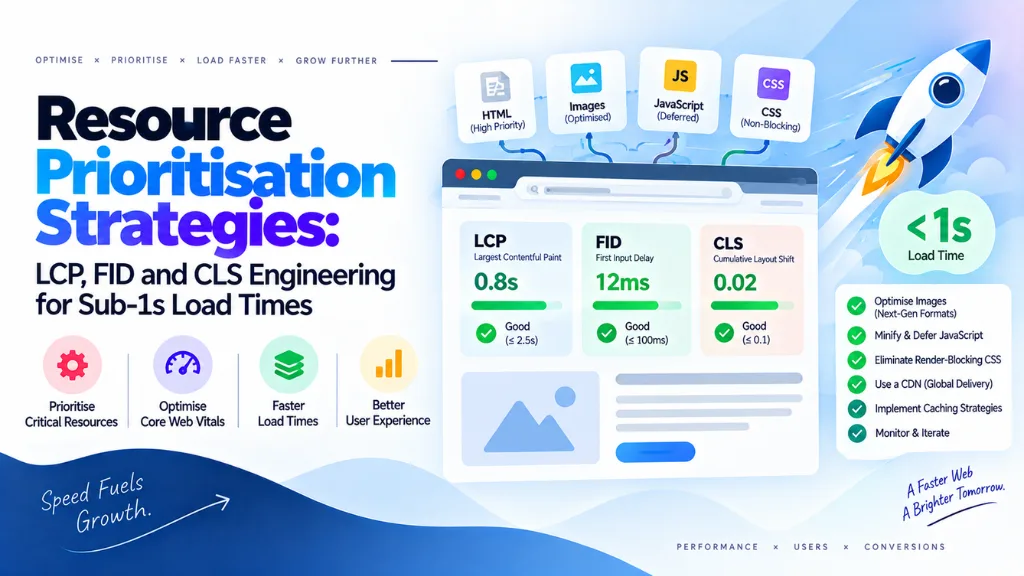

Before going further, one correction matters: FID (First Input Delay) was retired as a Core Web Vital in March 2024, replaced by INP (Interaction to Next Paint). Any resource prioritisation plan built around FID today is optimising for a metric Google no longer measures. This article covers the current three Core Web Vitals – LCP, INP, and CLS – and the resource prioritisation strategies that actually move them, particularly for teams chasing sub-1-second load times.
In this article12 sections
Resource prioritisation strategies are the set of techniques used to control the order and priority in which a browser fetches page resources – images, fonts, CSS, and scripts – so that the content users see and interact with first is also what loads first. Getting this order right is often a bigger lever than reducing file size, because the browser can only download so much at once, and what it downloads first determines what your Core Web Vitals scores actually look like.
Why Resource Order Matters More Than Resource Weight#
A common assumption is that slow pages are caused by heavy files. Often they aren’t. One documented case traced a 117KB hero image – small enough to download in milliseconds on a fast connection – that still produced a 1.2-second Largest Contentful Paint, because the browser didn’t discover the image early enough in the loading sequence. Once the image was made discoverable to the browser’s preload scanner and given a high fetch priority, LCP dropped from 1,247ms to 109ms without changing the image itself at all.
This is the core insight behind resource prioritisation: browsers assign default priority levels to resources as they’re discovered, and those defaults are frequently wrong for what actually matters to the user. An in-viewport hero image, for example, starts at “Low” priority by default and only gets upgraded to “High” after the browser finishes parsing CSS and completing layout – a delay that can cost hundreds of milliseconds on a metric where the “good” threshold is 2.5 seconds total.
The Current Core Web Vitals: LCP, INP, CLS#
| Metric | Measures | “Good” Threshold |
| LCP (Largest Contentful Paint) | Time until the largest visible content element renders | Under 2.5 seconds |
| INP (Interaction to Next Paint) | Responsiveness across all user interactions, not just the first | Under 200 milliseconds |
| CLS (Cumulative Layout Shift) | Visual stability during load | Under 0.1 |
Google scores all three at the 75th percentile of real Chrome users over a rolling 28-day window, using field data from the Chrome User Experience Report rather than lab tests. A page can post a perfect Lighthouse score in local dev tools and still fail Core Web Vitals in production if a meaningful share of real visitors – often on mid-range mobile devices – experience something slower.
INP is worth dwelling on because it changed what “responsiveness” means. FID only measured the delay before the browser began processing a user’s very first click or tap; it said nothing about how long that interaction took to finish, or how the page behaved on the second, third, or tenth interaction. INP measures the full cycle from interaction to the next visual update, across every interaction in the session, and reports roughly the worst one. A page that handled the first click instantly but grew sluggish after several form fields or menu opens would have passed FID cleanly and still feels broken to a real user – which is exactly the gap INP was introduced to close.
Resource Prioritisation Techniques That Move LCP#
fetchpriority: Overriding the Browser’s Guess#
The fetchpriority attribute lets developers explicitly tell the browser how important a resource is, overriding the default guess it makes at discovery time. Applied to an <img> tag as fetchpriority=”high”, it pushes the LCP candidate to the front of the download queue immediately, rather than waiting for the browser to upgrade its priority after layout. In one widely cited web.dev case study on Google Flights, adding fetchpriority=”high” to the LCP image alone improved LCP from 2.6 seconds to 1.9 seconds.
It’s worth noting that fetchpriority is a hint, not a directive – the browser can still apply its own conflict-resolution logic, and servers don’t always respect the priority signal either. It works best as a scalpel, applied to the one or two resources that genuinely determine LCP, not sprayed across every image on the page. Marking everything “high” priority simply recreates the same congestion the attribute was designed to solve.
preload vs. fetchpriority: Two Different Jobs#
These two hints are frequently confused, but they solve different problems:
- <link rel=”preload”> affects discoverability – it tells the browser about a resource before it would naturally encounter it in the HTML or CSS, so fetching can start earlier. It is a mandatory fetch, not a hint.
- fetchpriority affects priority level once a resource is already in the queue. It doesn’t help the browser find a resource sooner – only how urgently it downloads it relative to everything else.
For an LCP image that’s buried behind a request chain – say, discovered only after a CSS background rule resolves – preload solves the “found too late” problem, while fetchpriority solves the “found on time but queued behind everything else” problem. Chrome’s own performance documentation recommends combining both: preload the LCP image and set fetchpriority=”high” on both the preload directive and the image element itself.
Preconnect and DNS-Prefetch for Third-Party Origins#
Any resource served from a third-party domain – a font provider, a CDN, an analytics script – carries the cost of a fresh DNS lookup, TCP handshake, and TLS negotiation before the first byte arrives. <link rel=”preconnect”> and <link rel=”dns-prefetch”> let the browser complete that handshake in advance for origins you know will be needed, shaving the connection setup time off the critical resources that depend on it. Readers newer to these terms can cross-reference the website design and development glossary for plain-language definitions of the underlying browser and rendering concepts.
Deferring What Doesn’t Need to Load First#
Prioritisation isn’t only about promoting critical resources – it’s equally about explicitly deprioritising non-critical ones so they stop competing for bandwidth. Below-the-fold images should use native lazy loading (loading=”lazy”), non-critical third-party scripts should load with async or defer, and late-body scripts can be given lower fetch priority to avoid displacing the images the user actually sees first.
Engineering CLS While Prioritising Resources#
Resource prioritisation and layout stability interact more than most teams expect. Fetching an image early does nothing for CLS if the browser doesn’t know its dimensions in advance and has to reflow the page once it arrives. The core fixes are straightforward but easy to skip under deadline pressure:
- Set explicit width and height attributes on every image, video, and iframe, so the browser reserves the correct space before the resource loads.
- Use font-display: swap alongside a preloaded web font to avoid invisible text and the layout jump that comes with late font swaps.
- Reserve space for dynamically injected content – ad slots, cookie banners, embedded widgets – rather than letting it push existing content down after the fact.
A Practical Workflow for Sub-1s Load Times#
Reaching a sub-1-second LCP consistently, rather than in isolated lab tests, requires treating prioritisation as a system rather than a one-off fix:
- Identify the actual LCP element using Chrome DevTools’ Performance panel – don’t assume it’s the hero image without confirming it.
- Trace the request chain to see how many steps stand between page navigation and that element being discoverable.
- Apply preload and fetchpriority together if the element is discovered late, and fetchpriority alone if discovery is already fast but priority is wrong.
- Deprioritise everything else competing for bandwidth in that same early window – analytics scripts, below-the-fold images, non-critical fonts.
- Validate against field data, not just Lighthouse, since real-user CrUX data at the 75th percentile is what Google actually scores against.
A structural audit is often what surfaces these request-chain problems in the first place, since they’re rarely visible from a page-weight report alone. This is the kind of diagnosis Search Savvy runs before recommending any front-end change: tracing the actual request waterfall rather than guessing from a Lighthouse score. Search Savvy’s technical SEO services focus specifically on this kind of request-order diagnosis rather than generic speed recommendations, and a website audit is usually the fastest way to identify which resources are silently displacing your actual LCP candidate.
Common Mistakes in Resource Prioritisation#
- Setting fetchpriority=”high” on multiple images. This recreates the congestion the attribute exists to fix – reserve it for the single true LCP candidate.
- Preloading without matching fetchpriority. A preloaded resource that arrives after other high-priority requests still queues behind them unless fetchpriority is also set.
- Optimising for FID instead of INP. Guides and internal checklists still referencing FID are measuring a retired metric; responsiveness work should target INP’s 200ms threshold across all interactions.
- Ignoring CLS while chasing LCP speed. Fetching resources faster without reserving their layout space simply moves the visual jump earlier rather than eliminating it.
- Trusting Lighthouse scores alone. Lab data can look excellent while real-user field data at the 75th percentile still fails, especially on mid-range mobile devices.
The Bottom Line#
Sub-1-second load times are rarely won by shrinking files further – they’re won by controlling the order in which the browser discovers and fetches resources, so the element users actually see first is treated as the priority it is. Getting LCP, INP, and CLS into “good” territory together requires resource prioritisation techniques like fetchpriority and preload working in tandem with layout-stability fixes, validated against real field data rather than lab scores alone.
For teams running this diagnosis at scale across an e-commerce catalog or a large content site, Search Savvy’s ecommerce SEO services build these prioritisation audits into the broader technical roadmap, so performance work compounds with the rest of the site’s SEO rather than existing as a one-time fix.
Frequently Asked Questions#
What replaced FID as a Core Web Vital? INP (Interaction to Next Paint) officially replaced First Input Delay in March 2024. INP measures the full responsiveness cycle across every interaction on a page, not just the delay before the first one, with a “good” threshold under 200 milliseconds.
What is the difference between preload and fetchpriority? Preload controls when a resource is discovered by the browser, fetching it earlier than it would naturally be found in the page. Fetchpriority controls how urgently a resource is downloaded once it’s already in the queue. They solve different problems and often need to be used together on the same resource.
Can resource prioritisation alone achieve sub-1-second LCP? It’s usually the single highest-leverage technique, but it works alongside image compression, modern formats like WebP or AVIF, and reducing render-blocking CSS and JavaScript. On many sites, fixing discovery and priority order closes most of the gap before file-size optimisation is even needed.
Does fetchpriority guarantee a resource loads first? No. Fetchpriority is a hint, not a directive – the browser can still apply its own conflict resolution, and intermediate servers or CDNs don’t always honor the priority signal. It significantly improves the odds but isn’t an absolute guarantee.
Why does CLS matter if I’m only trying to improve load speed? Loading resources faster without reserving their layout space just moves a visual shift earlier in the page lifecycle rather than removing it. CLS and LCP need to be engineered together, since fixes for one can inadvertently worsen the other if dimensions aren’t reserved.
How do I know which element is actually my LCP element? Use Chrome DevTools’ Performance panel or the PageSpeed Insights report to identify the confirmed LCP element rather than assuming it’s the hero image. Applying prioritisation techniques to the wrong element wastes the optimisation and can actively delay the real one.