How to Repurpose One Blog Post Into a Week of Social Content

Most content calendars fail for a simple reason: teams treat “write the blog post” and “create this week’s social posts” as two separate jobs, when one well-researched post already contains the raw material for both. Repurpose blog content properly, and a single 1,500-word article can seed five to seven days of Instagram, LinkedIn, X and email content without a single new research session.
In this article16 sections
This guide gives you a repeatable content recycling strategy: pick the right source post, break it into extractable pieces, map those pieces to a full week across platforms, and adapt the format to what each platform actually rewards in 2026. The short version: one blog post, five to seven distinct pieces of social content, and one afternoon of production instead of a week of scattered ideas.
What Does It Mean to Repurpose Blog Content?#
To repurpose blog content means taking the ideas, data and structure already in a published article and reshaping them into new, platform-native formats, rather than simply sharing the same link everywhere. A single how-to guide can become a carousel, a thread, a short video script and a quote graphic, each built for how that platform’s audience actually consumes content.
This is different from just cross-posting a link. Sharing the same headline and URL on five platforms is distribution; repurposing is content atomization, a more systematic process of treating one long-form asset as raw material and deliberately extracting the statistics, frameworks, quotes and steps inside it before you decide what to build with each one.
Content Atomization vs Simple Repurposing#
The distinction matters because it changes your workflow. Content atomization, a framework closely associated with Gary Vaynerchuk’s “pillar content” model, works backward from platform to source instead of forward from source to platform:
| Simple repurposing | Content atomization | |
| Starting point | “What can I reuse from this post?” | “What does each platform need, and where is that inside this post?” |
| Process | Ad hoc, one post at a time | Systematic: map the whole article before creating anything |
| Typical output | 1 to 2 extra posts | 5 to 10+ pieces across multiple platforms |
| Best for | Quick wins, low-effort weeks | A repeatable weekly content system |
Vaynerchuk’s own team has described starting from one piece of “pillar content,” such as a keynote or long interview, and identifying every quote, statistic and standalone idea inside it before deciding what becomes a short video, a quote card or a written post. You don’t need a keynote to use the same logic. A well-structured blog post already has headers, a list, a definition, and probably at least one number worth pulling out on its own.
Step 1: Choose the Right Blog Post to Repurpose#
Not every post is equally repurposable. Before you build a week of content around one, check that it has:
- At least one list, framework or numbered process you can turn into a carousel or thread.
- A genuine statistic, quote or surprising fact, not just general advice, since concrete, attributable data extracts more cleanly than vague claims.
- A clear “before vs after” or “mistake vs fix” angle somewhere in the piece, which naturally suits short-form video and single-image posts.
- Enough length and depth that pulling five to seven pieces out of it doesn’t feel like padding one idea into ten posts.
A recent technical SEO explainer, a how-to guide, or a checklist-style post, the kind Search Savvy regularly publishes, usually repurposes far more easily than a narrow news update or opinion piece with no structure to lift from.
Step 2: Break the Post Into Extractable Pieces#
This is the atomization step: read through the post specifically looking for standalone pieces, not for content to summarize. For most blog posts, you’ll find several of these:
- The core definition or thesis, the one-sentence answer the post gives to its main question.
- A numbered list or checklist, where each item can become one carousel slide.
- One strong statistic or data point, with its source.
- A “common mistakes” section, often the easiest to turn into a “stop doing this” post.
- A comparison or “X vs Y” table, a natural fit for a two-panel graphic.
- A quote, either from the article itself or from an expert it cites.
- A question the post answers directly, a strong hook for a short video or a poll.
Not every post will have all seven. Three or four genuine pieces, done well, beat forcing content out of material that isn’t there.
Step 3: Map the Pieces to a Full Week#
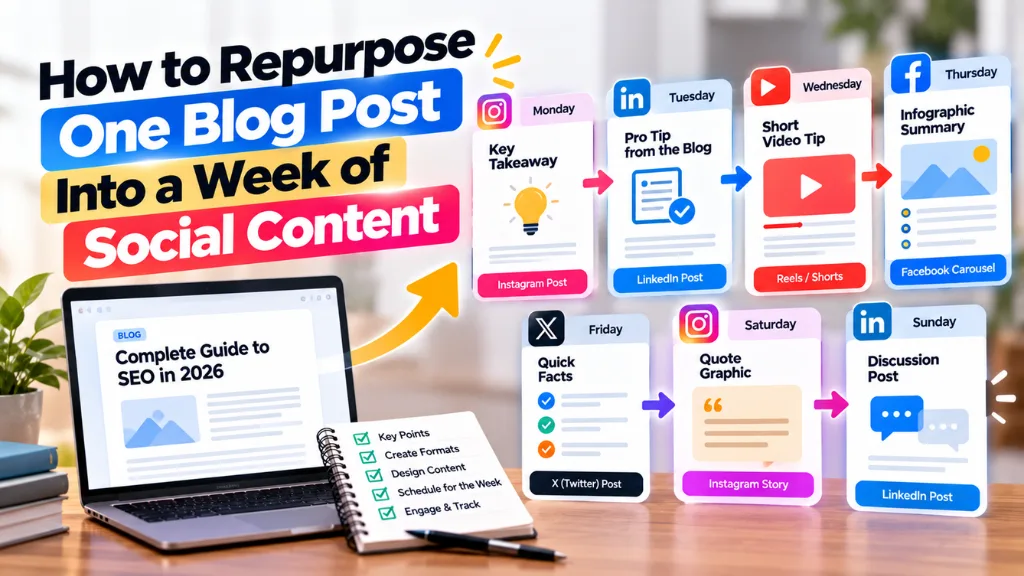
Here’s a practical seven-day structure. Adjust the days to your own posting rhythm; the sequence, not the exact day, is what matters.
| Day | Format | Source material | Platform |
| Mon | Carousel (blog to carousel) | The numbered list or checklist | Instagram, LinkedIn |
| Tue | Text post or thread | The core definition, expanded with one supporting point | X, LinkedIn |
| Wed | Quote or stat graphic | The strongest statistic or quote | Instagram, X |
| Thu | Short video (30 to 60 sec) | One “common mistake” from the post, explained on camera | Reels, Shorts, TikTok |
| Fri | Comparison graphic | The “X vs Y” table or two contrasting points | Instagram, LinkedIn |
| Sat | Community post (poll or question) | The question the post directly answers | Instagram Stories, X, LinkedIn |
| Sun | Recap link post | A one-line summary plus the link to the full post | All platforms, or an email newsletter |
This is a starting template, not a rule. If your post has no natural comparison, swap Friday for a second carousel slide set or a behind-the-scenes take on how you researched the piece.
Step 4: Adapt Format and Length to Each Platform#
A single piece of source content still needs platform-specific formatting, because the same 250-word caption behaves differently everywhere.
- Instagram and LinkedIn carousels both currently support up to 20 slides from their own apps, though third-party schedulers are capped at 10 because that’s the limit of Meta’s own API, not the platform’s true maximum. For a blog-to-carousel post, 6 to 10 slides usually suits a checklist better than either extreme: fewer feels thin, more risks losing the reader before slide 10.
- X (Twitter) keeps free accounts at 280 characters per post, with X Premium tiers unlocking far longer posts; a free-tier thread of 5 to 7 short posts usually carries a blog’s core argument better than trying to compress it into one.
- LinkedIn now allows posts up to roughly 3,000 characters, well beyond its older 1,300-character limit, giving you room to genuinely explain a concept rather than just teasing it.
- Instagram captions display in full up to 2,200 characters but visibly truncate after roughly the first 125 characters with a “more” link, so the sentence that matters most has to be the very first one.
Design once at a square or 4:5 ratio (1080×1080 or 1080×1350px) if you’re posting the same graphic across Instagram, LinkedIn and Facebook; only build a separate 9:16 version for Stories, Reels and TikTok, since those formats genuinely need it.
Step 5: Build a Repeatable Workflow, Not a One-Off#
The point of a content recycling strategy is that it works every week, not just for one post you happen to love. To make it repeatable:
- Extract pieces the same day you publish, while the structure is fresh, rather than returning to an old post later.
- Keep a simple template (the seven-day table above, or your own version) so you’re filling slots, not starting from a blank page each week.
- Batch the design work. Build all of a week’s graphics in one sitting using a consistent template, rather than designing each post individually as it goes live.
- Track which extracted format performs best, and let that inform which piece you pull first from your next post. If your carousels consistently outperform your quote graphics, lead with the list next time.
Search Savvy’s content calendar and creative production system built around this kind of weekly extraction removes the guesswork of “what do we post today” almost entirely, since the answer is already sitting inside last week’s article.
Common Mistakes to Avoid#
- Posting the same caption everywhere. Even the same idea needs a different first line for X’s 280-character limit than for a LinkedIn post with room to breathe.
- Repurposing thin posts. If the source article has no list, stat or clear structure, force-fitting seven posts out of it will show.
- Doing all the extraction in your head. Write the seven pieces down before you open a design tool; it’s much faster than improvising slide by slide.
- Ignoring platform limits. A carousel built past what a scheduler can publish, or a caption that truncates mid-sentence, undercuts otherwise good content.
- Never linking back. At least one post in the week should point to the full article, or you lose the SEO and traffic value of having written it.
Frequently Asked Questions#
How Many Social Posts Can One Blog Post Realistically Produce?#
Most well-structured posts yield five to seven distinct pieces: a carousel, a text post, a quote or stat graphic, a short video, and a couple of lighter formats like a poll or recap. Thinner posts might only stretch to three or four honest pieces, which is fine.
What’s the Difference Between Content Repurposing and Content Atomization?#
Repurposing usually means reshaping one piece into one new format, done case by case. Atomization is more systematic: you map out every extractable element in a source piece before creating anything, aiming for a full set of platform-native pieces rather than a single spin-off.
Which Blog Posts Repurpose Best Into Social Content?#
Posts with a numbered list, a clear framework, at least one concrete statistic, and a “mistakes to avoid” or comparison section repurpose most easily. General opinion pieces or narrow news updates with little structure tend to yield fewer usable pieces.
Do I Need Different Designs for Every Platform?#
Not for every post. A square or 4:5 graphic works across Instagram, LinkedIn and Facebook feeds without redesign. Vertical, full-screen formats like Reels, Shorts and TikTok genuinely need their own 9:16 version, since a resized square graphic looks cramped there.
How Long Should a LinkedIn Carousel Be When Repurposed From a Blog Post?#
Somewhere between 6 and 10 slides usually works well for a checklist or numbered-list style post: enough to cover the material without losing momentum, and within LinkedIn’s own maximum. Match the slide count to how many genuinely distinct points the source article actually makes.
Should Every Repurposed Post Link Back to the Original Article?#
Not every single one, but at least one post in the week should, ideally the recap or summary post near the end. That link is how the repurposing effort feeds traffic and SEO value back to the original piece, rather than just generating standalone social engagement.
The Bottom Line#
Repurposing one blog post into a week of social content comes down to treating the article as raw material: extract its list, its data, its mistakes section and its core question before you design a single graphic, then match each piece to the platform and format it actually suits. This week, pick your best-performing blog post from the last month, run it through the seven-piece extraction above, and see how many days it genuinely fills. If you’d like a structured system built around your own content, Search Savvy’s social media services and content calendar and creative production offering are built for exactly this kind of one-to-many workflow.