Open Graph Tags Explained: How to Control How Your Links Look on Social Media
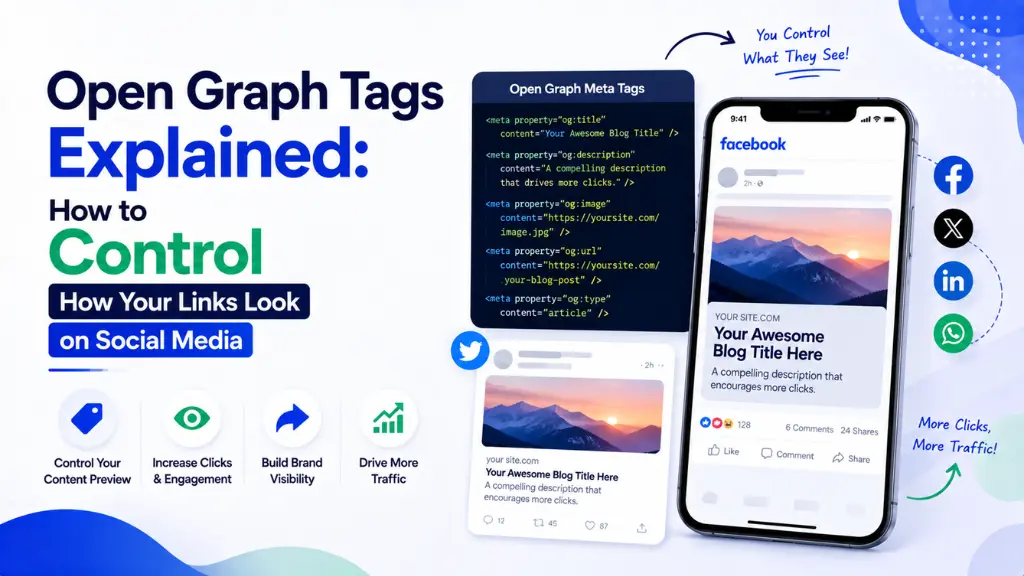

Paste a link into WhatsApp, LinkedIn, or Slack without any preparation, and the platform makes its own guess about what to show – often pulling a random image, a navigation menu label, or a meta description stuffed with keywords nobody meant for a human to read.
In this article8 sections
Open Graph tags explained simply: they are the four lines of HTML code that take that guesswork away entirely. Without them, social platforms scrape the page and make a best guess – often pulling the wrong image or a title meant for search engines, not social sharing, according to Web Aloha’s 2026 Open Graph guide. With them, every shared link becomes a clean, branded preview card instead of a coin flip.
At Search Savvy, Open Graph implementation is one of the smallest, highest-return fixes we make during a technical SEO audit, since setup takes minutes while the benefit compounds across every future share. This guide breaks down Open Graph tags explained clearly, the correct 2026 specifications, and why they now matter for AI search visibility too.
Open Graph Tags Explained: What Are They, Exactly?#
Open Graph tags explained at their core are HTML meta tags placed in a page’s <head> section that tell social platforms, messaging apps, and crawlers exactly how to render a link preview – the title, description, image, and content type.
The protocol was originally published by Facebook in 2010, and it remains the de-facto standard in 2026, now read by LinkedIn, X, Slack, Discord, WhatsApp, iMessage, Telegram, and a growing number of AI search crawlers, according to env.dev’s 2026 Open Graph guide. Four <meta property=”og:…”> tags in your page’s head are enough to turn a plain, unappealing blue hyperlink into a rich 1200×630 preview card complete with title, description, and image.
Open Graph tags explained in terms of what they actually require: every shareable page needs at minimum four core tags to claim basic control over its appearance, according to GEO Tool’s 2026 guide. These four tags form the absolute baseline – additional optional tags refine the preview further, but these are non-negotiable for any page you expect to be shared.
- og:title – the headline shown in the preview card
- og:type – the content type, most commonly “website” or “article”
- og:image – the preview image, the single most visually dominant element in the card
- og:url – the canonical URL, ensuring shares consolidate correctly rather than fragmenting
People Also Ask: What happens if a webpage has no Open Graph tags at all? Short Answer: The social platform scrapes the page and makes its own guess about what to display – typically pulling whatever image it finds first, which is often incorrect, along with a title or description not written with social sharing in mind. Without OG tags, previews look inconsistent and unprofessional.
How Does Open Graph Image Sizing Actually Work in 2026?#
Open Graph tags explained through their most visually important element – og:image – come down to one dominant, well-established specification that works reliably across nearly every platform.
The universal, recommended Open Graph image size in 2026 is 1200 × 630 pixels, at an aspect ratio of roughly 1.91:1 – this single size displays correctly across Facebook, LinkedIn, X, and Slack, according to Pixola’s 2026 complete guide to Open Graph images. The minimum acceptable size is 600 × 315 pixels, but using the full 1200 × 630 dimensions is strongly recommended for sharper, higher-quality previews across all platforms, per FreeImages’ 2026 image size guide.
Practical image guidelines worth following:
- Use 1200 × 630 pixels as your default; avoid creating separate platform-specific images unless you have a very specific reason to
- Leave 40–60px of padding from every edge, since platforms crop images differently, especially on mobile devices
- Keep file size under 300KB–1MB for fast loading, using PNG for graphics with text and JPEG for photographic images
- Use an absolute URL for og:image, including the full https:// prefix – relative paths do not render correctly across platforms
People Also Ask: What is the ideal Open Graph image size for 2026? Short Answer: 1200 × 630 pixels, at a 1.91:1 aspect ratio, is the current universal recommendation. This single size displays correctly across Facebook, LinkedIn, X, Slack, and most messaging apps, so creating separate images per platform is rarely necessary.
How Much Does Open Graph Actually Affect Click-Through Rate?#
Open Graph tags explained through their measurable impact show a genuinely significant lift in click-through rate – this is not a purely cosmetic improvement.
Custom, optimised OG images see two to three times more clicks compared to generic or default previews, according to Pixola’s 2026 guide. Separately, HubSpot’s 2025 A/B testing found that a link with an optimised OG image and description achieved a 2.3 times higher click-through rate than the same link with a generic, auto-generated preview, according to GEO Tool’s 2026 report.
Beyond raw clicks, well-crafted Open Graph tags improve lead quality too. A 2025 B2B software case study found leads from social shares with optimised OG tags had a 15% higher qualification rate, since the accurate preview correctly set expectations before the click, per the same GEO Tool analysis. A preview that accurately represents the content filters for genuinely interested visitors, rather than generating clicks that immediately bounce.
People Also Ask: Does a better Open Graph image really lead to more clicks? Short Answer: Yes, substantially. Custom, optimised OG images generate two to three times more clicks than default or generic previews, and A/B testing has shown click-through rate improvements of over 2 times when comparing optimised versus auto-generated link previews.
Do Open Graph Tags Explained as an SEO Concept Actually Affect Google Rankings?#
Open Graph tags explained accurately require being clear about a common misconception: they do not directly influence Google’s ranking algorithm, no matter how well they are implemented.
Google has repeatedly confirmed that Open Graph tags are not a ranking factor – Google uses its own <title> tag and meta description for search results, entirely separate from your og:title and og:description, according to Web Aloha’s 2026 guide. Conflating the two is a common mistake – optimising your Open Graph tags will never directly move your Google search position.
The impact instead is genuinely indirect, but real. Better social previews lift click-through rate on social referrals by roughly 30–40%, which increases branded traffic and return visits – behavioural signals that Google does factor into its broader understanding of a site’s relevance and trustworthiness, per the same source. Higher engagement and click-through rates from social sharing send positive signals that can influence search visibility over time, according to Pixola’s 2026 analysis.
People Also Ask: Do Open Graph tags directly improve Google search rankings? Short Answer: No, Google has confirmed OG tags are not a ranking factor and uses its own title and meta description tags for search results. The benefit is indirect – better social click-through rates drive branded traffic and engagement signals that can support visibility over time.
Why Do Open Graph Tags Matter for AI Search Visibility in 2026?#
Open Graph tags explained for the 2026 landscape need to include a genuinely new dimension: AI search crawlers now read this metadata too, using it as fallback structured data when evaluating and citing web content.
In 2026, links get scraped not just by eight or more social platforms and messaging apps, but by a growing number of AI search crawlers that use OG metadata as fallback structured data, according to Web Aloha’s 2026 guide. AI search systems like Perplexity, ChatGPT search, and Google AI Overviews all fall back to Open Graph tags when determining how to represent and understand a page they are considering for citation.
As generative AI systems increasingly pull structured metadata to understand web content, correct Open Graph metadata also functions as a signal that your content is well-organised and trustworthy, according to iMark Infotech’s 2026 guide. This means the same four tags built originally for Facebook in 2010 now play a quiet but genuine role in how AI systems evaluate and describe your content in 2026, well beyond their original social-sharing purpose.
People Also Ask: Do AI search tools like ChatGPT and Perplexity actually read Open Graph tags? Short Answer: Yes. AI search crawlers increasingly use Open Graph metadata as fallback structured data when evaluating pages for citation, meaning accurate OG tags help both human social sharing and AI systems understand and represent your content correctly.
How Should You Handle Open Graph Tags Differently Across Platforms?#
Open Graph tags explained as a single, universal setup mostly works – but a few platform- specific refinements can meaningfully improve how your content performs on each individual channel.
By default, the same Open Graph image is used across every platform, though platform-specific tags like twitter:image allow more granular control over how content appears on X specifically, according to FreeImages’ 2026 guide. Twitter/X actually falls back to standard Open Graph tags if Twitter-specific card tags are not present, so setting OG tags first and refining with Twitter-specific tags afterward is the recommended sequence, per Online Tool Base’s 2026 guide.
Platform behaviour genuinely differs beyond just image handling. LinkedIn favours professional, clean imagery paired with longer descriptions, Pinterest prioritises high-vertical images, and messaging apps like WhatsApp display previews inside intimate, one-on-one conversations where trust matters especially heavily, according to GEO Tool’s 2026 analysis. A single, well-constructed set of OG tags can still serve all these contexts reasonably well, making the four-tag baseline a highly efficient investment even without extensive customisation.
People Also Ask: Do I need different Open Graph images for every social platform? Short Answer: Generally, no. The 1200 × 630 pixel format works reliably across nearly every platform. Platform-specific tags like twitter:image offer additional refinement where genuinely useful, but a single well-built OG image set covers most sharing contexts effectively.
How Should You Test and Implement Open Graph Tags Correctly?#
Open Graph tags explained in practice come down to a straightforward implementation process, though a handful of common mistakes cause previews to render incorrectly or not appear at all.
A practical implementation and testing process:
- Add the four core tags – og:title, og:type, og:image, og:url – to every shareable page’s <head> section
- Use an absolute URL for og:image specifically, since relative paths fail to render across platforms
- Confirm the image is not blocked by robots.txt or hotlink protection, which is one of the most common reasons og:image fails to render
- Test with platform-specific debuggers – Facebook’s Sharing Debugger, LinkedIn’s Post Inspector – before sharing publicly, since these tools refresh cached previews
- Track social referral performance in Google Analytics 4, comparing click-through rate before and after implementing or refining OG tags
- Re-test after any significant content or image update, since platforms cache previews and may not reflect changes immediately without a manual refresh
At Search Savvy, we recommend building Open Graph implementation into every new page template from the start, rather than treating it as a retrofit project – the cost is a handful of lines of code, and the upside compounds across every future share.
FAQ: Open Graph Tags Explained#
Q1: Are Open Graph tags the same as Twitter Card tags? A: Not exactly, though closely related. Open Graph tags are the broader standard read by most platforms, while Twitter Card tags (twitter:) offer X-specific refinements. X falls back to standard OG tags if Twitter-specific tags are not present.
Q2: Why is my Open Graph image not showing up when I share a link? A: The most common causes are a relative rather than absolute image URL, the image being blocked by robots.txt or hotlink protection, or a cached preview from before you added the tags. Platform debugging tools like Facebook’s Sharing Debugger can refresh the cache and diagnose the issue.
Q3: Do I need Open Graph tags on every page of my website? A: Any page you expect might be shared should have them, which in practice means most content pages, blog posts, and product pages. Purely internal or utility pages unlikely to be shared externally are lower priority.
Q4: Can I use different Open Graph images for the same page over time? A: Yes, but be aware platforms cache previews, sometimes for extended periods. Use the platform’s specific debugging or refresh tool after updating an image to force the cache to update, rather than assuming the change will appear immediately.
Q5: Is it worth hiring a developer to set up Open Graph tags, or can I do it myself? A: Many CMS platforms, including WordPress plugins like Yoast and RankMath, generate Open Graph tags automatically with minimal manual input. Custom sites or specific platform refinements may benefit from developer involvement, but the core four tags are genuinely simple to implement.
Q6: Do Open Graph tags help with anything besides social media sharing? A: Yes. Beyond social previews, they indirectly support SEO through improved click-through rate and branded traffic, and increasingly serve as fallback structured data that AI search crawlers read when evaluating and citing web content.
Want your website’s Open Graph tags audited and implemented correctly across every page? Visit Search Savvy to speak with a technical SEO expert who can make sure your links look right everywhere they’re shared.