Keyword Cannibalisation Detection: Advanced GSC + Python Workflows
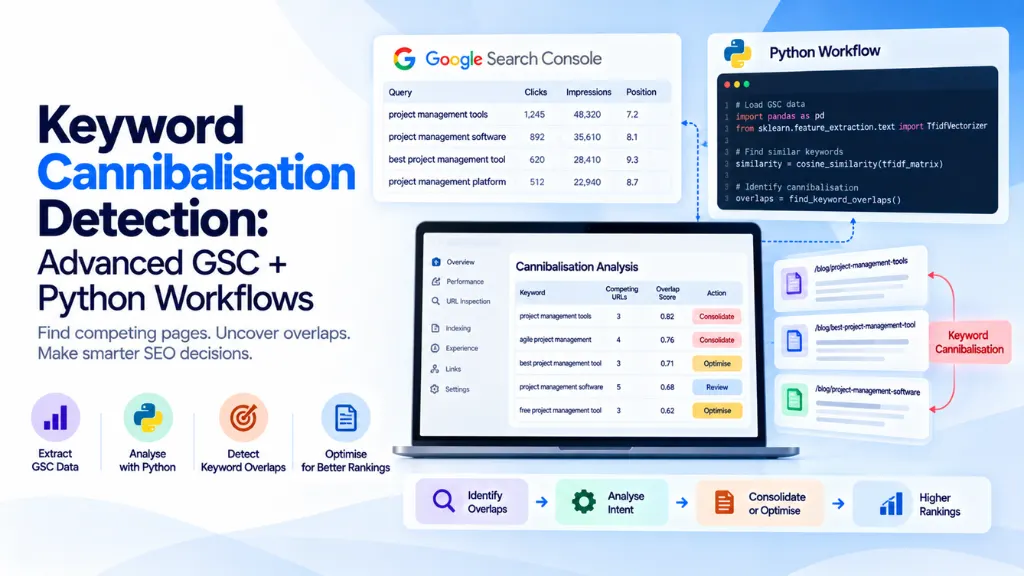

Checking the Search Console Performance report by hand catches the cannibalisation cases that are already obvious – two pages both showing up for your most important keyword, easy to spot in a quick filter. It’s the hundreds of quieter conflicts, buried across thousands of query-page pairs, that manual review never surfaces. Keyword cannibalisation detection at any real scale needs to run through the Search Console API and pandas rather than the UI, and this guide walks through exactly how to build that workflow – authentication, data extraction, the detection logic itself, and how to turn flagged conflicts into a prioritised, actionable list.
In this article13 sections
What This Workflow Detects, and Why the API Is Necessary#
Keyword cannibalisation happens when two or more pages on your own site compete for the same query, splitting clicks, impressions, and ranking signals that a single, consolidated page could otherwise capture fully. The clearest signal is structural: the same query, with meaningful impressions split across more than one of your own URLs.
The Search Console UI technically shows this data, but it isn’t built for bulk pattern detection – there’s no way to ask it “show me every query where two or more of my pages both received impressions this month” in one step. The Search Console API, pulled into a pandas DataFrame, makes that exact question trivial to answer, and repeatable on a schedule rather than done manually every quarter.
Setting Up API Access#
The Search Console API is accessed through Google’s official google-api-python-client library, authenticated with either an OAuth client or a service account. A service account is the more practical choice for a recurring, automated workflow, since it doesn’t require re-authenticating through a browser consent screen each run.
# pip install google-api-python-client google-auth
from google.oauth2 import service_account
from googleapiclient.discovery import build
SCOPES = [“https://www.googleapis.com/auth/webmasters.readonly”]
SERVICE_ACCOUNT_FILE = “service_account.json”
credentials = service_account.Credentials.from_service_account_file(
SERVICE_ACCOUNT_FILE, scopes=SCOPES
)
service = build(“searchconsole”, “v1”, credentials=credentials)
Before this works, the service account’s email address needs to be added as a user on the target property inside Search Console itself – a step that’s easy to forget and produces a permissions error if skipped.
Pulling Query and Page Data#
The core request combines the query and page dimensions, which is what makes cannibalisation detection possible in the first place – pulling either dimension alone loses the relationship between the two.
def fetch_search_analytics(site_url, start_date, end_date, start_row=0, row_limit=25000):
request = {
“startDate”: start_date,
“endDate”: end_date,
“dimensions”: [“query”, “page”],
“rowLimit”: row_limit,
“startRow”: start_row,
“dataState”: “final”, # excludes fresh, still-fluctuating data
}
response = service.searchanalytics().query(
siteUrl=site_url, body=request
).execute()
return response.get(“rows”, [])
A single request is capped at 25,000 rows, which larger sites will exceed within a single date range. Paginating with startRow in increments of 25,000 until a response comes back empty covers the full dataset:
def fetch_all_rows(site_url, start_date, end_date):
all_rows = []
start_row = 0
while True:
rows = fetch_search_analytics(site_url, start_date, end_date, start_row)
if not rows:
break
all_rows.extend(rows)
start_row += 25000
return all_rows
Using dataState: “final” matters for consistency – Search Console’s most recent one to two days of data can still shift as processing catches up, and including it in a recurring pipeline introduces noise that looks like volatility but is really just incomplete data.
Transforming the Response into a DataFrame#
Each row’s keys array matches the order of the requested dimensions, so with [“query”, “page”] requested, keys[0] is always the query and keys[1] is always the page:
import pandas as pd
def rows_to_dataframe(rows):
records = [
{
“query”: row[“keys”][0],
“page”: row[“keys”][1],
“clicks”: row[“clicks”],
“impressions”: row[“impressions”],
“ctr”: row[“ctr”],
“position”: row[“position”],
}
for row in rows
]
return pd.DataFrame(records)
rows = fetch_all_rows(“https://www.example.com/”, “2026-08-01”, “2026-08-31”)
df = rows_to_dataframe(rows)
Core Detection Logic: Flagging Query-Level Conflicts#
With the data in a DataFrame, detecting cannibalisation is a groupby-and-filter operation: group by query, count how many distinct pages received impressions, and flag any query where that count is two or more, above a minimum impression threshold to filter out statistical noise from low-volume queries.
MIN_IMPRESSIONS = 50 # ignore low-volume noise
def detect_query_conflicts(df, min_impressions=MIN_IMPRESSIONS):
grouped = df.groupby(“query”).agg(
page_count=(“page”, “nunique”),
total_impressions=(“impressions”, “sum”),
).reset_index()
conflicts = grouped[
(grouped[“page_count”] >= 2) &
(grouped[“total_impressions”] >= min_impressions)
].sort_values(“total_impressions”, ascending=False)
return conflicts
conflicts = detect_query_conflicts(df)
This produces a ranked list of queries worth investigating, ordered by total impression volume so the conflicts with the most traffic at stake surface first – a critical prioritisation step on a site with hundreds of flagged queries, where investigating every single one isn’t a realistic use of time.
Scoring Severity: How Close Is the Competition?#
Not every multi-page query is equally worth fixing. A query where one page gets 95% of impressions and a second page gets 5% is a minor overlap; a query split closer to 50/50 between two pages represents active, meaningful competition. Calculating each page’s share of total impressions per query surfaces this distinction directly:
def score_conflict_severity(df, conflict_queries):
detail = df[df[“query”].isin(conflict_queries[“query”])].copy()
detail[“query_total_impressions”] = detail.groupby(“query”)[“impressions”].transform(“sum”)
detail[“impression_share”] = detail[“impressions”] / detail[“query_total_impressions”]
# Severity: how close the top two competing pages are to an even split
severity = (
detail.sort_values([“query”, “impressions”], ascending=[True, False])
.groupby(“query”)
.head(2)
.groupby(“query”)[“impression_share”]
.apply(lambda shares: 1 – abs(shares.iloc[0] – shares.iloc[1]) if len(shares) > 1 else 0)
.reset_index(name=”severity_score”)
)
return severity.sort_values(“severity_score”, ascending=False)
severity = score_conflict_severity(df, conflicts)
A severity score closer to 1 indicates the top two competing pages are splitting impressions nearly evenly – the clearest sign of genuine, active cannibalisation rather than one dominant page with a minor secondary overlap.
Adding Position Volatility: The Strongest Signal Available#
Impression splitting alone doesn’t confirm Google is actively uncertain about which page to rank – it’s possible one page has consistently outranked the other throughout the whole period. Position volatility, tracked across multiple pulls over time, is the stronger signal, since it shows Google itself alternating which URL it favours for the same query from week to week.
def track_position_volatility(historical_dfs):
“””historical_dfs: list of (date_label, dataframe) tuples pulled weekly.”””
combined = pd.concat([
df.assign(period=label) for label, df in historical_dfs
])
volatility = (
combined.groupby([“query”, “page”])[“position”]
.agg([“mean”, “std”])
.reset_index()
)
# Flag query-page pairs with meaningful position swings
return volatility[volatility[“std”] > 3].sort_values(“std”, ascending=False)
Running this weekly and storing each pull (in a simple CSV, a database table, or a lightweight warehouse) builds the historical view this analysis depends on – a single snapshot can only show impression splitting, not the alternating-rank pattern that most reliably confirms an active conflict.
Combining Everything into a Prioritised Report#
The final, actionable output merges query-level conflicts, severity scores, and position volatility into a single ranked table:
def build_cannibalization_report(conflicts, severity, volatility):
report = conflicts.merge(severity, on=”query”, how=”left”)
volatile_queries = volatility[“query”].unique()
report[“has_position_volatility”] = report[“query”].isin(volatile_queries)
report[“priority_score”] = (
report[“severity_score”].fillna(0) * 0.5
+ report[“total_impressions”].rank(pct=True) * 0.3
+ report[“has_position_volatility”].astype(int) * 0.2
)
return report.sort_values(“priority_score”, ascending=False)
final_report = build_cannibalization_report(conflicts, severity, volatility)
final_report.to_csv(“cannibalization_report.csv”, index=False)
This weighting is a reasonable starting point, not a fixed formula – the relative importance of impression volume, severity, and volatility should be tuned against how your own site’s conflicts have historically played out, and against how much manual review capacity you actually have to act on the output.
Reading and Acting on the Output#
Once the report is built, each flagged query-page group needs a quick manual judgment call the code itself can’t fully make: is this genuine cannibalisation, or two pages that legitimately serve different intents despite sharing a keyword? A quick check of the actual search results for the query, and a read of both pages’ content and titles, resolves this in a couple of minutes per case – far faster than the manual discovery process this pipeline replaces.
For queries confirmed as genuine conflicts, the standard remediation choices apply: merge the weaker page’s unique content into the stronger one and 301 redirect it, rewrite one page’s angle to serve a genuinely distinct intent, or apply a canonical tag where both URLs legitimately need to stay live for users.
Scheduling the Workflow#
For a site with meaningful publishing velocity, running this pipeline weekly – pulling the trailing 28 days of data each time – balances catching new conflicts early against not over-reacting to short-term noise in smaller datasets. Storing each week’s raw pull, not just the final report, is what makes the position volatility analysis possible; without historical snapshots, there’s no way to detect a query alternating between two of your own pages over time.
Common Mistakes in Building This Workflow#
- Pulling only the query dimension, or only page. Cannibalisation detection specifically depends on the relationship between the two, so both dimensions must be requested together.
- Skipping dataState: “final”. Including the most recent one to two days of unprocessed data introduces artificial noise that can look like a conflict signal but is really just incomplete data.
- Ignoring the 25,000-row limit. Failing to paginate with startRow silently truncates results on larger sites, producing an incomplete and misleading conflict list.
- Treating every multi-page query as a problem. A query where one page dominates with 95% of impressions and a second page gets a trivial share usually isn’t worth acting on – the severity scoring step exists specifically to filter these out.
- Never storing historical pulls. Without a running history of position data, the pipeline can only detect impression splitting, not the alternating-rank pattern that most reliably confirms active competition.
- Acting on the report without a quick manual SERP check. Automated detection surfaces candidates efficiently, but confirming genuine cannibalisation versus a legitimate intent difference still needs a brief human judgment call before remediation.
Frequently Asked Questions#
Do I need a paid tool to detect keyword cannibalisation, or is the Search Console API enough? The Search Console API, combined with pandas for analysis, covers the core detection workflow at no cost beyond development time. Paid tools can add convenience and additional data sources, but they aren’t required to build a genuinely functional detection pipeline.
How much historical data do I need before position volatility detection becomes useful? At least three to four weekly pulls, since detecting alternating rank patterns requires comparing position across multiple points in time rather than a single snapshot.
What impression threshold should I use to filter out noise? There’s no universal number – it depends on your site’s overall traffic volume. A reasonable starting point is a threshold that excludes queries too small to matter for your business, then adjusting based on how many results the filter returns and how actionable they turn out to be.
Can this workflow run automatically without manual intervention? The data pulling, detection, and scoring steps can run entirely on a schedule. The final judgment on whether a flagged conflict is genuine cannibalisation versus a legitimate intent difference still benefits from a brief human review before any remediation action is taken.
What’s the difference between this workflow and using Search Console’s UI filters directly? The UI can filter by a single query at a time, but it has no built-in way to scan every query across the site for multi-page conflicts in bulk. The API and pandas approach turns that into a single repeatable operation across the entire query set.
How is keyword cannibalisation detection different from broader content cannibalisation detection? Keyword-level detection, as covered here, works directly from Search Console’s query-and-page performance data. Broader content cannibalisation detection often adds a content-similarity layer using text embeddings, which catches near-duplicate pages even before they’ve accumulated enough ranking history to show up as a query-level conflict.
The Bottom Line#
Detecting keyword cannibalisation at scale comes down to a repeatable pipeline: pull query-and-page performance data through the Search Console API, group and filter for multi-page conflicts in pandas, score each conflict by severity and position volatility, and route the prioritised output to a quick manual review before remediation. None of the individual steps are complex on their own – the value comes from running them consistently, on a schedule, rather than relying on someone eventually noticing a ranking dip. Search Savvy’s keyword research services and technical SEO services teams build workflows like this directly into ongoing content and technical audits, and the SEO glossary is a useful reference for the terminology covered throughout this guide.