

If your WordPress site feels sluggish no matter how many caching plugins you install, the bottleneck usually isn’t content – it’s architecture. Headless WordPress architecture separates WordPress’s editorial backend from the public-facing frontend, letting a framework like Next.js render pages instead of PHP. The result, when built correctly, is faster load times, tighter control over Core Web Vitals, and a content layer that can feed a website, app, or kiosk from one source.
That said, “headless is faster” is a half-truth that gets repeated far more than it gets verified. This guide breaks down what headless WordPress actually is, when the switch is worth the engineering cost, and what the 2026 field data says about the real performance gap – not the marketing one.
What Is Headless WordPress Architecture?
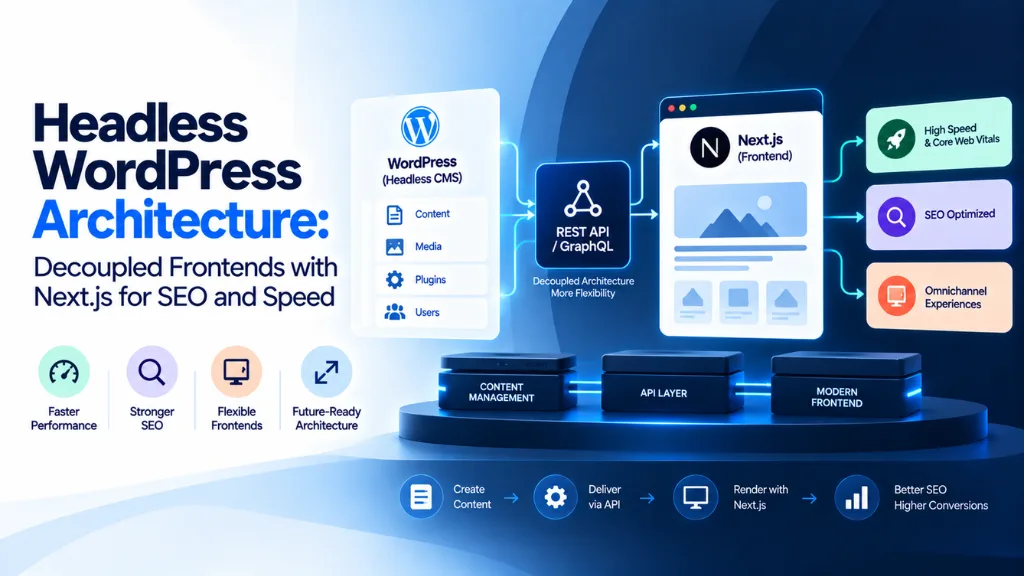
Headless WordPress is a setup where WordPress manages content in its admin dashboard, but a separate frontend application – typically built in Next.js – fetches that content through an API and renders it independently. WordPress becomes a pure content source; it no longer controls how pages look or load.
In a traditional WordPress site, one PHP application handles everything: the database, the editorial interface, and the theme that renders pages for visitors. That’s a monolith. In a headless setup, those responsibilities split into two independently operated systems that communicate over the WordPress REST API or WPGraphQL, a widely used plugin that exposes WordPress content as a GraphQL schema. Tools like Faust.js, built specifically for this stack, add WordPress-aware routing, authentication, and preview handling on the Next.js side.
| Traditional WordPress | Headless WordPress | |
| Editorial interface | WordPress admin | WordPress admin (unchanged) |
| Frontend rendering | PHP theme | Next.js (or another JS framework) |
| Content delivery | Rendered HTML pages | JSON via REST or GraphQL |
| Channels served | The website only | Website, app, kiosk, partner feeds |
| New page type | Editor + theme template | Editor + frontend engineering |
| Systems to operate | One | Two (CMS + frontend app) |
Why Consider Decoupling WordPress in 2026?
The short answer: Core Web Vitals now carry real ranking weight, and traditional WordPress themes consistently underperform on them at scale. But the size of that performance gap is smaller – and more nuanced – than most agency blog posts claim.
According to field data from the Core Web Vitals Technology Report, which uses real Chrome User Experience (CrUX) data rather than lab tests, WordPress’s mobile pass rate sat at roughly 46% in the November 2025 snapshot. Separate April 2026 framework benchmarks built on the same CrUX dataset put Next.js at 68%, a meaningful but modest lead – not the “40% versus 90%” gap frequently cited in vendor marketing.
That same benchmark data is worth looking at in full, because it complicates the simple “headless is faster” narrative:
| Frontend technology | Mobile CWV pass rate |
| Astro | 84% |
| Eleventy | 81% |
| SvelteKit | 75% |
| Next.js | 68% |
| Remix | 66% |
| Nuxt | 60% |
| Gatsby | 53% |
| WordPress | ~46% |
| React (client-rendered SPA) | 44% |
| Angular | 41% |
The overlooked detail here matters: a plain, client-rendered React app scores below traditional WordPress. Migrating to a JavaScript framework without server-side rendering or static generation is a step backward, not forward. Server rendering, static generation, or incremental static regeneration in Next.js is what actually produces the performance gain – not the framework switch by itself.
Is Headless WordPress Faster Than Traditional WordPress?
Usually, yes, but the gap is closer to 20 percentage points than the 50-point difference often advertised. A disciplined traditional WordPress build – lean theme, audited plugins, quality hosting – can outperform a poorly executed headless migration. Execution consistently matters more than architecture alone.
Headless WordPress vs Traditional WordPress: Key Differences
Choose traditional WordPress when:
- One team manages one website and editors need full independence
- Budget favors a faster, lower-cost build (typically 4–6 weeks)
- “Fast, well-optimized site” is the goal rather than top-tier CWV scores
Choose headless WordPress with Next.js when:
- Your editorial team already knows and likes WordPress
- The frontend needs to be app-like, highly interactive, or share components with an existing product
- You’re willing to operate two systems and rebuild conveniences – draft previews, redirects, forms – that coupled WordPress provides for free
This decision is one many teams get wrong by treating it as purely a performance question. As one detailed 2026 architecture comparison put it, going headless is “not a performance purchase. It’s an architecture decision that should be made on your team, your channels, your budget.”
What Does Headless WordPress Cost?
Expect a real cost premium, not just an engineering preference. Migrations to a decoupled stack typically run 1.5 to 3 times the cost of an equivalent traditional WordPress build, because features plugins provide for free – SEO metadata, sitemaps, forms, redirects, and draft previews – become custom engineering work on the frontend.
That premium buys three concrete things:
- A frontend with no theme-imposed constraints
- One content source feeding multiple channels (web, mobile app, kiosk)
- Independence from the WordPress plugin supply chain
It’s only worth paying if your team will actually use one of those benefits. “It’ll feel more modern” isn’t a strong enough reason on its own – the performance table above shows execution, not framework choice, drives most of the improvement. Teams weighing this cost against a full rebuild often benefit from scoping the frontend work alongside a website design and development services provider before committing to either architecture.
Security: What Actually Changes
WordPress security is often summarized with the vague claim that “WordPress is insecure.” The more accurate picture, per Patchstack’s State of WordPress Security 2026 report, is that of 11,334 new vulnerabilities logged across the WordPress ecosystem in 2025 – a 42% year-over-year increase – 91% were found in plugins, 9% in themes, and only six in WordPress core itself.
Decoupling shrinks the public attack surface: no PHP execution, no exposed login page, no plugin endpoints on the visitor-facing site. But the WordPress admin still exists somewhere and still needs securing. Headless architecture trades a plugin-patching discipline for an API-token-and-permissions discipline – a different risk, not a smaller one, if your team hasn’t managed either well before.
Building a Headless WordPress Site With Next.js: The Core Steps
- Install WPGraphQL (or use the native REST API) on your WordPress backend to expose content as structured data.
- Set up a Next.js project and connect it to the WordPress API, using a library like Faust.js to simplify routing, previews, and authentication.
- Fetch content at build time or request time using static generation (SSG) for stable content and server-side rendering (SSR) or incremental static regeneration (ISR) for frequently updated pages.
- Rebuild SEO essentials manually – canonical tags, structured data, XML sitemaps, and metadata – since WordPress’s SEO plugins no longer control the rendered output.
- Configure draft previews so editors can view unpublished content in context, a feature traditional WordPress handles natively but headless setups must engineer.
- Deploy the frontend to an edge network (Vercel, Netlify, or Cloudflare) to take advantage of global caching and fast time-to-first-byte.
- Test Core Web Vitals in the field, not just in lab tools, using CrUX data or Google Search Console’s Core Web Vitals report.
Skipping step 4 is one of the most common mistakes in headless migrations – teams gain frontend speed but lose SEO functionality that a plugin like Yoast previously handled automatically.
Does Headless WordPress Hurt or Help SEO?
Done correctly, it helps. Done carelessly, it actively hurts rankings. Next.js supports server-side rendering, which ensures search engine crawlers see fully rendered HTML rather than an empty JavaScript shell – a common failure mode in poorly built single-page applications. Combined with faster load times and better Core Web Vitals scores, a well-executed headless build can outperform a traditional theme on both technical SEO and page experience signals.
The catch is that none of this happens automatically. Structured data, canonical URLs, redirect management, and sitemap generation all need explicit implementation in the Next.js layer – WordPress SEO plugins won’t touch the frontend output anymore. Teams that treat this as an afterthought often see SEO regressions immediately after launch, even while raw performance improves. This is where dedicated technical SEO services earn their keep on a headless build, since the frontend layer needs the same rigor a plugin used to provide by default.
Not Everyone Should Go Headless
Not every WordPress user, marketer, or business owner needs this shift, and it’s a point worth stating plainly. WordPress co-founder Matt Mullenweg has been publicly skeptical of the industry’s enthusiasm for decoupled architecture, once writing on social media, “I will take a long bet against anything branded ‘headless.'” His broader argument has been that decoupled stacks often add operational complexity – multiple vendors, deployment pipelines, and lost editorial independence – without a corresponding benefit for most site owners.
That skepticism is a useful counterweight to headless marketing, even for teams that ultimately decide to make the switch. The right call depends on channel count, team structure, and whether the frontend genuinely needs capabilities a WordPress theme can’t provide – not on architecture trends alone.
AI Search and Structured Data: Why This Matters Beyond Google
Search Savvy’s work with content-heavy sites has repeatedly shown that AI answer engines – Google AI Overviews, ChatGPT, Perplexity, and Copilot among them – favor content that’s server-rendered, clearly structured, and entity-rich, regardless of which CMS architecture produces it. A decoupled Next.js frontend makes structured data (schema markup, clean semantic HTML, and consistent entity relationships) an explicit engineering responsibility rather than a plugin default. That’s an advantage if your team executes it well, and a liability if it’s skipped – the kind of gap AI search optimization (AEO/GEO) services are built to catch before launch.
For teams evaluating whether their current content strategy is even ready for this kind of technical shift, it’s worth running a website audit on existing on-page structure and internal linking before touching architecture at all – a faster frontend doesn’t fix thin or poorly organized content.
Frequently Asked Questions
What is headless WordPress architecture? It’s a setup where WordPress manages content through its admin dashboard while a separate frontend application, typically Next.js, retrieves that content via an API and renders the public-facing site independently.
Is headless WordPress better for SEO than traditional WordPress? It can be, mainly through improved Core Web Vitals and server-side rendering, but SEO features like metadata, sitemaps, and structured data must be rebuilt manually in the frontend rather than relying on plugins.
How much does a headless WordPress migration cost? Typically 1.5 to 3 times the cost of a comparable traditional WordPress build, since capabilities like forms, previews, and redirects that plugins provide for free become custom development work.
Do I need to know React to use headless WordPress with Next.js? Yes, meaningfully. Building and maintaining the frontend requires JavaScript and React expertise, which is a different skill set than traditional WordPress theme development.
Is headless WordPress faster than a regular WordPress site? Usually, but the real-world gap is around 20 percentage points in Core Web Vitals pass rates, not the dramatic differences often quoted – and a poorly built headless site can perform worse than a well-optimized traditional one.
Can small businesses benefit from headless WordPress? Rarely, unless the business needs to serve content across multiple channels (web, app, kiosk) or requires highly custom frontend interactivity. For most small sites, a well-optimized traditional WordPress build remains the more practical and cost-effective choice.
The Bottom Line
Headless WordPress architecture with Next.js can meaningfully improve speed and give you more control over the frontend experience, but it’s an architectural trade-off, not a guaranteed performance win. The teams that benefit most are the ones with a real multi-channel need or a frontend that traditional theming genuinely can’t support – not those chasing a trend. Before committing to a rebuild, audit your current site’s actual field performance and content structure first; Search Savvy generally recommends fixing hosting, images, and script bloat before assuming architecture is the problem, since execution consistently outweighs framework choice in the data.