Free vs Paid SEO Tools: What a Small Business Actually Needs in 2026
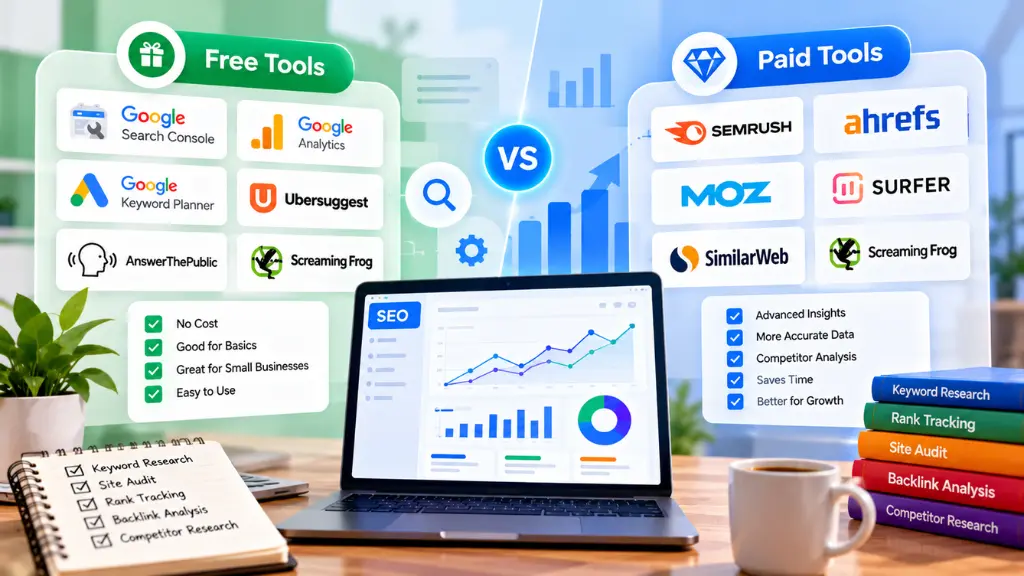

Most small businesses should start with free SEO tools and add one paid tool only when a specific limit blocks real work. Google’s free tools cover performance, indexing, and page experience. Paid platforms add what Google cannot give you: competitor data, backlink research, and large-scale keyword and rank tracking.
In this article18 sections
This guide explains where the line sits, what the main paid options cost in 2026, and how to test whether a subscription earns its place in your budget.
What Can Free SEO Tools Do?#
Short answer: Free tools can handle the core of small-business SEO: measuring search performance, finding indexing problems, checking page speed, validating markup, and managing local visibility. They are first-party or crawl-based, so the data about your own site is often more reliable than paid estimates.
Here is an essential SEO tools list that costs nothing:
| Tool | What it does | Why a small business needs it |
| Google Search Console | Shows queries, clicks, impressions, indexing status, and manual actions | The only source of real Google search data for your site |
| Google Analytics 4 | Tracks visits, engagement, and conversions | Connects traffic to leads and sales |
| PageSpeed Insights | Reports Core Web Vitals and lab diagnostics | Finds speed and mobile experience problems |
| Google Business Profile | Controls your local listing | Drives local pack and Maps visibility |
| Google Trends | Compares search interest over time | Spots seasonality and rising topics |
| Rich Results Test and schema validators | Checks structured data | Prevents markup errors |
| Ahrefs Webmaster Tools | Free site audit and backlink data for sites you verify | Adds crawl and link insight without a subscription |
| Screaming Frog (free version) | Crawls up to 500 URLs | Finds broken links, redirects, and missing tags |
Search Savvy also publishes a hub of free SEO tools, including generators for meta tags, robots.txt, and XML sitemaps. We have a stake in recommending them, so judge them on usefulness, not our word.
Google Search Console free tools worth learning first#
If you only learn one tool, make it Search Console. Set it up, verify your domain, and submit your sitemap. Then review three reports monthly: Performance (which queries earn clicks), Pages (what is indexed and why other pages are not), and Core Web Vitals. Search Savvy’s free sitemap XML generator can produce the file if your platform does not.
What Do Paid SEO Tools Add?#
Short answer: Paid tools add data you cannot get from your own site: competitors’ keywords and links, search volume and difficulty estimates, historical trends, automated rank tracking, and workflow features that save time at scale.
Specifically:
- Competitor intelligence. See which pages and keywords drive a rival’s visibility.
- Backlink analysis. Find who links to competitors and where you can earn similar links.
- Keyword research at depth. Volume, difficulty, and related-question data across thousands of terms.
- Rank tracking. Daily or weekly position tracking by location and device.
- Scheduled audits and reporting. Automated crawls, alerts, and client-ready reports.
- Scale. Higher crawl limits, more projects, and saved history.
One caution: paid tools model their data. Traffic and volume figures are estimates, not measurements. Your own Search Console and analytics data should always be the reference.
How Much Do Popular SEO Tools Cost in 2026?#
Short answer: Entry-level paid plans range from about $12 to $30 per month for budget tools, while established platforms start around $129 to $140 per month. Prices shift often, and sources report different figures, so confirm on each vendor’s pricing page before buying.
| Tool | Reported entry pricing (2026) | Notes |
| Ahrefs | Starter reported at $29/month; Lite at $129/month; Standard at $249/month | Credit-based limits on lower plans, per TechRadar’s review |
| Semrush | Pro reported at $139.95/month, or about $117 billed annually | Pro limits include 5 projects and 500 tracked keywords, per Tools for Humans |
| Ubersuggest | Entry plans reported between roughly $12 and $29/month; lifetime options offered | Sources disagree on current figures, so verify |
| Screaming Frog | Free up to 500 URLs; paid annual licence in the low hundreds of dollars | Strong for technical crawls, per Toolradar |
Ahrefs lists annual billing discounts, but reviewers report different effective monthly rates, which is another reason to check the vendor page directly.
Ubersuggest vs Ahrefs: Which Fits a Small Business?#
Short answer: Ubersuggest suits owners who need affordable keyword ideas and basic audits. Ahrefs suits businesses that depend on competitor and backlink research and can justify a higher monthly cost. Neither is required to start.
| Factor | Ubersuggest | Ahrefs |
| Price level | Budget, with lifetime options | Premium, credit-limited at lower tiers |
| Best for | Keyword ideas, simple audits, content ideas | Backlink research, competitor analysis, deep keyword data |
| Learning curve | Gentle | Moderate |
| Data depth | Lighter; reviewers note smaller keyword and tracking limits | Larger index and richer link data |
| Risk | Estimates can differ from your analytics | Cost can be hard to justify when just starting |
A reviewer on Capterra put the Ahrefs trade-off plainly: it is not cheap, and a business just beginning SEO may struggle to justify the monthly cost. That matches a common pattern: advanced features matter less than consistent publishing and technical basics in the first months.
When Are Free Tools Enough?#
Short answer: Free tools are enough when your site is small, your market is local or niche, and your main tasks are fixing technical issues, publishing helpful pages, and tracking results. You can run a credible SEO program on Google’s tools plus one crawler.
You likely do not need a paid platform yet if:
- Your site has fewer than a few hundred pages.
- You compete locally, where Business Profile and reviews matter most.
- You already know your core topics and customer questions.
- You lack time to act on advanced data.
- Your bottleneck is content or development capacity, not research.
When Should You Upgrade to a Paid SEO Tool?#
Short answer: Upgrade when a clear task keeps stalling because free tools cannot supply the data. A subscription should solve a named problem, not satisfy curiosity.
Common triggers:
- You need competitor and link data to plan outreach or content gaps.
- You manage many keywords and need reliable rank tracking.
- You run a large or fast-changing site that exceeds free crawl limits.
- You report to clients or stakeholders and need automated reporting.
- You are in a competitive market where small data differences matter.
Add one tool, use it for 60 to 90 days, then decide whether to keep it.
How Should You Set an SEO Tool Budget?#
Here are three practical tiers. They are illustrations, not rules:
| Tier | Monthly spend | Stack | Fits |
| Foundation | $0 | Search Console, GA4, PageSpeed Insights, Business Profile, free crawler, free validators | New sites, local businesses, tight budgets |
| Growth | About $30 or less | Foundation plus a budget keyword tool | Businesses publishing regularly who need keyword ideas |
| Competitive | $130 or more | Foundation plus a full platform such as Ahrefs or Semrush | Competitive niches, agencies, large sites |
Also consider hidden costs: credit limits, add-ons, annual commitments, and the time needed to learn each tool. Cancel anything unused for two consecutive months.
How Do You Calculate Tool ROI for a Small Business?#
Short answer: Compare the tool’s annual cost to the value of the specific outcomes it enables, such as leads from new pages or hours saved. If you cannot name the outcome, do not buy the tool yet.
Use this simple test:
- Name the task the tool will perform, for example “find 20 keyword gaps and publish four pages.”
- Estimate the value of one result, such as the average value of a new customer.
- Estimate the realistic lift, using your own historical conversion data.
- Add time cost. Include hours spent learning and using the tool.
- Compare to annual cost. A hypothetical example: if a $1,500 yearly subscription helps win one new client worth $3,000, the return is clear. If no such outcome can be traced, it is not.
Avoid promising yourself outcomes tools cannot guarantee. Rankings depend on content quality, authority, and competition, not on which dashboard you use.
Common Mistakes When Choosing SEO Tools#
- Buying a full platform on day one. Learn the free tools first.
- Paying for several overlapping tools. Most small teams need one paid research tool.
- Trusting estimated traffic over your analytics. Third-party numbers are modeled.
- Collecting data without acting on it. An unused report has no value.
- Ignoring technical basics. Indexing, speed, and clean markup come first. A schema markup validator is a quick free check.
- Chasing every keyword. Prioritize terms tied to revenue.
Frequently Asked Questions#
Can you do SEO with only free tools?#
Yes. Search Console, GA4, PageSpeed Insights, and Business Profile cover performance, indexing, speed, and local visibility. Free tools limit competitor and backlink research, not your ability to improve your own site.
Is Ubersuggest as good as Ahrefs?#
They serve different budgets. Ahrefs offers deeper link and competitor data, while Ubersuggest costs less and suits basic keyword research. Use the tool that matches your workload.
What is the best first paid SEO tool?#
Choose by the problem you need to solve: a keyword tool for content planning, a rank tracker for monitoring, or a platform like Ahrefs or Semrush for competitor and link research. Avoid buying before the need is clear.
Do paid tools improve rankings?#
No tool improves rankings on its own. Tools provide information. Rankings depend on how you use that information to improve content, technical health, and authority.
How often should I review my SEO tool subscriptions?#
Quarterly is sensible. Check what you actually used, which decisions the data supported, and whether a free alternative now covers the task.
Are free SEO tool generators safe to use?#
Reputable ones are fine for tasks such as creating meta tags or sitemaps, but always review the output and validate it. Do not paste sensitive data into unknown tools.
The Practical Takeaway#
Begin with the free stack, measure results, and let a specific limitation, not marketing, justify your first subscription. Revisit your tool budget every quarter and keep only what supports decisions.
If you want help deciding which tools fit your site, Search Savvy can review your setup through a website audit or support your keyword planning with keyword research services.