How to Build a Content Brief Template That Cuts Editing Time in Half
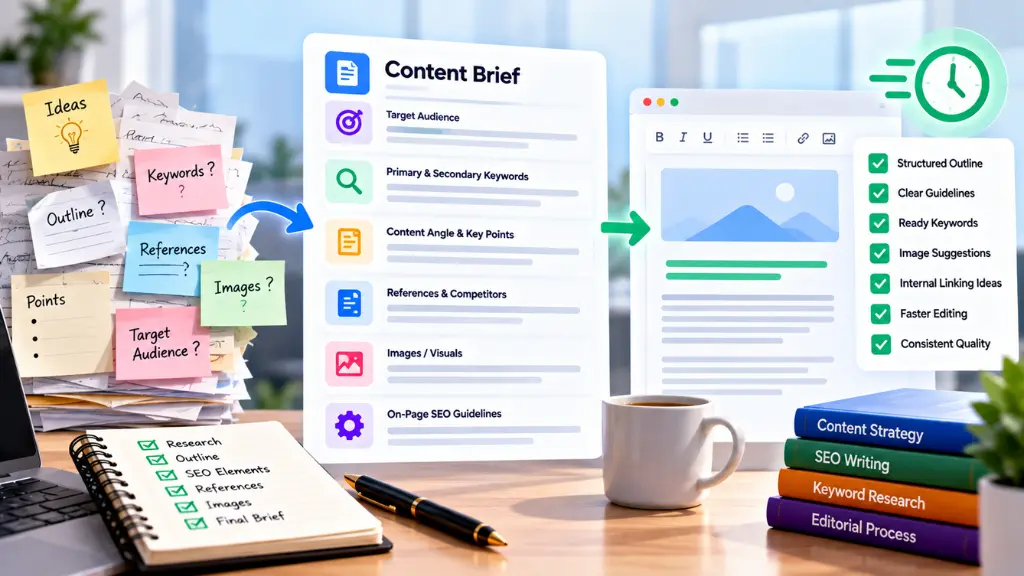

A content brief template is a reusable document that gives writers everything they need before drafting: the reader, the search intent, the angle, the structure, the sources, and the quality bar. Most heavy editing happens because one of those was missing at the start. A good template moves those decisions to the front, so editors review a draft instead of rebuilding it.
In this article23 sections
One caution before the how-to. There is no verified industry benchmark that says a brief halves editing time, so treat “half” as a goal to test. This guide gives you the template, the reasoning behind each field, and a simple way to measure your own before-and-after results.
What Is a Content Brief Template?#
Short answer: A content brief template is a standard form your team fills out for every article. It records the topic, audience, search intent, target keywords, outline, requirements, and review criteria so any writer can produce a draft that matches editorial expectations on the first pass.
The template is the container. The brief is the filled-in version for a specific piece. Teams that skip the template usually rewrite briefs from scratch each time, which leads to inconsistent instructions and inconsistent drafts.
Why Do Drafts Need Heavy Editing in the First Place?#
Short answer: Most editing problems trace back to unclear instructions, not weak writers. When the brief does not define the reader, the intent, or the angle, the writer guesses, and the editor has to correct those guesses later.
Common patterns include:
- Wrong intent. A “how to” query gets a definition essay.
- Generic angle. The draft repeats what every ranking page already says.
- Structure problems. Key answers are buried, or sections overlap.
- Missing proof. No examples, data, or first-hand experience.
- Style drift. Tone, terminology, and formatting differ from your standards.
- Late discovery of constraints, such as legal wording, product claims, or required links.
Each of these is cheaper to fix in a brief than in a second draft.
What Should an SEO Content Brief Include?#
Short answer: At minimum: the target reader, primary and related keywords, search intent, a working outline with question-based headings, source requirements, internal links, and a clear definition of “done.” These fields address the problems that cause rework.
Google’s guidance on creating helpful content is a useful backbone. Its self-assessment questions ask whether content provides original information or analysis, covers the topic completely, offers insight beyond the obvious, and uses a descriptive title. It also asks creators to consider who made the content, how it was made, and why. A brief can answer each of these in advance.
The core fields#
| Field | What to capture | Editing problem it prevents |
| Working title and focus keyword | Draft title, primary keyword, close variations | Off-topic or keyword-stuffed drafts |
| Audience | Who reads this, their knowledge level, their problem | Wrong depth or tone |
| Search intent | Informational, commercial, transactional, or navigational, plus the question behind the query | Mismatched content type |
| Primary takeaway | One sentence the reader should leave with | Unfocused drafts |
| Angle and differentiation | What this piece adds that existing results do not | Generic, derivative content |
| Outline | H2 and H3 headings, with the question each section answers | Structural rewrites |
| Related keywords and questions | Semantic terms, People Also Ask-style questions | Gaps in coverage |
| Sources and evidence | Required primary sources, data to verify, forbidden sources | Unverified claims |
| Internal and external links | Target pages and suggested anchor themes | Missing links at final review |
| Voice and style | Tone, reading level, terminology, banned phrases | Line-by-line style edits |
| Length and format | Word range, tables, examples, visuals | Padding or thin sections |
| Author and review | Who writes, who reviews, who signs off | Unclear accountability |
| Deadline and milestones | Outline approval, draft, edit, publish dates | Rushed final edits |
How Do You Build a Content Brief Template Step by Step?#
Step 1: Audit your last ten edits#
Pull ten recent drafts and list every substantive change the editor made. Group them: intent, structure, accuracy, style, missing sections, links. The categories that appear most often become required fields in your template. This keeps the template based on your real problems rather than a generic list.
Step 2: Define search intent before anything else#
Search the primary keyword and look at what currently ranks: the formats, the questions answered, and what is missing. Note the intent in one line, for example: “Reader wants a copyable template and an explanation of each field.” Use competing pages only to understand intent and gaps, never as a source to mimic. Copying or lightly rewording existing content is exactly what Google’s quality guidance warns against.
Step 3: Specify the angle and the proof#
Most briefs say what to cover but not what makes the piece worth reading. Add two required fields: “What will this article say that others do not?” and “What evidence will support it?” Evidence can be first-hand testing, original screenshots, customer questions, internal data you are cleared to share, or cited research. The Search Quality Rater Guidelines describe high-quality main content as showing effort, originality, talent, or skill, and they rate content with little effort or added value lower. The brief is the right place to plan for that.
Step 4: Build the outline with answer-first sections#
Write headings as real questions or clear topic statements, then add a one-line note under each: “Answer in 40 to 60 words first, then explain.” This makes drafts easier to scan, easier to edit, and easier for search engines and AI answer engines to extract from. For longer-term planning, align outlines with a cluster strategy, so each article supports the others. Search Savvy’s content strategy and topical authority services are built around that approach.
Step 5: Add keyword guidance without stuffing#
List the focus keyword, two to four close variations, and the related questions you want answered. Add one instruction: “Use keywords where they fit naturally. Do not force them.” If you need ideas, Search Savvy’s keyword research services can supply the topic and question lists that feed your briefs.
Step 6: Set source and fact-check rules#
State what counts as an acceptable source: government sites, academic research, official documentation, and recognized industry bodies. Add rules such as “Every statistic needs a link and a date” and “If a claim cannot be verified, leave it out.” This is also where you handle AI use. Google’s guidance on generative AI content says to focus on accuracy, quality, and relevance, and to review AI-assisted material manually before publishing. If your team uses AI for research or outlines, say so in the brief and require human fact-checking.
Step 7: Write the editorial checklist into the brief#
The same checklist should guide the writer and the editor. Include it at the bottom of every brief:
- Does the intro answer the main question quickly?
- Does each H2 do a distinct job, with no overlap?
- Are all statistics linked, dated, and verified?
- Are there specific examples, not only general advice?
- Are internal links relevant and descriptive?
- Is the tone consistent with the style guide?
- Is the title accurate, with no exaggeration?
- Are the meta title, meta description, and URL slug supplied?
A writer who self-checks against this list catches many issues before the editor sees the draft.
A Copy-Ready Content Brief Template#
Adapt the fields below to your workflow:
CONTENT BRIEF
Working title:
Focus keyword:
Related keywords / questions:
Target reader (role, knowledge level, problem):
Search intent (one line):
Primary takeaway (one sentence):
ANGLE
What this piece adds that existing results do not:
Evidence we will use (first-hand, data, examples):
OUTLINE
H1:
H2 (question or topic) – answer in 40-60 words first
H3 (if needed)
H2 …
FAQ (5-6 questions):
SOURCES
Required sources:
Not allowed:
Statistics rule: link + date + verified
LINKS
Internal pages to link (3-6), with anchor themes:
External sources to cite:
STYLE
Tone / reading level:
Terms to use / avoid:
Format needs (tables, steps, examples):
Word range:
LOGISTICS
Writer: Editor: Approver:
Outline due: Draft due: Publish date:
EDITORIAL CHECKLIST
[ ] Intro answers the question fast
[ ] Distinct H2s, no overlap
[ ] Stats verified, linked, dated
[ ] Real examples included
[ ] Internal links relevant
[ ] Title accurate
[ ] Meta title, description, slug provided
For teams producing many pieces, an overview of content marketing services can help you decide which parts of the workflow to keep in-house. Unfamiliar terms are defined in the content marketing glossary.
How Do You Know If the Template Is Cutting Editing Time?#
Short answer: Measure revision effort before and after. Track the time editors spend per article, the number of revision rounds, and the type of changes requested. Compare ten articles written without the template to ten written with it.
A simple scorecard:
| Metric | How to measure |
| Editor time per article | Minutes logged from first review to approval |
| Revision rounds | Number of times the draft returns to the writer |
| Structural changes | Count of sections added, removed, or reordered |
| Fact-check corrections | Claims changed or removed |
| Time to publish | Days from assignment to live |
Do not expect the first brief to be perfect. Revisit the template after every five to ten articles, remove fields nobody uses, and add fields where problems repeat.
Common Mistakes When Creating a Content Brief Template#
- Making it too long. If writers skip fields, the brief is working against you. Keep required fields to what prevents real problems.
- Copying competitors’ outlines. Briefs should explain gaps and angles, not instruct writers to mirror existing pages.
- Skipping search intent. Keywords without intent produce on-topic but unhelpful drafts.
- Treating the brief as one-way. Invite writers to challenge the outline before drafting. They often spot gaps first.
- Stuffing keywords into instructions. Asking for a fixed keyword count tends to hurt readability.
- Forgetting accountability. Name the writer, editor, and approver so feedback has an owner.
- Never updating it. Search results, product facts, and standards change.
Frequently Asked Questions#
What is the difference between a content brief and a content outline?#
An outline lists headings and structure. A brief includes the outline plus audience, intent, angle, sources, style rules, and review criteria. The outline is one part of the brief.
How long should a content brief be?#
Long enough to prevent common edits, short enough that writers read it. One to two pages works for most blog posts. Longer pieces or regulated topics may need more detail.
Who should write the content brief?#
Usually an SEO strategist, content lead, or editor, with input from a subject-matter expert. The writer should review it before drafting and flag gaps.
Do I need a different template for each content type?#
A shared core with small variations works well. Keep the audience, intent, angle, sources, and checklist fields constant, then add extras for guides, comparisons, or product pages.
Can I use AI to create content briefs?#
Yes, for research, question lists, and first-pass outlines. Review everything manually, verify facts, and add the angle and evidence only your team can supply.
How many internal links should a brief specify?#
Three to six relevant links is a practical range for a blog post. Choose pages that help the reader, and describe the anchor idea rather than forcing exact-match text.
The Practical Takeaway#
Build your template from the problems your editors already fix. Start with intent, angle, evidence, outline, sources, and a shared checklist. Test it on ten articles, compare editing time against your baseline, and refine from there.
If you want help turning briefs into a repeatable publishing system, Search Savvy can support the strategy side, from topic planning to AI-search-ready content structure, through its AI search optimization services.