Crawl Budget Optimisation for Enterprise: Controlling Googlebot at 1M+ Page Sites
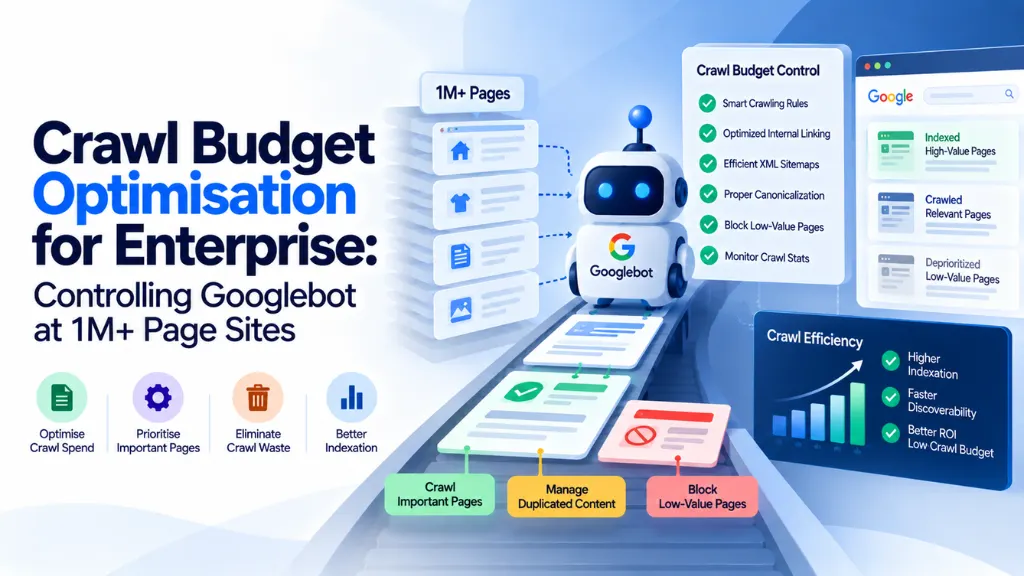

At a handful of pages, Googlebot finds everything eventually and it doesn’t matter how efficiently it gets there. At a million pages, that stops being true. Crawl budget optimisation at enterprise scale isn’t about getting Google to discover more of your site – it’s a prioritisation problem: making sure Googlebot spends its limited attention on the pages that drive revenue, not on filtered URLs, expired inventory, and redirect chains that happen to still be reachable.
In this article11 sections
This guide is written specifically for sites large enough for crawl budget to matter – Google’s own guidance points to sites with more than a million pages updated weekly, or more than ten thousand pages updated daily – and covers how crawl budget actually works, where it gets wasted at scale, and the concrete techniques enterprise SEO teams use to control it.
What Is Crawl Budget, and When Does It Actually Matter?#
Crawl budget is the number of URLs Googlebot can and wants to crawl on a given site within a given timeframe, determined by two independent factors multiplied together: crawl rate limit and crawl demand.
Crawl rate limit is the maximum number of simultaneous requests Googlebot will send without degrading server performance, and Google adjusts it automatically based on how your server responds – a fast, healthy server (response times comfortably under 200 milliseconds) earns a higher crawl rate, while slow responses or a rise in server errors cause Google to pull back automatically to avoid making things worse.
Crawl demand reflects how much Google actually wants to crawl your URLs, shaped by a page’s popularity, how frequently it changes, and how much duplicate or low-value content surrounds it. A page nobody links to, that never changes, and that closely resembles a hundred other URLs on the site earns very little crawl demand, regardless of how healthy your server is.
Crawl budget is not a ranking factor. Google has been explicit about this. What it affects is speed: how quickly new content gets discovered, how quickly updates to existing pages get reflected, and how efficiently Google can keep up with a site that changes constantly. On a site with a million or more pages, that speed difference translates directly into lost revenue from slow-to-index product pages, stale category content, and a widening gap between what’s live on the site and what Google actually has indexed.
Where Crawl Budget Gets Wasted at Enterprise Scale#
The pattern shows up consistently across large sites, and it’s rarely one single cause:
- Faceted navigation and parameter explosion. A catalog of 50,000 products with 20 filter facets – size, color, price range, brand, availability – can theoretically generate millions of unique URLs, the overwhelming majority representing zero unique content and zero real search demand.
- Duplicate content across URL variants. HTTP versus HTTPS, www versus non-www, and tracking or session parameters all create additional crawlable paths to the same underlying content.
- Technical debt that keeps regenerating. Redirect chains, soft 404s, and expired inventory pages that were never properly retired continue consuming crawl attention long after they stopped mattering to the business.
- Infinite scroll and pagination implemented without crawlable URLs. If Googlebot can’t reach paginated content through a real URL, it either wastes resources trying to render JavaScript-driven interactions or simply never sees the deeper content at all.
- Low-value auto-generated pages. Thin tag archives, empty internal search result pages, and near-duplicate location or filter pages accumulate at scale in a way that’s rarely visible from manual review alone.
On a smaller site, this waste is a rounding error. On a million-page site, it can mean Googlebot spends the majority of its available attention on pages with no business value while priority pages sit undiscovered or go stale between recrawls.
Diagnosing Crawl Budget Problems: The Enterprise Toolkit#
Manual review doesn’t scale to sites this size – a 100,000-page site with roughly 250 internal links per page generates on the order of 25 million internal links alone, which is well beyond what any manual audit process can meaningfully assess.
- Search Console’s Crawl Stats and Pages reports are the starting point, not the finish line. Watch the ratio between “Discovered – currently not indexed” and “Crawled – currently not indexed” over time; a growing volume of “Discovered” URLs sitting unprocessed, alongside valuable pages you know exist, is one of the clearest available signals of a genuine crawl budget constraint.
- Server log file analysis shows what Googlebot is actually requesting, not a sampled and delayed summary of it. This is where crawl waste becomes visible in a way Search Console alone doesn’t fully expose – parameter combinations, bot traffic to pages with no SEO value, and exactly how much of Googlebot’s activity each site section is consuming.
- Enterprise crawling and log-analysis platforms (tools in the category of Botify, Lumar, and JetOctopus) simulate Googlebot’s behaviour at full site scale and cross-reference it against real log data, which is necessary once a site exceeds what a standard desktop crawler can process in a reasonable timeframe.
- Database and server response time monitoring matters more than raw page count. A large catalog backed by fast, well-indexed database queries can sustain a healthier crawl rate than a smaller site with slow, poorly optimised queries – server responsiveness drives the crawl rate limit far more directly than sheer inventory size.
The Prioritisation Framework: Donor and Acceptor Pages#
One useful model for allocating crawl and link attention deliberately, rather than letting it distribute randomly across a large site, treats pages as either donors or acceptors. Donor pages already carry strong crawl frequency and search visibility – high-traffic category pages, popular editorial hubs, well-linked cornerstone content. Acceptor pages are weaker pages that need more crawl attention and authority than they currently receive – newer product pages, recently expanded categories, or underlinked but commercially important sections.
The strategic move is routing internal links deliberately from donor pages to acceptor pages, rather than linking at random or relying entirely on automated, template-driven internal linking that treats every page as equally important. On a large site, this kind of deliberate routing has a measurable effect: one documented large-site case study found that a revised internal linking strategy raised the share of pages actually crawled by Googlebot from 40% to 70% – a substantial coverage improvement without any change to the underlying content itself.
Practical Techniques for Controlling Googlebot at Scale#
- Segment XML sitemaps by section and priority, keeping each sitemap file under the standard URL limit and organising them through a sitemap index, so you can monitor indexation rates section by section rather than only at the domain level.
- Consolidate faceted navigation URLs through canonical tags pointing to the clean base page, and use robots.txt to block parameter combinations that generate genuinely zero search demand and zero unique content – being careful not to block paths that also carry your only internal links to important pages.
- Fix server response times as a first-order priority. Slow database queries suppress the crawl rate limit more directly than almost any other single factor, and this fix benefits crawl efficiency and user experience simultaneously.
- Eliminate redirect chains and resolve soft 404s identified through log analysis, since both continue consuming crawl attention indefinitely if left unaddressed.
- Prune or noindex low-value, auto-generated pages – thin tag pages, empty search result pages, and near-duplicate archives – that accumulate quietly at scale and rarely surface in manual review.
- Improve internal linking depth deliberately, using a donor-acceptor approach so priority pages sit within a reasonable number of clicks of high-authority, frequently crawled pages rather than being buried deep in the architecture.
- Monitor log files on an ongoing basis, not just periodically. Search Console data is sampled and delayed; real-time or near-real-time log monitoring catches crawl waste and server issues faster than dashboard-based reporting alone.
Common Sources of Enterprise Crawl Waste at a Glance#
| Cause | Typical Scale Impact | Fix |
| Faceted navigation / filter parameters | Can generate millions of near-duplicate URLs from a modest product catalog | Canonical tags to base URL; robots.txt for zero-demand parameter combinations |
| HTTP/HTTPS, www/non-www duplication | Doubles crawlable paths to identical content sitewide | 301 redirect to one canonical version |
| Redirect chains | Consumes crawl attempts without reaching final content efficiently | Collapse to a single direct redirect |
| Soft 404s | Signals low-value pages that continue to be recrawled unnecessarily | Return a genuine 404/410 or restore real content |
| Thin auto-generated pages | Accumulates unnoticed at scale across tag, archive, or empty search pages | Prune, consolidate, or noindex |
| Slow server/database response | Directly suppresses the crawl rate limit Google assigns | Optimise database queries and server infrastructure |
Should You Block AI Crawlers to Preserve Crawl Capacity?#
AI crawlers – including those associated with major AI platforms and web-scale crawl projects – now operate independently of Googlebot and can consume a meaningful share of server bandwidth during active crawl periods, which can indirectly suppress the crawl capacity available for Googlebot on the same infrastructure. Blocking these crawlers in robots.txt is technically straightforward, but it isn’t a free decision: doing so also removes a site from consideration as a source for AI-generated answers on the platforms tied to that crawler, at a moment when AI-driven citation and referral traffic is becoming a meaningful visibility channel in its own right.
This has become a genuine strategic trade-off rather than a purely technical one. Enterprise teams should treat the decision to block or allow specific AI crawlers as a deliberate choice weighed against both server capacity and AI-search visibility goals, rather than a default reflex applied uniformly across every bot that isn’t Googlebot.
How Often Should Enterprise Sites Audit Crawl Budget?#
For sites in the multi-million-page range, a monthly audit combining Search Console data with log file analysis is a reasonable baseline, since crawl patterns and new sources of waste can emerge quickly at that scale. Sites in the 10,000-to-1-million-page range, where crawl budget is a real but less acute concern, can typically manage with a quarterly review cycle instead.
Common Mistakes in Enterprise Crawl Budget Management#
- Treating crawl budget as a ranking factor. It isn’t – it’s a speed-of-discovery and freshness factor, and framing it otherwise leads to misallocated priority against actual ranking issues.
- Blocking parameters that also carry unique internal links. An overly broad robots.txt rule can inadvertently cut off Googlebot’s only path to legitimately important pages.
- Relying solely on Search Console. Its data is sampled and delayed; log file analysis reveals crawl behaviour that dashboard reporting alone misses, particularly at large scale.
- Linking every page with equal weight. Templated, undifferentiated internal linking spreads crawl and authority signals too thinly to meaningfully help the pages that matter most.
- Making a blanket AI crawler decision without weighing the trade-off. Blocking every non-Google bot by default forecloses AI-search visibility without necessarily solving the underlying server capacity problem, which often has other causes worth addressing directly.
- Fixing symptoms without fixing root causes. Canonicalising a set of faceted URLs helps, but if the underlying navigation keeps generating new low-value parameter combinations, the same problem resurfaces continuously.
Frequently Asked Questions#
How do I know if my site actually has a crawl budget problem? A growing number of valuable, known URLs sitting in “Discovered – currently not indexed” status in Search Console, combined with log file evidence that Googlebot is spending significant activity on low-value parameter or duplicate pages, are the clearest combined signals.
Is crawl budget a ranking factor? No. Google has stated clearly that crawl budget affects how quickly content is discovered and refreshed in the index, not how that content ranks once it’s there.
What size site actually needs to worry about crawl budget? Google’s own guidance points to sites with more than a million pages that change weekly, or more than ten thousand pages that change daily, as the threshold where crawl budget becomes a meaningful, active concern rather than a background consideration.
Does blocking AI crawlers help my Googlebot crawl budget? It can free up server capacity that AI crawlers would otherwise consume, but it comes with a trade-off: blocking a specific AI platform’s crawler also removes your site from consideration as a source for that platform’s AI-generated answers, which is a strategic decision, not just a technical one.
What’s the fastest way to improve crawl efficiency on a large site? Fixing slow server and database response times tends to produce the most immediate improvement, since response speed directly determines the crawl rate limit Google assigns – often before any content or navigation changes are needed at all.
How often should a large enterprise site review its crawl budget? Monthly for sites in the multi-million-page range, combining Search Console data with log file analysis; quarterly is generally sufficient for sites between roughly 10,000 and 1 million pages.
The Bottom Line#
Crawl budget optimisation at enterprise scale is fundamentally a prioritisation exercise: making sure Googlebot’s limited attention lands on the pages that drive the business, not on filtered URLs, duplicate paths, and technical debt that happens to remain crawlable. Fixing server response times, consolidating faceted navigation, and routing internal links deliberately from strong pages to weaker priority pages consistently move the needle faster than chasing discovery in the abstract. Search Savvy’s enterprise SEO services and technical SEO services teams work through exactly this kind of log-file-driven diagnosis on large sites, and the free sitemap XML generator is a useful starting point for teams beginning to segment sitemaps by section and priority.