How to Design a Website for SEO: 8 Design Decisions That Affect Rankings
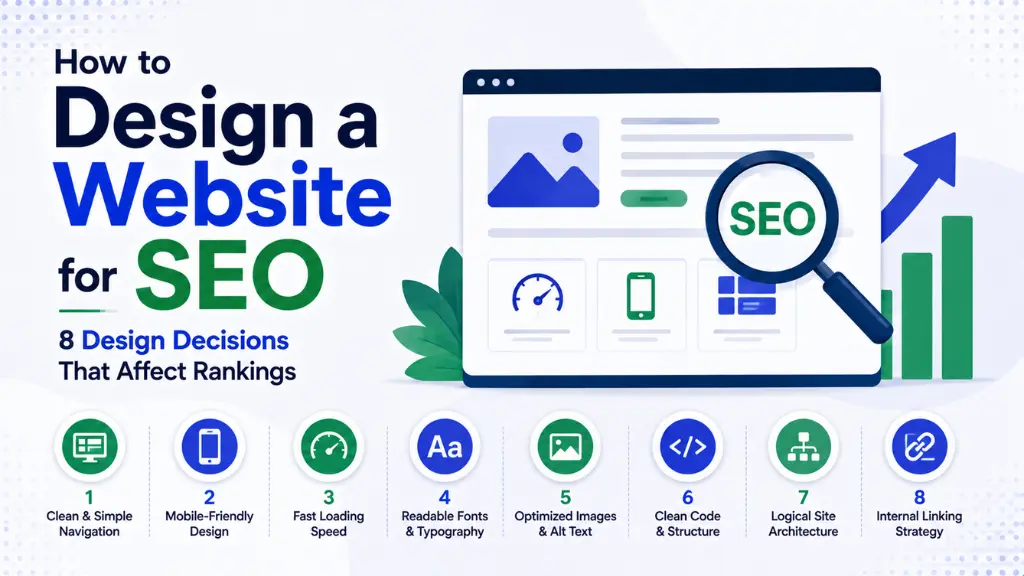

Most businesses build the website first and plan to “add SEO later.” By the time an SEO specialist gets involved, the URL structure is already locked, the navigation is rigid, and the hero image is a 4MB PNG quietly destroying page speed – expensive rework that could have been avoided entirely.
In this article10 sections
Design a website for SEO from the start, because design decisions genuinely are ranking decisions – website design accounts for an estimated 30 to 40 percent of all ranking factors, according to Magier’s 2026 complete website design and SEO guide. Core Web Vitals, mobile-friendliness, HTTPS, semantic structure, and content hierarchy are not technical add-ons; they are design decisions made – or missed – during the build itself.
At Search Savvy, we consistently see the same pattern: beautiful websites that nobody can find, because SEO was treated as a checklist item rather than a design input. This guide breaks down eight design decisions that directly affect rankings in 2026, backed by current data.
1. How Does Site Architecture Affect Your Ability to Design a Website for SEO?#
Design a website for SEO starting with site architecture, since a poorly structured site prevents search engines from discovering and understanding your most important pages, no matter how good the content on them is.
A flat hierarchy where every important page is reachable within three to four clicks from the homepage works best for SEO, according to UXPin’s 2026 UX and SEO guide. Poor site architecture – excessive clicks to reach important pages, isolated pages with no internal links, and strictly vertical link flow – measurably hinders SEO performance, while a flat structure improves crawlability and rankings for category-level keywords, according to Team Lewis’ 2026 site structure guide.
Homepage links carry particular weight in this structure. Whatever your homepage links to, Google treats as a priority, so choose those links deliberately, and design navigation around buyer journeys rather than internal org charts – visitors do not care how your team is structured, they care about finding the right page fast, according to Memorable Design’s 2026 architecture guide.
People Also Ask: How many clicks should it take to reach an important page from the homepage? Short Answer: Three to four clicks maximum is the widely recommended standard for 2026. A flat site hierarchy within this range improves both crawlability for search engines and usability for visitors, supporting stronger rankings for category and product-level keywords.
2. How Should URL Structure Be Designed for SEO?#
Design a website for SEO by treating URL structure as a genuine design decision, not an afterthought handled automatically by your CMS – the structure of your URLs directly signals site hierarchy to both users and search engines.
Keep URL structure three to four levels deep, with keywords appearing early in the path, according to SEO Level Up’s 2026 website design practices guide. URL structure functions like the address system for your website – a logical structure helps both users and search engines find and understand content more effectively, according to Koanthic’s 2026 URL structure analysis, which also notes that descriptive URLs provide context clues about page content while improving user trust and click-through rate.
Practical URL design principles:
- Keep URLs short and descriptive, matching the page’s actual position in your site hierarchy
- Include target keywords naturally early in the URL path, not stuffed at the end
- Avoid unnecessary parameters and session IDs that create duplicate or confusing paths
- Match URL structure to site hierarchy consistently, so the path itself reflects the category and subcategory a page belongs to
People Also Ask: Does changing a website’s URL structure affect existing SEO rankings? Short Answer: Yes, potentially significantly. URL changes should be planned carefully and, where possible, staged separately from broader design changes, since coordinating redirects correctly is critical to preserving rankings and avoiding lost link equity during a redesign.
3. Why Does Core Web Vitals Performance Depend on Design Decisions?#
Design a website for SEO with Core Web Vitals in mind from the earliest design stage, since all three metrics – Largest Contentful Paint, Interaction to Next Paint, and Cumulative Layout Shift – are determined primarily by design and front-end engineering choices, not fixed later as a technical patch.
Core Web Vitals are confirmed Google ranking signals, and all three are shaped directly by decisions made during design – image sizing, font loading, layout stability, and interactive element placement, according to UXPin’s 2026 web design and SEO guide. A visually striking hero image that has not been properly compressed, or an animated element that shifts layout as it loads, are design choices with direct, measurable ranking consequences.
Practical design decisions that protect Core Web Vitals:
- Compress and properly size images before they ever reach production, not after a speed audit flags them
- Reserve layout space for images and ads before they load, preventing visible content shifts
- Limit heavy animations and interactive elements on pages where speed matters most
- Choose fonts and loading strategies deliberately, since font-related delays directly affect LCP scores
People Also Ask: Which Core Web Vitals metric is most affected by design decisions? Short Answer: All three – Largest Contentful Paint, Interaction to Next Paint, and Cumulative Layout Shift – are shaped primarily by design and front-end choices. Image sizing, layout stability, and interactive element placement each map directly onto one or more of these metrics.
4. How Does Mobile-First Design Affect Your Ability to Design a Website for SEO?#
Design a website for SEO with mobile as the primary consideration, since Google uses mobile-first indexing to evaluate rankings – meaning the mobile version of your site is what actually gets assessed, regardless of how strong your desktop design looks.
A desktop-first design that degrades on mobile hurts both user experience and search rankings, according to UXPin’s 2026 guide. Responsive design is a baseline SEO requirement in 2026, not a feature layered on top of an already-finished desktop design, according to UXPin’s separate 2026 design principles guide.
People Also Ask: Why does Google evaluate the mobile version of a site instead of desktop? Short Answer: Because of mobile-first indexing, which Google has applied broadly across the web. Since most search traffic now happens on mobile devices, Google uses the mobile version of a page to determine rankings, making mobile design quality a direct ranking factor rather than a secondary consideration.
5. Why Does Accessibility Design Improve SEO Comprehension?#
Design a website for SEO by prioritising accessibility, since the overlap between accessibility best practices and search engine comprehension is larger than most designers assume.
Deque’s research found that 67% of WCAG 2.1 Level AA success criteria directly support search engine optimisation, according to SEO Level Up’s 2026 guide. Semantic HTML, descriptive alt text, and a clear heading hierarchy directly improve how search engines comprehend and index a page’s content, according to UXPin’s 2026 design principles guide – the same clarity that helps a screen reader navigate a page also helps a crawler understand it.
Practical accessibility decisions that double as SEO improvements:
- Use semantic HTML elements correctly, rather than generic divs styled to look like headings or buttons
- Write descriptive alt text for every meaningful image, not decorative filler text
- Maintain a logical heading hierarchy – one H1 per page, with H2s and H3s nested correctly beneath it
- Ensure navigation works without JavaScript, since crawlers and assistive technology both benefit from this fallback
People Also Ask: Does designing for accessibility actually help SEO, or are they separate concerns? Short Answer: They overlap significantly. Research shows 67% of WCAG 2.1 Level AA accessibility criteria directly support SEO. Semantic HTML, alt text, and heading hierarchy serve both assistive technology users and search engine crawlers simultaneously.
6. How Should Navigation Be Designed to Support Both SEO and AI Search?#
Design a website for SEO through navigation that serves search engines and, increasingly in 2026, the AI systems that pull content directly from well-structured sites for citation.
Search now blends classic rankings with AI answers – tools like Google AI Overviews, ChatGPT Search, and Perplexity pull from well-structured, clearly organised sites, and clean website architecture makes content easier for these systems to extract and cite, according to Memorable Design’s 2026 analysis. Include a footer with links to important pages not covered in primary navigation, and use clear categories, descriptive URLs, breadcrumbs, and contextual internal links throughout, according to UXPin’s 2026 guides.
People Also Ask: Do AI search tools like ChatGPT and Perplexity care about site navigation? Short Answer: Indirectly, yes. Clean, well-organised navigation and internal linking help AI systems extract and understand content more reliably, since these tools favour clearly structured sites when determining what to cite in generated answers.
7. Why Does Structured Data Belong in the Design Process, Not After Launch?#
Design a website for SEO by building schema markup into page templates from the start, rather than treating structured data as an add-on bolted on after the visual design is finalised.
Include schema markup to improve structured data across individual pages, and implement breadcrumb schema specifically to show hierarchy directly within search results, according to Team Lewis’ 2026 site structure guide and SEO Level Up’s 2026 practices guide. Building schema requirements into your design system’s templates means every new page inherits correct structured data automatically, rather than depending on someone remembering to add it manually after launch.
People Also Ask: Should schema markup be planned during design or added after launch? Short Answer: During design, ideally built directly into page templates. This ensures every new page automatically inherits correct structured data, rather than relying on manual addition after launch, which is where schema implementation most commonly gets missed or forgotten.
8. How Should Design Systems Support SEO Consistency Across a Site?#
Design a website for SEO at scale by using a design system that enforces SEO-friendly patterns automatically, rather than relying on individual designers or developers to remember every SEO requirement on each page.
Design systems enforce SEO-friendly patterns – semantic markup, optimised images, and consistent heading structure – automatically across every page, according to UXPin’s 2026 guide. Tools that ensure production components carry correct semantic markup and accessibility attributes from the start make SEO compliance effectively automatic at the component level, rather than a manual checklist item repeated for every new page.
According to Search Savvy’s insights from auditing client sites, inconsistency between pages – one with proper heading hierarchy, another without – is one of the clearest signs a site was built without a genuine design system enforcing these patterns from the start.
How Should You Actually Sequence These Decisions?#
Design a website for SEO by planning these eight decisions before development begins, not retrofitting them afterward – SEO should be planned before design and development start, not added as a final task after launch, according to Nepa Works’ 2026 web design SEO checklist.
A practical sequencing framework:
- Start with keyword research to define your page structure and site architecture before any visual design begins
- Map site hierarchy and URL structure together, ensuring the two stay consistent from the start
- Build Core Web Vitals performance budgets into design specifications – maximum image sizes, animation limits, font loading rules
- Design navigation around user journeys, not internal team structure
- Bake accessibility and semantic HTML into your design system’s component library
- Plan schema markup requirements into page templates before development, not after
At Search Savvy, we recommend treating SEO and design as one project from day one – as Google’s own guidance has repeatedly emphasised, search performance and design quality are not two disciplines that meet at the end, they are the same project.
FAQ: Designing a Website for SEO#
Q1: How much of SEO ranking is actually determined by website design? A: Website design is estimated to account for roughly 30 to 40 percent of ranking factors, according to 2026 industry analysis, covering Core Web Vitals, mobile-friendliness, HTTPS, semantic structure, and content hierarchy.
Q2: Is it more expensive to design for SEO from the start, or fix it later? A: Designing for SEO from the start is generally more cost-effective. Retrofitting SEO after a site is built often means reworking locked URL structures, rigid navigation, and unoptimised images – expensive rework that proper upfront planning avoids.
Q3: Can a visually beautiful website still rank poorly in search? A: Yes, commonly. A site can look modern and polished while performing poorly in search if it is slow, hard to crawl, difficult to use on mobile, or missing key structural elements like proper headings and internal linking.
Q4: Does website redesign risk hurting existing SEO rankings? A: Yes, if not planned carefully. URL changes, navigation restructuring, and content changes during a redesign should be coordinated and staged carefully, with proper redirects, to avoid losing existing rankings and link equity.
Q5: What is the single most overlooked design decision that affects SEO? A: Image optimisation is commonly overlooked, since an unoptimised hero image can single- handedly damage page speed and Core Web Vitals scores, undermining an otherwise well-designed page’s ranking potential.
Q6: Do design systems actually help with SEO, or are they purely a development efficiency tool? A: Both. A well-built design system enforces SEO-friendly patterns – semantic markup, consistent heading structure, optimised images – automatically across every page, making SEO compliance consistent at scale rather than dependent on manual effort for each new page.
Want a website audit to identify which design decisions are helping or hurting your SEO? Visit Search Savvy to speak with an expert who can align your design and search strategy from the ground up.