Advanced Email Deliverability: DMARC, BIMI and Sender Reputation Engineering
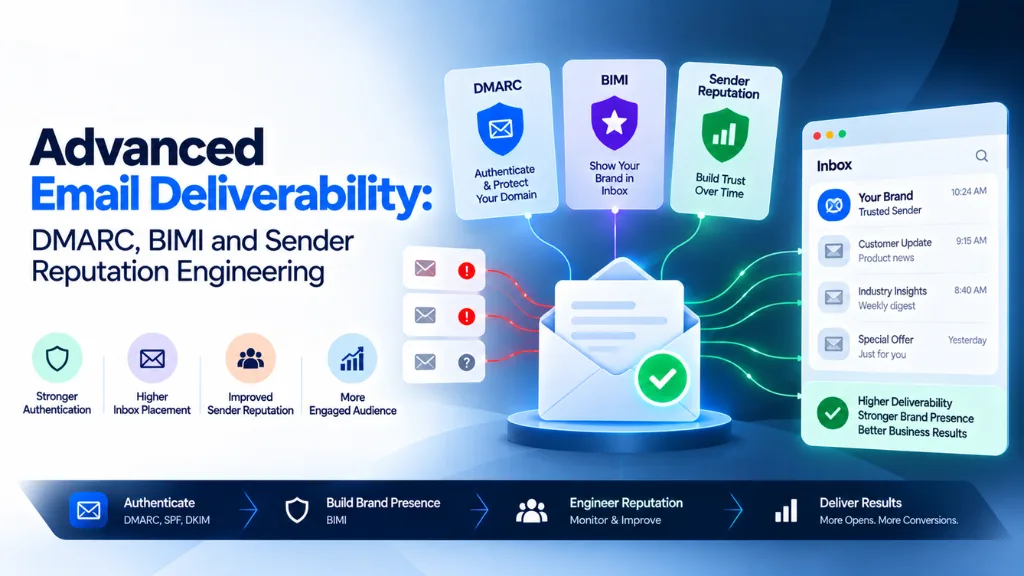

If your marketing emails have started landing in spam more often, or a client’s newsletter suddenly stopped reaching Gmail inboxes at scale, the cause is very likely authentication – not your subject lines. By 2026, DMARC isn’t a nice-to-have technical checkbox anymore; it’s the price of admission to major inboxes, and Google made that shift explicit when it first announced bulk sender requirements. As Gmail Security & Trust Group Product Manager Neil Kumaran put it in Google’s own announcement, the company is “requiring those who send significant volumes to strongly authenticate their emails” – a policy that has already reshaped how deliverability actually works.
In this article10 sections
This guide, drawing on the deliverability audits we run for clients at Search Savvy, goes past the basics of “just set up SPF” and into what advanced deliverability actually requires in 2026: how DMARC, BIMI, and sender reputation fit together, what’s changed in enforcement this year, and a practical rollout plan that won’t tank your sending reputation while you get there.
Why Email Deliverability Got This Technical#
Email authentication used to be optional best practice. That changed in October 2023, when Google and Yahoo jointly announced new requirements for bulk senders, with enforcement beginning in February 2024. Microsoft followed with its own enforcement update in May 2025, and France’s La Poste added similar requirements in September 2025 – Apple’s guidelines already closely mirror the others, and industry trackers widely expect formal enforcement there by 2026 or 2027. The pattern is consistent: what started as one company’s policy has become the shared baseline across every major inbox provider.
The results have been measurable. According to Kumaran, Gmail’s authentication requirements drove a 75% drop in unauthenticated messages reaching its users’ inboxes. That’s a real, meaningful shift in the email ecosystem – but it hasn’t closed the gap everywhere. Industry monitoring from email security firm Red Sift has found that only around 16% of domains have DMARC properly implemented, leaving the large majority still vulnerable to spoofing and the delivery failures that come with non-compliance.
What Counts as a “Bulk Sender” in 2026?#
Any domain sending roughly 5,000 or more messages per day to Gmail or Yahoo addresses is classified as a bulk sender – and that classification is permanent once you cross the threshold, even if your volume later drops. Bulk senders face the full requirement set: SPF and DKIM authentication, a published DMARC policy with proper alignment, one-click unsubscribe functionality, and a spam complaint rate that stays reliably low. Senders below that threshold aren’t technically required to comply, but Google, Yahoo, and Microsoft all recommend the same authentication stack regardless of volume, since it improves deliverability and protects your domain from spoofing either way.
SPF, DKIM, and DMARC: The Baseline Stack#
These three standards work together, but they each do a genuinely different job. SPF (Sender Policy Framework) publishes a list of servers authorized to send email on your domain’s behalf. DKIM (DomainKeys Identified Mail) adds a cryptographic signature to each message, verifying it wasn’t altered in transit. DMARC (Domain-based Message Authentication, Reporting, and Conformance) sits on top of both, requiring that at least one of them align with your visible “From” domain, and telling receiving mail servers what to do when a message fails that check – monitor it, quarantine it, or reject it outright.
DMARC has continued gaining formal recognition as core internet infrastructure rather than an optional add-on. In May 2026, RFC 9989 was published, advancing DMARC’s specification on the IETF’s Standards Track – a meaningful signal that the protocol has moved well beyond “recommended practice” status in the eyes of the standards body that governs core email infrastructure.
What Happens If I Don’t Have DMARC Set Up Correctly?#
The consequences vary by provider but are consistently bad. Google now issues permanent SMTP-level 550 rejection errors for bulk senders that fail its requirements – meaning the message doesn’t even land in spam, it simply doesn’t get delivered. Microsoft takes a somewhat different approach, weighing IP reputation heavily alongside domain authentication; if you’re sending from a shared IP with a history of spam, your deliverability will suffer at Microsoft even with a technically correct DMARC setup. The safest path is publishing DMARC at a monitoring-only policy (p=none) first, reviewing the aggregate reports it generates, fixing any alignment issues those reports reveal, and only then tightening the policy to p=quarantine and eventually p=reject.
BIMI: Turning Authentication Into a Trust Signal#
Brand Indicators for Message Identification (BIMI) is a DNS TXT record that points to a hosted SVG version of your logo, allowing your verified brand mark to appear directly next to your sender name in a supporting inbox. It’s built entirely on top of DMARC – a policy of p=quarantine or p=reject is a hard prerequisite before BIMI will function at all, which is exactly why it belongs at the end of a deliverability roadmap, not the beginning.
For consumer brands and high-volume senders, the payoff can be genuinely worthwhile: industry estimates commonly cite an open-rate lift in the range of 5% to 15% once a verified logo starts appearing consistently in the inbox, since it visually differentiates a legitimate sender in an increasingly cluttered inbox. For smaller B2B senders still working through foundational SPF, DKIM, and DMARC configuration, BIMI is reasonably treated as a later-stage project rather than an immediate priority.
Do I Need a Trademark to Get BIMI’s Verified Checkmark?#
In most cases, yes. Gmail’s verified blue checkmark specifically requires a Verified Mark Certificate (VMC) issued by a qualified certificate authority, and obtaining a VMC generally requires the logo to be a registered trademark. Some email clients will display the BIMI logo itself without a VMC, but the verified checkmark specifically – the strongest trust signal BIMI offers – depends on that trademark registration being in place.
Sender Reputation Engineering: The Part Authentication Alone Doesn’t Fix#
Passing SPF, DKIM, and DMARC checks doesn’t automatically guarantee inbox placement, because reputation is evaluated separately from authentication – a distinction that trips up even technically sophisticated teams we work with at Search Savvy. Two distinct reputation layers matter: domain reputation, tied to your sending domain’s history, and IP reputation, tied to the specific servers your mail is sent from. This is precisely why Microsoft’s emphasis on IP reputation matters so much in practice – sharing infrastructure with a poor-reputation sender can drag down your deliverability even when your own authentication is flawless.
A few concrete levers actually move reputation:
- Spam complaint rate. Google’s guidance is to stay under 0.1% and never approach 0.3% – once you cross that higher threshold, deliverability degrades and takes real time to recover, since reputation systems weight recent history heavily.
- One-click unsubscribe. Bulk marketing mail must support one-click unsubscribe via the List-Unsubscribe and List-Unsubscribe-Post headers defined in RFC 8058, and unsubscribe requests must be honored within two days without forcing a login.
- Gradual IP and domain warm-up. New sending infrastructure needs to build reputation gradually through genuine engagement – sending a large volume immediately from a brand-new domain or IP is one of the fastest ways to trigger spam filtering, regardless of authentication status.
- Valid DNS hygiene. Correct forward and reverse DNS (PTR) records for sending IPs, along with TLS for transmission, round out the infrastructure-level signals mailbox providers weigh alongside authentication.
Monitoring tools like Google Postmaster Tools and Microsoft’s Smart Network Data Services (SNDS) give direct visibility into how a domain’s reputation is actually trending, rather than leaving deliverability as a guessing game based on open rates alone.
A Practical Rollout Plan for Advanced Deliverability#
- Publish correctly aligned SPF and DKIM records for every domain and subdomain actually used to send mail, including third-party platforms and ESPs.
- Publish DMARC at p=none first and monitor the aggregate reports for two to four weeks before making any policy changes.
- Fix alignment failures the reports reveal – a common culprit is a third-party sending platform whose signing domain doesn’t match your visible “From” address.
- Move DMARC to p=quarantine, then p=reject once reports show consistent, clean alignment across all legitimate senders.
- Implement one-click unsubscribe headers to meet bulk sender requirements and reduce the spam complaints that damage reputation.
- Monitor spam complaint rate continuously through Google Postmaster Tools, keeping it comfortably under the 0.1% threshold.
- Add BIMI once DMARC enforcement is stable, pursuing a Verified Mark Certificate if a registered trademark and consumer-facing brand recognition make the investment worthwhile.
- Treat reputation monitoring as ongoing, not a one-time launch task, especially on shared sending infrastructure where another sender’s behavior can affect your own standing.
This kind of technical email infrastructure work sits right alongside the broader deliverability and marketing automation work we help clients with at Search Savvy. Our Email Marketing blog category covers more of the practical side of this, our Email Marketing glossary is a useful shared reference if some of this terminology – SPF, DKIM, DMARC alignment – is still new to parts of your team, and our Marketing Automation glossary covers how deliverability connects to the broader automation stack most sending platforms sit inside.
FAQ: Advanced Email Deliverability#
What’s the difference between SPF, DKIM, and DMARC? SPF authorizes which servers can send mail for your domain. DKIM cryptographically signs messages to verify they weren’t altered. DMARC requires alignment between one of those checks and your visible sending domain, and tells receiving servers what to do when a message fails.
What counts as a bulk sender for Google and Yahoo in 2026? Any domain sending roughly 5,000 or more messages a day to Gmail or Yahoo addresses, a classification that becomes permanent once crossed, regardless of later volume changes.
Do I need BIMI if I already have DMARC set up? No, BIMI is optional and builds on top of DMARC rather than replacing it. It’s most valuable for consumer brands and high-volume senders seeking visual differentiation in the inbox, and reasonably treated as a lower priority for smaller senders still refining core authentication.
Why would my emails still land in spam even with correct SPF, DKIM, and DMARC? Authentication and reputation are evaluated separately. A high spam complaint rate, poor IP reputation from shared sending infrastructure, or a lack of one-click unsubscribe compliance can all hurt deliverability even when authentication passes cleanly.
What spam complaint rate should I aim for? Google recommends staying under 0.1% and treats 0.3% as a hard ceiling – exceeding it can meaningfully degrade deliverability and take considerable time to recover from.
How long does it take to properly implement DMARC without breaking deliverability? Most guidance suggests six to eight weeks: starting at a monitoring-only policy, reviewing aggregate reports to catch alignment issues, and only then progressively tightening enforcement to quarantine and reject.
The Bottom Line#
Advanced email deliverability in 2026 isn’t about clever subject lines or send-time optimization anymore – it’s infrastructure work, and treating it that way is what separates senders who reliably reach the inbox from those quietly losing visibility to spam folders and outright rejections. Get SPF, DKIM, and DMARC properly aligned and enforced, layer in BIMI once that foundation is solid, and keep sender reputation under active, ongoing monitoring rather than a one-time setup. The providers have made the rules explicit; the senders who take them seriously are the ones who keep landing in the inbox.