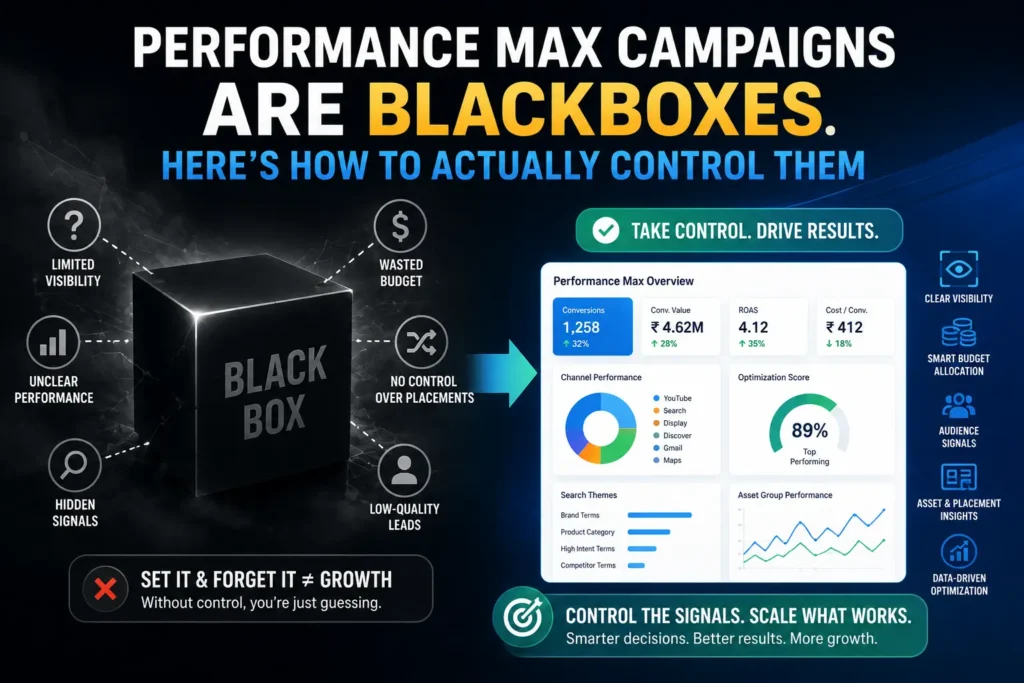
Performance Max Campaigns Are Blackboxes. Here’s How to Actually Control Them

Performance Max campaign optimisation is the challenge that defines paid search management in 2026. Over 1 million advertisers globally now run Performance Max, and Google claims an average 18% lift in conversions at similar cost-per-action for advertisers using PMax alongside existing campaigns. The adoption rate jumped from 60% of surveyed advertisers in 2024 to 71% in 2025. The platform is pushing harder than ever.
In this article13 sections
And yet, the most persistent complaint from experienced PPC practitioners – heard since PMax launched in 2021 and still echoing through every agency channel in 2026 – remains: I don’t know what it’s doing with my money.
That criticism was fair when it was made, and it is still partially fair today. Google’s April 2026 updates added the Channel Performance Timeline, Final URL reports, asset-level metrics, and a 10,000-keyword negative list. These are genuine improvements. But one honest case study from the same period tells the real story: a documented PMax campaign where Display placements consumed 50% of budget while generating under 20% of conversions – and the advertiser had no direct lever to reduce Display spend. The reports arrived. The control did not.
At Search Savvy, the position we take with clients is the same one every honest 2026 PMax review eventually arrives at: Performance Max gives you more visibility than it used to and less control than you need. The question is not whether to run it – in most accounts, you should – but how to structure it so that the controls you do have are used to maximum effect. This post gives you exactly that.
What Is Performance Max and Why Is It Still Called a Blackbox in 2026?#
Performance Max campaign optimisation starts with understanding what you are actually dealing with. PMax is a goal-based campaign type that runs ads across all Google channels simultaneously – Search, Shopping, YouTube, Display, Discover, Gmail, and Maps – from a single campaign, using AI to allocate budget, select placements, compose ad creative, and choose audiences in real time.
The original “blackbox” label was earned honestly. Early PMax gave advertisers one input (assets and a budget), one output (aggregate campaign metrics), and almost no diagnostic layer between them. You could see that the campaign was spending and converting. You could not see where, on what queries, with what creative combination, or to what audiences.
The 2024–2025 update cycles changed the equation materially:
- Search Themes (2024) – replaced old Search Category Insights with a writable input field, giving advertisers a way to guide query matching
- Campaign-level brand exclusions – the single most important control addition; prevents PMax from claiming credit for brand traffic you were already capturing
- Asset group reporting by channel – you can now see which channels each asset group is serving on
- Customer Match without minimum audience size – first-party audience signals now available at any scale
- Search term report – a long-demanded feature that shows the actual queries triggering your PMax ads, with the ability to add negatives directly
In April 2026, Google added the Channel Performance Timeline – a graph view showing how budget allocation shifts week-over-week across channels. It is the most significant PMax transparency update since launch.
But this is the critical 2026 truth: transparency has increased, but control mechanisms have not kept pace. You can now see Display consuming half your budget. You still cannot directly reduce Display spend. The reports are useful. What you do with them is still heavily constrained.
Understanding that gap – between what you can see and what you can actually change – is the foundation of effective Performance Max campaign optimisation in 2026.
Does Performance Max Actually Work? What Does the Real Data Show?#
Performance Max campaign optimisation is worth the complexity – but only if you enter it with accurate expectations, not Google’s headline numbers.
Google’s claimed benchmark: 18% average lift in conversions at similar CPA for advertisers running PMax alongside existing campaigns.
What practitioners are actually seeing:
The honest answer is high variance. Whether those conversion uplifts reflect genuine incrementality – new customers, new queries, real growth – or structural cannibalisation of Search campaigns and brand traffic depends almost entirely on how the account is set up.
The key question every PMax account should answer: Is PMax generating conversions that my Search campaigns would not have produced anyway? If PMax is consuming budget on branded queries your Search campaigns already owned, or Display placements with 50% of spend and 20% of conversions, the headline conversion number looks healthy while the true incremental ROI is poor.
Three account conditions where PMax consistently performs well:
- Conversion-rich accounts – minimum 30–50 conversions per month in the account; below this, the AI cannot learn effectively and performance is genuinely unpredictable
- Clean conversion tracking – PMax’s AI optimises for whatever signal it receives; multiple or polluted conversion actions produce misdirected spend
- Complementary campaign structure – PMax running alongside, not instead of, core Search campaigns; structured to handle expansion (new audiences, new queries, cross-channel) rather than compete for existing demand
At Search Savvy, the performance pattern we see most consistently is this: well-structured PMax campaigns with strong negative keyword architecture, first-party audience signals, and clean conversion tracking deliver genuine incremental reach. Poorly structured PMax campaigns cannibalise Search, inflate vanity metrics, and hide the damage behind aggregate conversion numbers.
What Controls Do You Actually Have Over Performance Max in 2026?#
Performance Max campaign optimisation relies on a specific set of controls – some native to Google Ads, some requiring structural ingenuity. Here is the complete 2026 control inventory:
Control 1: Brand Exclusions (Non-Negotiable)#
Brand exclusions are the single most important Performance Max control available. Without them, PMax will bid on your own brand terms – capturing conversions that your branded Search campaigns or organic results would have produced anyway – and report those as PMax conversions. This is not PMax working. It is PMax claiming credit.
How to implement: Go to Campaign settings → Brand inclusions/exclusions → Add your brand name and variations. Also add your key competitors if you are deliberately avoiding competitor brand terms.
This step is non-negotiable for any PMax account. Do it before the campaign goes live, not after you’ve noticed inflated conversion numbers.
Control 2: Search Themes – Your Directional Signal to the Algorithm#
Search Themes are the most powerful query-steering tool in Performance Max campaign optimisation. Added in 2024, they allow you to provide up to 25 descriptive phrases per asset group that tell Google’s AI which types of search queries your campaign should prioritise. They are not exact match keywords – they function as directional signals that influence the AI’s query interpretation.
How to use them effectively:
- Use specific, intent-revealing phrases rather than generic category terms – “emergency plumber Mumbai central” beats “plumber”
- Add Search Themes that reflect your highest-value conversion categories – not just traffic volume
- Review your search term report after 4–6 weeks and add Themes for high-performing query patterns you want to reinforce
- Use Themes to steer the AI toward query types your standard Search campaigns are not capturing – that is where PMax’s expansion value lives
Control 3: Negative Keywords – The Budget Containment Layer#
Negative keywords have been available in Performance Max at campaign level since early 2025, and as of April 2026, Google expanded the negative keyword limit to 10,000 keywords per campaign. This is a major practical improvement.
Negative keyword strategy for PMax differs from Search campaign strategy:
- Brand negatives: Exclude your own brand terms (supplement brand exclusions with keyword negatives for brand variants) – prevents cannibalisation of branded Search campaigns
- Competitor brand negatives: If you are not actively targeting competitor brands, exclude them – PMax will otherwise bid on them when AI signals suggest purchase intent
- Irrelevant query segments: Use your search term report to identify query patterns wasting spend and add negatives systematically
- Informational intent negatives: Queries like “how to”, “what is”, “DIY” typically have low conversion intent for most businesses – exclude them to tighten relevance
Important limitation: Account-level negative keywords applied via the shared library affect PMax campaigns. Campaign-level negatives are available directly in PMax settings. Both should be actively maintained.
Control 4: Asset Group Segmentation – Your Structural Control Lever#
Performance Max campaign optimisation is significantly more controllable when asset groups are used strategically rather than as a single catch-all. While PMax does not have ad groups in the traditional sense, asset groups function as your primary segmentation unit – each with its own creative assets, audience signals, and listing groups.
Why asset group structure matters:
- Each asset group gets separate performance data in 2026 reporting – you can see which segments are generating conversions and which are consuming budget inefficiently
- Google treats each asset group as a distinct context signal – a group with tightly themed assets and relevant audience signals performs better than a generic everything-included group
- You can pause underperforming asset groups without pausing the entire campaign – giving you a meaningful lever when specific segments are producing poor results
Recommended asset group structure:
| Account Type | Asset Group Logic |
| E-commerce | One asset group per product category (e.g., Running Shoes, Gym Apparel, Accessories) |
| Lead generation | One asset group per service type (e.g., Residential, Commercial, Emergency) |
| Multi-location | One asset group per region or city if messaging differs |
| Single product/service | One asset group per audience stage (cold awareness, warm consideration, retargeting) |
True control in PMax optimisation comes not from maximising the number of campaigns, but from building smart structures that balance segmentation with sufficient data volume per segment.
Control 5: Audience Signals – First-Party Data as Your Competitive Edge#
Audience signals in Performance Max are directional inputs – you are not restricting who can see your ads, but you are telling the AI which audience profiles to prioritise as a starting point. In 2026, first-party audience signals are the most powerful Performance Max input available to advertisers with existing customer data.
Highest-value audience signal types:
- Customer Match lists – upload your existing customer email list; PMax uses it as a seed to find similar high-intent users across Google’s ecosystem
- Website visitor lists – retargeting signals from your highest-converting page visitors
- YouTube engagers – for accounts with YouTube audiences, video engagement signals can improve PMax performance on YouTube placements
- In-market segments – add relevant Google in-market categories as supporting signals, not as primary targets
The 2026 Customer Match update that matters: Google removed the minimum audience size requirement for Customer Match in PMax. Indian SMBs and early-stage brands with small but high-quality customer lists can now use them as signals, regardless of list size.
Control 6: The Channel Performance Report – Your Diagnostic Tool, Not a Control Lever#
The Channel Performance Timeline (added April 2026) gives you week-over-week channel allocation data – showing how budget is distributed across Search, Shopping, YouTube, Display, Discover, Gmail, and Maps.
Here is the honest framing: this report tells you what is happening. It does not give you a direct lever to change channel allocation.
What you can do with channel data:
- If Display is consuming disproportionate budget with poor conversion contribution, pause Display-heavy asset groups and replace them with Search and Shopping-optimised groups (different assets attract different channel distribution)
- If a specific channel shows zero conversions across 4+ weeks, it is a signal to review and revise the creative assets associated with that channel
- If Shopping is outperforming all other channels, increase your product feed investment – feed optimisation is the highest-ROI input for Shopping-dominant PMax accounts
What Are the Most Common Performance Max Mistakes That Kill Campaign Performance?#
Performance Max campaign optimisation fails in predictable ways. The patterns are consistent regardless of industry:
Mistake 1: Launching without brand exclusions active The most common and most expensive mistake. PMax immediately bids on brand terms, captures conversions that were never at risk, and reports a healthy ROAS that masks the real incremental performance. Set brand exclusions before the first impression.
Mistake 2: Running PMax as a replacement for Search, not a complement to it PMax is designed to expand reach – to find new queries, new audiences, and cross-channel opportunities that Search campaigns cannot reach. When PMax replaces your core Search campaigns, it cannibalises proven demand without providing incremental growth. Run both. Use Search for your high-intent, high-converting core terms. Use PMax for expansion.
Mistake 3: Insufficient conversion data before launch PMax’s AI requires a minimum of 30–50 conversions per month to learn effectively. Launching PMax in accounts with fewer than 30 monthly conversions produces genuinely poor results – not because PMax doesn’t work, but because the algorithm cannot distinguish between converting and non-converting users with insufficient signal data.
Mistake 4: One asset group for everything A single asset group covering all products, services, and audience stages gives the algorithm no structural guidance. It pools all creative together, produces averaged performance data, and removes your ability to diagnose which segments are working. Segment by category, intent stage, or margin profile – and give each group its own assets.
Mistake 5: Ignoring the search term report The search term report is now available in PMax and is one of the most valuable optimisation tools in the account. Advertisers who check it weekly and add negatives based on what they find consistently outperform those who set PMax and check in monthly.
What Is the Right Account Structure for Performance Max in 2026?#
Performance Max campaign optimisation at the account architecture level follows Google’s recommended “Power Pack” framework for 2026:
- Performance Max: Cross-channel expansion – 40–50% of total budget for e-commerce; 25–35% for lead generation
- AI Max for Search (replacing DSA): High-intent search coverage with transparency
- Standard Search campaigns: Core branded terms, high-converting exact/phrase match terms – never handed to PMax
- Demand Gen: Top-of-funnel awareness and retargeting on YouTube and Discover
The key architectural rule: PMax should never compete with your Search campaigns for the same queries. Use negative keywords and brand exclusions in PMax to push it toward additive reach. Your Search campaigns own the proven demand. PMax finds the new demand.
FAQ: Performance Max Campaign Optimisation in 2026#
Q1: Is Performance Max a blackbox in 2026? Less than it used to be – but still significantly more opaque than Standard Search campaigns. Google’s 2024–2026 updates added Search Themes, a search term report, channel performance reporting, asset-level metrics, and a 10,000-keyword negative list. These changes provide meaningful transparency. However, advertisers still cannot directly control channel budget allocation – you can see that Display is consuming 50% of your budget, but you cannot directly reduce it. Control comes through structural decisions (asset group segmentation, audience signals, negatives) rather than direct bidding controls.
Q2: How many conversions do I need before launching Performance Max? A minimum of 30–50 conversions per month across the account is the standard recommendation before launching PMax. Below this threshold, the AI cannot learn effectively from the data and produces inconsistent results. Google’s own best practice guidance states: “Start broad, then tighten targets once Google’s AI has at least 30–50 conversions to learn from.” If your account is below this conversion volume, invest in Standard Search campaigns first to build the conversion history PMax needs.
Q3: Should I use Performance Max instead of Shopping campaigns? No – for most e-commerce advertisers, the answer is to run both. Performance Max running alongside Standard Shopping allows Shopping campaigns to own your proven high-performing product segments with full visibility and control, while PMax handles cross-channel expansion and audience discovery. When PMax completely replaces Shopping, you lose the granular bidding control and product-level performance visibility that Standard Shopping provides. The question shifts from “PMax or Shopping?” to “How do I structure both so they complement each other?”
Q4: What is the most important Performance Max optimisation step to do first? Set brand exclusions before your campaign goes live. This is the single highest-impact first step in any PMax account. Without brand exclusions, PMax will bid on your brand terms, capture conversions your Search campaigns or organic results would have produced anyway, and report inflated ROAS figures that obscure true incremental performance. Every other optimisation step is secondary to preventing brand term cannibalisation from day one.
Q5: How do Search Themes differ from keywords in Performance Max? Search Themes are directional inputs – descriptive phrases (up to 25 per asset group) that tell PMax’s AI which types of queries to prioritise. They are not exact match keywords; the AI uses them as context signals to interpret query intent, not as strict targeting rules. Search Themes give you meaningful influence over query matching without the restrictive structure of keyword targeting. They work best when they reflect specific, high-intent query patterns you want the algorithm to recognise and prioritise.
Q6: Can I control which channels Performance Max spends on? Not directly – this is the primary remaining limitation of PMax in 2026. Google’s Channel Performance Timeline (April 2026) now shows you how budget is distributed across Search, Shopping, YouTube, Display, Discover, Gmail, and Maps. But there is no direct budget allocation control per channel. Indirect levers exist: asset group composition influences channel distribution (video-heavy groups attract more YouTube spend; product feed groups attract Shopping spend), and pausing underperforming asset groups reduces exposure on their dominant channels. Direct channel-level budget control remains absent from the interface.
The Bottom Line#
Performance Max campaign optimisation in 2026 is not about fighting the algorithm – it is about structuring your inputs well enough that the algorithm has what it needs to perform, and using every available control lever to prevent it from destroying the performance you have already built.
The blackbox criticism was fair in 2021. It remains partially fair today. But the gap between “uncontrollable” and “requires different control skills” is wide – and the advertisers who have closed that gap are extracting genuine incremental value from PMax’s cross-channel reach while their less-structured competitors watch their budget disappear into Display placements with 20% conversion contribution.
Set your brand exclusions. Build your Search Themes from real intent data. Segment your asset groups by category and margin. Maintain your negative keyword list from the search term report weekly. Use first-party Customer Match data as your primary audience signal. And run PMax alongside Search – not instead of it.
According to Search Savvy’s paid search practice, those five structural decisions account for the majority of Performance Max performance variance we observe across accounts. Everything else is refinement. If you want a PMax account audit – an honest assessment of where your structure is working and where it is leaking budget – reach out to the Search Savvy team.