What Is Log File Analysis in SEO and How to Do It?

Every other SEO data source is an estimate. Google Search Console shows aggregated crawl stats with a roughly 48-hour delay. Third-party crawlers simulate what a search engine might see. Log file analysis is different: it reads the actual record your own server writes every time a bot requests a page, in real time, with no sampling involved. Log file analysis in SEO is the process of examining these server access logs to see exactly how search engine and AI crawlers behave on your site – what they request, how often, and what your server actually returns to them.
In this article12 sections
This article covers what a log file contains, why it reveals problems no other SEO tool can see, the verification step most guides skip, and a practical step-by-step process for running your first analysis.
What Is Log File Analysis in SEO?#
A log file is a plain text file your web server writes automatically, recording a line for every single request it receives – from human visitors and from bots alike. Log file analysis in SEO means filtering that raw record down to crawler traffic specifically, then studying the resulting pattern to understand exactly how Googlebot, Bingbot, and other crawlers interact with your site: which pages they visit, how often, and what response code they receive.
The distinction that matters most is between what a tool estimates and what a log actually proves. Search Console, rank trackers, and crawl emulators are all models of crawler behavior – reasonable approximations built from sampled or simulated data. A server log is the ground truth, because it’s a direct record of what actually happened, not a projection of what probably happened.
What a Log File Actually Contains#
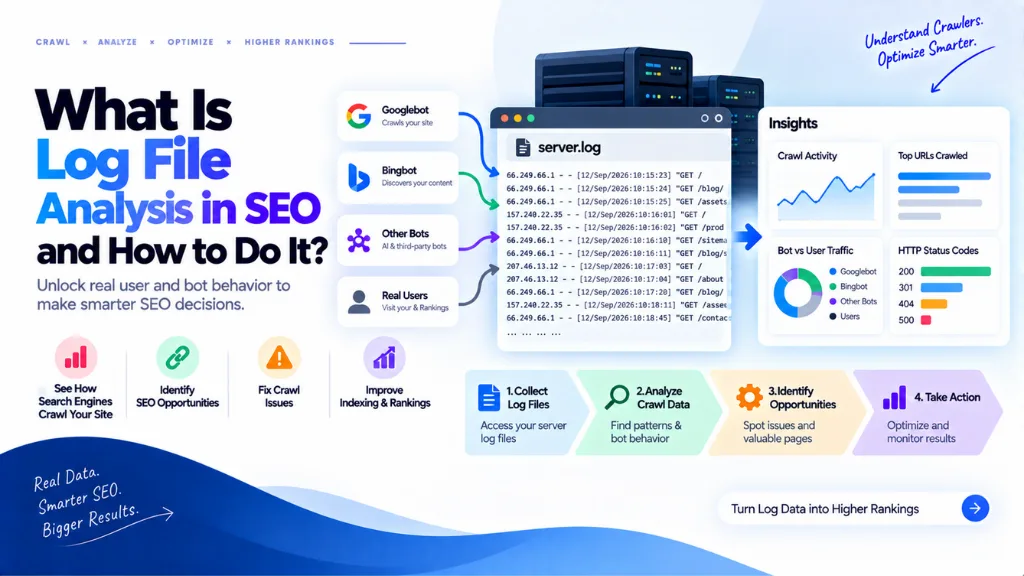
Most web servers write logs in a standard structure called the Combined Log Format. A typical line looks something like this:
66.249.66.1 – – [20/Mar/2026:14:02:05 +0000] “GET /technical-seo-guide HTTP/1.1” 200 8452 “-” “Mozilla/5.0 (compatible; Googlebot/2.1)”
Each field carries specific information: the requesting IP address, a timestamp, the exact URL requested, the HTTP status code returned (200 for success, 301/302 for a redirect, 404/410 for a missing resource, 500/503 for a server error), the response size in bytes, and the user-agent string identifying who made the request. Taken together across thousands or millions of lines, these fields form a complete, chronological record of exactly how crawlers moved through your site.
Why Log Files Beat Search Console and Crawl Simulators#
Google Search Console’s crawl stats are useful for a high-level trend view, but they’re aggregated and delayed by roughly 48 hours, which makes them too coarse to catch a specific, individual problem – a page returning 200 to real visitors but 500 to Googlebot, for instance, an error that goes unnoticed everywhere except in the raw log. Crawl simulators face a different limitation: they show what a crawler theoretically might do based on your site’s structure, not what a real crawler actually did.
For any site with thousands of URLs – a large ecommerce catalog, a news publisher, a programmatic SEO project – this distinction has real financial consequences. A technical audit might flag canonicalization issues or redirect chains in the abstract, but only log files show the actual crawl frequency distribution across your full URL inventory, revealing precisely where crawl budget is being spent, wasted, or entirely withheld.
The Critical Step Everyone Skips: Verifying Bot Identity#
Anyone can put “Googlebot” in a user-agent string. Scrapers, spam bots, and malicious tools frequently spoof well-known crawler names to bypass firewalls or blend into legitimate traffic. Analyzing log data based purely on the user-agent field, without verifying the requester’s actual identity, produces corrupted conclusions – you might be measuring how a scraper behaves and mistaking it for Googlebot’s real crawl pattern.
The fix is straightforward: verify suspicious or high-volume bot lines by IP address, not just by name. Running a reverse DNS lookup on an IP claiming to be Googlebot – using the command host 66.249.66.1 on Mac, Linux, or Command Prompt on Windows – should resolve to a legitimate Google domain such as crawl-66-249-66-1.googlebot.com. Purpose-built tools like Screaming Frog’s Log File Analyser automate this step, cross-checking IPs against each search engine’s officially published ranges rather than trusting the user-agent string alone.
Do I Need to Verify Every Single Bot Request?#
No. Verifying every line in a multi-million-row file isn’t practical. The standard approach is spot-checking high-volume or unusual bot activity – an IP responsible for an unexpectedly large share of requests, or traffic claiming to be a bot but hitting URL patterns a real crawler wouldn’t typically prioritize – rather than verifying every single request.
The Five Things to Look For in Your Logs#
Once verified crawler data is isolated, five recurring analyses cover most of what a log file investigation is actually trying to answer.
| Analysis | What It Reveals |
| HTTP status code distribution | How much crawl activity is being spent on errors (4xx/5xx) versus successful requests, by bot and by section |
| Crawled vs. uncrawled pages | Which important URLs in your sitemap or inventory Googlebot has never visited, or hasn’t visited in a meaningful window |
| Orphan URLs | Pages receiving bot requests despite having no internal links pointing to them, often indicating stale sitemap entries or old redirects |
| Crawl frequency by page type | Whether high-value templates – category pages, product pages, key service pages – are crawled proportionally to their business importance |
| Crawl waste on non-strategic URLs | Crawl budget spent repeatedly on filtered/faceted URL parameters, duplicate content, or low-value pages instead of priority content |
If your most important, revenue-driving pages are fetched frequently, that’s generally a sign Google considers them relevant enough to revisit regularly. If they’re barely crawled while low-value parameter URLs consume a disproportionate share of requests, that mismatch is exactly the kind of actionable finding log analysis is built to surface. One documented case illustrates the scale of impact this can have: a team analyzing daily server logs used the findings to remove 27% of low-value URLs from the crawl path and redirect 180 orphan pages, lifting organic sessions on priority templates by 11%.
The New Complication in 2026: Three Types of Bots#
Log analysis has gained a genuinely new dimension in 2026: the bot population hitting a typical site’s origin has split into three distinct categories, each requiring different handling.
| Bot Category | Purpose | Examples |
| Indexation bots | Crawl for traditional search indexing and ranking | Googlebot, Bingbot |
| AI training bots | Crawl to gather training data for future model versions | GPTBot, Google-Extended, Bytespider |
| AI-search retrieval bots | Crawl in real time to answer a live user query in an AI assistant | OAI-SearchBot, PerplexityBot, ClaudeBot, Claude-SearchBot |
This split matters directly for robots.txt configuration: blocking an AI training bot doesn’t affect whether your content can be retrieved and cited in a live AI search answer, and blocking an AI-search retrieval bot could remove your site from a growing source of referral visibility entirely. According to Cloudflare Radar’s 2025 Year in Review, AI bots collectively accounted for an average of 4.2% of HTML requests in 2025 – a modest but rapidly growing share that makes distinguishing between these three bot categories increasingly relevant, not just a technical curiosity. Search Savvy’s AI search optimization (AEO/GEO) services incorporate this kind of bot-category log segmentation, since blocking the wrong crawler type can quietly remove a site from AI-generated answers without anyone noticing until traffic has already declined.
How to Do a Log File Analysis: Step-by-Step#
- Collect a representative log window. Two to four weeks of server logs is generally enough to establish a reliable crawl pattern without an unmanageable data volume.
- Parse the logs into standard fields. Break each line into IP, timestamp, URL, status code, response size, and user agent, using a dedicated tool for anything beyond a small sample.
- Filter out human traffic entirely. Keep only requests matching known search engine and AI bot user-agent strings, discarding everything else.
- Verify bot identity by IP, not user-agent alone, spot-checking high-volume or unusual activity against each provider’s officially published IP ranges.
- Group and compare against your priorities. Segment findings by directory or page type, then compare crawl frequency against which pages actually drive revenue or conversions.
- Act on what the data shows. Redirect or remove orphan URLs, fix pages returning errors specifically to bots, and adjust internal linking toward underserved high-value sections.
Search Savvy’s crawl audit process builds this kind of log-based analysis directly into ongoing site health monitoring, rather than relying solely on Search Console’s delayed, aggregated view of crawl activity.
What Log Files Can’t Tell You#
Log analysis has real limits worth stating plainly. Logs prove what was crawled – they don’t prove whether a page was indexed or how it ranks, which remains Search Console’s domain. They also don’t measure content quality or search intent match, and the reliability of any analysis depends on clean, unmanipulated data; truncated log retention or misconfigured logging can silently produce an incomplete picture that looks complete.
Common Mistakes in Log File Analysis#
- Trusting the user-agent string without verification. Spoofed bot identities are common enough that unverified analysis can produce entirely wrong conclusions.
- Analyzing too short a log window. A few days rarely captures a representative crawl pattern; two to four weeks is the more reliable baseline.
- Ignoring the three-way bot split. Treating all non-human traffic as one category risks misconfiguring robots.txt in ways that block valuable AI-search retrieval traffic.
- Skipping orphan URL detection. Pages receiving bot requests with no internal links pointing to them often signal stale sitemap entries wasting crawl budget.
- Treating log analysis as a one-time project. Crawl patterns shift after site changes and algorithm updates; a recurring review catches problems before they compound.
The Bottom Line#
Log file analysis in SEO reveals what search engines and AI crawlers actually do on a site, rather than what a tool estimates they probably do – and that distinction becomes more valuable, not less, as the bot population hitting a typical site fragments into indexation, training, and AI-search retrieval categories that each demand different handling. Verifying bot identity by IP, focusing on the five core analyses, and building log review into a recurring workflow turns a technically dense process into a genuinely actionable source of crawl-budget wins.
The practical next step is pulling two to four weeks of your own server logs and checking whether your highest-value pages are actually being crawled as often as your lowest-value ones. Search Savvy’s technical SEO services and website audit services build this kind of log-based crawl diagnosis into a full technical audit, surfacing the crawl-budget waste that Search Console’s delayed, aggregated view simply can’t show.
Frequently Asked Questions#
What is log file analysis in SEO? It’s the process of examining a website’s server access logs – the raw record of every request the server receives – to understand exactly how search engine and AI crawlers interact with the site, including which pages they visit, how often, and what HTTP status code they receive.
Why is log file analysis more reliable than Google Search Console for crawl data? Search Console shows aggregated crawl statistics with a roughly 48-hour delay, while log files show individual requests in real time as your server actually processes them, with no sampling or aggregation involved.
Why do I need to verify bot identity by IP address instead of just checking the user-agent? Anyone can put “Googlebot” in a user-agent string, and scrapers frequently do exactly this to bypass firewalls. Verifying the requesting IP against a search engine’s officially published ranges, through a reverse DNS lookup or a dedicated tool, confirms the request is genuinely from that crawler.
How much log data do I need for a reliable analysis? Two to four weeks of server logs is generally considered sufficient to establish a reliable crawl pattern without requiring an unmanageable volume of data to process.
Why does the split between indexation bots, AI training bots, and AI-search retrieval bots matter? Each category requires different robots.txt handling. Blocking an AI training bot doesn’t affect traditional search rankings, but blocking an AI-search retrieval bot could remove a site from a growing source of AI-generated referral traffic entirely.
Can log file analysis tell me if my pages are actually ranking well? No. Log files prove what was crawled, not whether a page was indexed or how it ranks – that information still comes from Search Console and rank tracking tools. Log analysis is a crawl-behavior diagnostic, not a ranking or indexing report.