Your Google Ads Are Now Showing Inside AI Overviews. Here’s How to Qualify

Something changed in Google Search this year that most advertisers have not fully processed yet – not because it is hard to understand, but because it requires rethinking what paid search actually is.
In this article12 sections
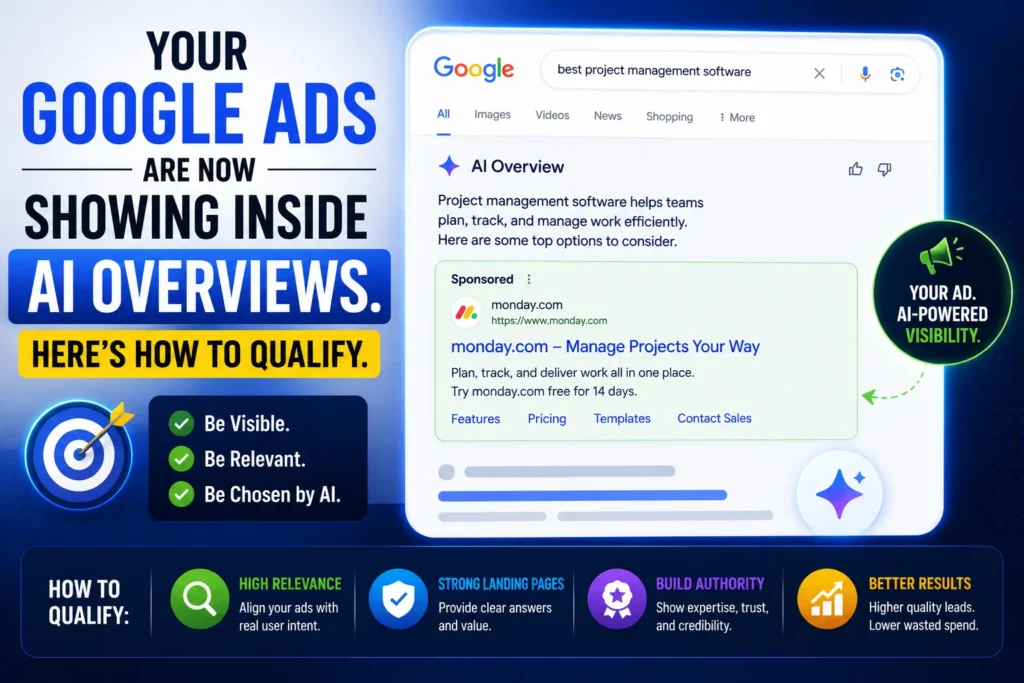
Google Ads are now appearing inside AI Overviews – the AI-generated answer summaries that sit at the top of the search results page, above traditional organic listings, and now, increasingly, above the traditional ad positions as well. In early 2025, ads alongside AI Overviews appeared in approximately 3% of AI Overview results. By early 2026, that figure reached approximately 25.5%. The most valuable real estate in search has moved from position one to inside the AI answer itself.
The catch? There is no toggle. No campaign setting called “Show in AI Overviews.” No new budget line you can create for this placement. Eligibility is determined entirely by how your campaigns are currently structured. If they meet the criteria, your ads appear inside AI Overviews automatically. If they do not – regardless of how much you spend – they will not appear.
At Search Savvy, we manage Google Ads across e-commerce, lead generation, and service businesses – and the advertisers we see capturing AI Overview placement in 2026 are not spending more. They are structured differently. This article explains exactly what those structural differences are, which campaign types qualify, and how to optimise your existing campaigns for this new and rapidly expanding placement.
What Are Google Ads in AI Overviews – and How Did They Get Here?#
Google Ads in AI Overviews represent the most significant expansion of paid search inventory since Shopping ads launched in 2012.
Google’s VP of Ads Dan Taylor confirmed in early 2026 that ads within AI Overviews serve a specific function in the user journey. When a user asks a complex, multi-layered question, Google’s AI synthesises a comprehensive response. The journey does not end with the answer – often, the user needs a tool, a product, or a professional service to act on that information. This is where AI Overview ads live.
Ads are eligible to show above, below, or within AI Overviews on Search, allowing advertisers to reach customers in new moments of exploration on Search. The three placements are distinct:
- Within the AI Overview – The highest-value placement. Your ad appears embedded inside the generated answer, as the “next step” for a user who has just read an AI-generated response.
- Above the AI Overview – Traditional ad positions, appearing above the entire AI summary block.
- Below the AI Overview – Traditional ad positions below the AI summary, before or among organic results.
Ads are eligible to show above or below the AI Overview in all 200+ markets where AI Overviews are available. The within-AI Overview placement is currently live in English in the US on mobile and desktop, with global rollout expected throughout 2026.
The commercial logic is compelling. Search behaviour is shifting from exploration to decision-stage filtering. Traffic becomes less evenly distributed, and performance depends on the quality of intent rather than impression volume. Users who click from inside an AI Overview are more qualified, more intentional, and have already received a comprehensive answer – meaning the click represents a genuine next-step intent, not exploratory research.
People Also Ask: Where exactly do Google Ads appear in AI Overviews? Short Answer: Google Ads can appear in three positions relative to AI Overviews: within the AI Overview itself (embedded as the suggested next step inside the answer), above the AI Overview (traditional top-of-page placement), and below the AI Overview (between the AI summary and organic results). The within-overview placement is currently live in English in the US, with global rollout expected through 2026. Above and below placements are available in all 200+ markets where AI Overviews are active.
Which Campaign Types Are Eligible for Google Ads in AI Overviews?#
Google Ads in AI Overviews eligibility is the most important structural question – and the answer catches most advertisers off guard.
Standard Search campaigns running only exact or phrase match keywords are not eligible for AI Overview placements. Performance Max campaigns, AI Max for Search campaigns, and broad match-enabled Search campaigns are the three campaign types currently eligible for this inventory.
This is the critical fact that changes everything for accounts still running tightly themed exact and phrase match campaigns. The structural advantage of keyword precision that made SKAGs effective in 2019 is now the exact structural barrier to AI Overview placement in 2026.
Here is the complete eligibility breakdown as of June 2026:
| Campaign Type | Above/Below AI Overview | Within AI Overview |
| Performance Max | ✅ Eligible | ✅ Eligible |
| AI Max for Search | ✅ Eligible | ✅ Eligible |
| Search – Broad Match | ✅ Eligible | ✅ Eligible |
| Shopping campaigns | ✅ Eligible (product carousels) | ✅ Eligible |
| Search – Exact/Phrase Match only | ✅ Above/Below | ❌ Not eligible within |
| Display campaigns | ❌ Not eligible | ❌ Not eligible |
| App campaigns | Limited | ❌ Not eligible |
Currently, we don’t show ads in AI Overviews for sensitive verticals like adult, alcohol, gambling, finance, healthcare, politics, and more. This vertical exclusion is significant for Indian advertisers in BFSI, pharmaceutical, and healthcare categories – these verticals are currently excluded from within-AI Overview placement regardless of campaign structure.
Google has also confirmed a dynamic eligibility requirement: for ads to show within the AI Overviews, the ads must additionally be relevant to the content of the AI Overviews. Search and shopping ads from existing Search, Shopping and Performance Max campaigns that are able to win the auction and address both the query and the information in the AI Overview are selected. Winning the auction is necessary but not sufficient – the ad must also be contextually relevant to the specific AI Overview being displayed.
People Also Ask: Do I need to create a new campaign to show ads in AI Overviews? Short Answer: No. There is no separate AI Overview campaign type. Eligibility comes from your existing campaigns – Performance Max, AI Max for Search, and broad match-enabled Search campaigns automatically qualify when they meet relevance and Quality Score requirements. Standard Search campaigns running only exact or phrase match keywords are not eligible for within-AI Overview placement. The fix is structural: adding broad match with Smart Bidding, enabling AI Max features, or running Performance Max.
What Is AI Max for Search – and Why Is It Central to AI Overview Eligibility?#
Google Ads in AI Overviews strategy in 2026 increasingly centres on AI Max for Search – the campaign feature that Google launched this year as the most direct pathway to AI-era placement eligibility.
AI Max for Search is a suite of AI-powered features that Google layers on top of existing Search campaigns. It includes Search Themes, URL Expansion, and AI-generated ad copy. Rather than creating a new campaign type, AI Max enhances your current Search campaigns by broadening keyword reach, dynamically matching landing pages, and generating creative variations using machine learning. It is available to all advertisers globally in 2026 with no spend minimums.
The three core AI Max features and what they do:
Search Themes – Allow you to provide topic-level guidance alongside traditional keywords. You can add up to 25 search themes per campaign, and Google’s AI uses these as directional signals to find relevant queries your keyword list would not have captured. The AI Max match type appears as “AI MAX” in your Search Terms report – distinguishable from broad, phrase, or exact match.
URL Expansion – Lets Google automatically match search queries to the most relevant landing page on your website, even if that page was not specified in your ad group. For advertisers with large websites and diverse content, this dramatically expands relevance matching.
AI-generated ad copy – Dynamically generates headline and description variations based on your landing pages, assets, and campaign context. As of February 26, 2026, Text Guidelines are available globally, allowing you to set term exclusions (up to 25 specific words per campaign) and messaging restrictions (up to 40 concept-level rules) to control what the AI does and does not generate.
You should first ensure that broad match can work for you, which might require reorganising ad groups, testing new ads, and optimising your landing pages. Only after you have consistently seen good results with broad match should you try AI MAX. The prerequisite matters: AI Max expands query matching at the campaign level using signals from your entire account and website. Without a clean account structure and strong negative keyword coverage, AI Max can expand aggressively into irrelevant queries.
Critically, Google has also announced that Dynamic Search Ads are being deprecated in favour of AI Max. Starting in September, remaining eligible Search campaigns with legacy settings will automatically upgrade to AI Max, and you won’t be able to create new campaigns with DSA via Google Ads, Google Ads Editor and the Google Ads API. For any account running DSA campaigns, the transition is not optional – it is scheduled.
People Also Ask: What is AI Max for Search in Google Ads? Short Answer: AI Max for Search is a suite of AI-powered features (Search Themes, URL Expansion, AI-generated ad copy) that Google layers onto existing Search campaigns to expand reach and improve AI Overview eligibility. It is available globally in 2026 with no spend minimums. It is not a new campaign type – it enhances existing campaigns. AI Max-enabled Search campaigns qualify for within-AI Overview placement. From September 2026, Google will automatically upgrade remaining DSA campaigns to AI Max.
How Do You Qualify Your Existing Campaigns for Google Ads in AI Overviews?#
Google Ads in AI Overviews qualification follows a specific checklist – and most accounts need to address at least two or three items before their campaigns become eligible.
Step 1: Audit Your Current Match Type Structure#
The first barrier to AI Overview eligibility is an exact-match-only campaign structure. Review your Search campaigns and identify any campaign running exclusively on exact or phrase match keywords without a broad match component.
For each tightly structured campaign, you have two options:
- Add broad match versions of your most important keywords alongside Smart Bidding. Broad match with Smart Bidding is Google’s recommended configuration for AI Overview eligibility – and data shows 27% conversion lift specifically for exact and phrase match-heavy campaigns that add broad match, suggesting significant untapped query coverage.
- Enable AI Max features on the campaign to access Search Themes and expanded matching without manually creating broad match keyword variants.
Before enabling AI MAX, you must build extensive negative keyword lists. Do not expect AI to understand what you do not want to target. Comprehensive negatives – competitor brands, low-intent queries, irrelevant variations – are the protective infrastructure that makes broad match and AI Max expansion safe.
Step 2: Ensure Performance Max Is Running#
Existing Search, Shopping, and Performance Max campaigns may qualify if they meet Google’s relevance and quality requirements. This means you do not need to create a special AI Overview campaign. Instead, you need to optimise your current campaigns to improve eligibility.
Performance Max is Google’s highest-eligibility campaign type for AI Overview placement. If you are not running PMax for your primary conversion objective, this is the fastest structural change to improve AI Overview eligibility. Ensure your PMax campaign has:
- A complete, optimised product data feed (for shopping-eligible businesses)
- High-quality images with detailed, keyword-rich alt text and titles
- First-party audience signals uploaded from your CRM
- Conversion tracking verified and working accurately
Step 3: Optimise Landing Page Relevance for Conversational Queries#
Google Ads in AI Overviews selection requires relevance to the content of the specific AI Overview being displayed – not just the query. Google’s AI only serves ads within the overview when three conditions are met: Commercial Intent (the user’s query must have an underlying need for a product or service), ad relevance (the ad must address both the query and the AI Overview content), and landing page quality.
AI Overview queries tend to be significantly longer and more conversational than traditional search queries – often 10+ words. We look at the Search Terms Report for queries that are 10+ words long. These are almost exclusively AI-triggered.
Your landing pages must address the specific problems these conversational queries raise. A page that answers only the core product question may not satisfy the contextual relevance requirement of an AI Overview on a nuanced, multi-part query. Review your top landing pages and ensure they address the full range of questions a searcher might have at the research phase of their journey.
Step 4: Build Ad Creative for Decision-Stage Intent#
Google Ads in AI Overviews are served to users who have already received a comprehensive answer. The creative requirement is therefore different from traditional search ads – you are not explaining what the product does; you are providing the clear next step.
Winning in this environment requires advertisers to stop treating every click as a closing attempt, and start treating it as a progression. Users who click from inside an AI Overview are typically more qualified, more realistic, and more intentional. They convert differently – not worse.
Ad headlines for AI Overview placement should:
- Lead with specific outcome language (“Get your free SEO audit”, “Book a consultation today”) rather than feature descriptions
- Match the intent of the research stage – the user has been educating themselves and is now ready for a next step
- Use Social proof and specificity – “Trusted by 500+ Indian businesses” or “96% client satisfaction” – to bridge from AI-generated authority to brand trust
Step 5: Implement Text Guidelines for AI Max Copy Control#
Text guidelines govern the content of AI-generated assets regardless of where those ads are served. If your Performance Max or AI Max campaign is eligible for AI Overview and AI Mode placements, your text guidelines will apply to the copy generated for those placements as well.
For brand-sensitive advertisers, configuring Text Guidelines before enabling AI Max is non-negotiable. Set term exclusions to prevent the AI from generating copy with competitor names, pricing claims you cannot substantiate, or language that conflicts with your brand guidelines. Set messaging restrictions at the concept level to ensure the AI’s creative stays within your approved communication framework.
People Also Ask: How do I make my Google Ads appear in AI Overviews? Short Answer: There is no direct toggle. Qualify by: running Performance Max, AI Max for Search, or broad match with Smart Bidding campaigns (exact/phrase-only campaigns are not eligible within AI Overviews); ensuring strong landing page relevance for conversational, multi-word queries; maintaining high Quality Scores and strong conversion tracking; and configuring Text Guidelines to control AI-generated creative. Google selects ads where the campaign wins the auction and addresses both the user query and the specific content of the displayed AI Overview.
How Do You Measure Performance from Google Ads in AI Overviews?#
Google Ads in AI Overviews measurement is the most frustrating limitation of the current system – and understanding it prevents misinterpretation of your performance data.
One of the biggest frustrations in 2026 is that Google does not (yet) provide a “This click came from an AI Overview” report. It is bundled into your Search Network data. AI Overview placement clicks are currently indistinguishable from other Search network clicks in standard reporting.
According to Search Savvy’s insights from managing accounts across multiple verticals, the proxy metrics that most reliably indicate AI Overview placement activity are:
Conversion Value Lift on Broad Match – Monitor whether broad match conversions have improved since AI Overviews expanded. AI Overview-driven clicks tend to convert at higher rates because the user arrives pre-qualified. A rising conversion rate on broad match traffic, without a proportional increase in click volume, is a reliable signal.
10+ Word Query Conversions in Search Terms Report – We look at the Search Terms Report for queries that are 10+ words long. These are almost exclusively AI-triggered. If we are converting on these conversational terms, we know the AI Overview placements are working. Filter your Search Terms report by query length – long conversational queries correlating with conversions are your strongest indicator of AI Overview contribution.
Search Console AI Impression Data – The June 3, 2026 Google Search Console update introduced AI impression reporting. Cross-referencing which organic pages are receiving AI impressions against the landing pages your ads are sending traffic to provides a relevance signal – pages that Google is already selecting for AI citations organically are the strongest candidates for AI Overview ad placement eligibility.
Switch-Back Testing – For rigorous measurement, disable AI Max features or broad match for a controlled period in a specific region and measure the impact on lead quality and conversion rate. The delta between AI Max-active and AI Max-inactive periods quantifies AI Overview contribution to campaign performance.
What Does the Broader Strategic Shift Mean for Your Paid Search Budget?#
Google Ads in AI Overviews represent more than a new placement – they represent a structural shift in what paid search is for.
Many informational searches previously had little commercial value. AI Overviews help Google identify commercial intent hidden within research-oriented searches. As a result, businesses can reach potential customers earlier in their buying journey.
At Search Savvy, we see this playing out across client accounts: the traditional high-intent, bottom-of-funnel keywords are still valuable but increasingly competitive and expensive. The emerging opportunity is in the AI Overview inventory – where a business can appear at the research stage of a complex buying journey for queries that would never have been worth bidding on under the old system.
The funnel math changes when AI Overviews are involved. Top-of-funnel contribution shrinks – when users receive comparisons, recommendations, and contextual explanations directly on the SERP, fewer sessions move into the research phase. Click volume contracts, but the upside is that the remaining traffic is more qualified.
This means: fewer clicks, better conversions, more efficient CPA – but only for advertisers who have structured their campaigns for AI Overview eligibility. Advertisers still running exact match-heavy campaigns for “efficiency” are now less efficient, not more – they are missing the higher-converting AI Overview inventory entirely.
At Search Savvy, we recommend treating the AI Overview eligibility audit as a Q3 2026 priority for every Google Ads account. The DSA auto-upgrade to AI Max scheduled for September 2026 is the forcing function – but waiting for the forced upgrade means months of foregone AI Overview placement while competitors who have already made the transition are capturing that inventory.
People Also Ask: Are clicks from Google Ads in AI Overviews higher quality than regular search clicks? Short Answer: Early data and practitioner reports consistently indicate higher conversion intent from AI Overview clicks. Users who click from inside an AI Overview have already received a comprehensive answer to their question – they are clicking for a specific next step, not for more information. This makes AI Overview clicks pre-qualified in a way that position-one traditional clicks rarely are. One confirmed example: MyConnect reported 16% more leads at 13% lower cost per action when AI Overview eligibility was activated through AI Max, with 30% of conversions coming from previously unmatched queries.
FAQ: Google Ads in AI Overviews – Your Questions Answered#
Q1: How quickly will my campaigns start appearing in AI Overviews after I enable broad match or AI Max? Google does not provide a confirmed timeline, but practitioner experience suggests AI Overview placement begins appearing within 2–4 weeks of enabling broad match or AI Max features, assuming the account has sufficient conversion history and Quality Score. The algorithm needs time to learn your expanded query set and identify the highest-relevance placements for your ads. For Performance Max campaigns already running, AI Overview eligibility is immediate – but placement frequency increases as Google builds confidence in your campaign’s relevance across different query types.
Q2: Will running broad match for AI Overview eligibility increase my wasted spend? It can, if negative keyword coverage is insufficient. Broad match significantly expands query matching – which is the mechanism that enables AI Overview eligibility but also increases the risk of irrelevant clicks. Before enabling AI MAX, you must build extensive negative keyword lists. The recommended sequence: build your negative keyword list first, then enable broad match or AI Max features, then monitor the Search Terms report weekly for the first month. Campaigns with 50+ account-level negatives and regular Search Terms audits see broad match performance closely mirror equivalent phrase match accounts with significantly broader coverage.
Q3: My business is in healthcare or finance. Are we excluded from AI Overview ads? Currently yes. We don’t show ads in AI Overviews for sensitive verticals like adult, alcohol, gambling, finance, healthcare, politics, and more. For BFSI, pharmaceutical, and healthcare businesses in India, within-AI Overview placement is not currently available. Above and below AI Overview placements remain available in all 200+ markets including India. Monitor Google’s official advertising policy updates for any changes to vertical exclusions – these restrictions may evolve as Google’s AI content review capabilities improve.
Q4: Should I prioritise Performance Max or AI Max for Search for AI Overview eligibility? Both are eligible, but the optimal choice depends on your business model. Performance Max is better for e-commerce businesses with product feeds, where the Shopping carousel format inside AI Overviews is a strong user experience match. AI Max for Search is better for service businesses, lead generation, and B2B advertisers where text ads and landing page relevance to specific research-stage queries are the primary conversion mechanism. Running both simultaneously – PMax for product visibility, AI Max for Search for research-stage lead capture – is increasingly the standard configuration for businesses with both product and service offerings.
Q5: What happens to my DSA campaigns when Google auto-upgrades them to AI Max in September 2026? For DSA users: Your campaigns containing dynamic ad groups will transition to standard ad groups, with settings and data ported into AI Max to maintain consistent performance. All three AI Max features – search term matching, text customisation and final URL expansion – will be enabled with your legacy URL controls preserved. Google recommends proactively upgrading before September to ensure your setup is aligned with your business needs from day one, rather than relying on the automated migration. Accounts that self-upgrade earlier can configure Text Guidelines, set up negative keywords, and adjust Search Themes before the algorithm needs to relearn from scratch.
Q6: How do I set up Text Guidelines in AI Max to protect my brand in AI-generated ad copy? Text Guidelines are available in both AI Max for Search and Performance Max campaigns. Access them in your Google Ads account under the campaign settings for your AI Max or PMax campaign. Term exclusions prevent specific words or phrases (up to 25 per campaign) from appearing in AI-generated copy – use these for competitor brand names, unsubstantiated claims, or legally restricted language. Messaging restrictions (up to 40 per campaign, written in natural language) set concept and tone-level rules – use these to prevent promotional styles that conflict with your brand voice or to restrict topic areas the AI should not reference. As of February 26, 2026, Text Guidelines are available globally across all languages and verticals.
Are your Google Ads campaigns structured to qualify for AI Overview placement – or are you running the exact campaign type that is excluded? Visit Search Savvy for a Google Ads AI readiness audit and a clear, account-level plan to capture the most valuable search real estate of 2026.