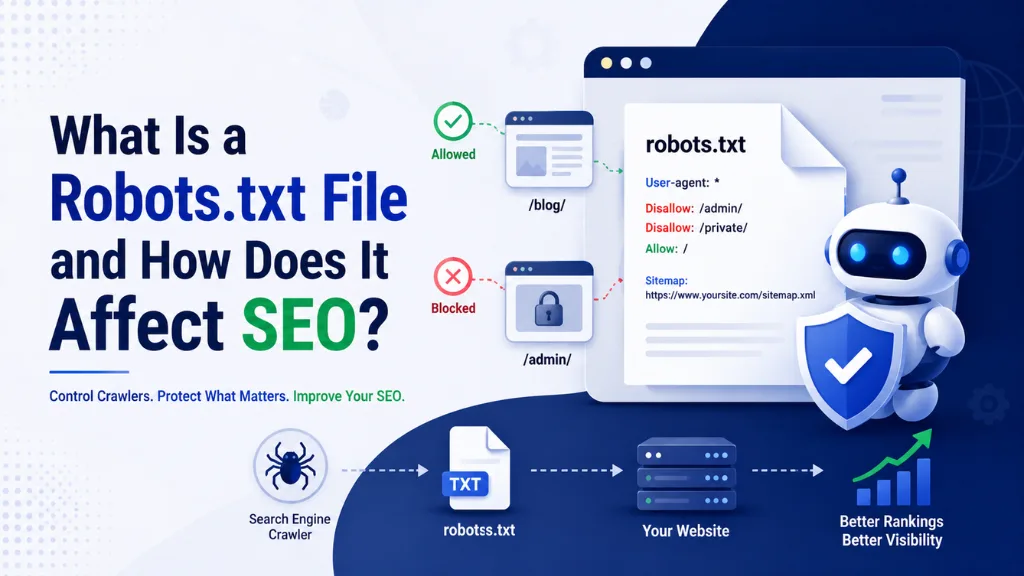
What Is a Robots.txt File and How Does It Affect SEO?

Here is a real scenario that plays out more often than you would expect: a site relaunches, traffic drops to zero within days, and nobody can figure out why. The cause, almost every time, is two lines in a file most people never look at.
In this article9 sections
A robots.txt file is one of the smallest, most overlooked files on a website, and yet it can single-handedly decide whether search engines – and increasingly, AI systems – can see your content at all.
A robots.txt file used to be a quiet technical detail mainly relevant to large, complex sites. In 2026, it has become one of the most strategically important files you own, since it now controls not just Googlebot, but also GPTBot, ClaudeBot, PerplexityBot, and dozens of other AI crawlers shaping what appears in AI Overviews, ChatGPT Search, and Perplexity.
A robots.txt file gets misconfigured surprisingly often, and the consequences range from minor crawl inefficiency to a complete, sitewide crawl block that quietly erases months of SEO work.
At Search Savvy, checking a client’s robots.txt file is one of the very first things we do in any technical SEO audit, because a single misplaced line here can undo every other optimisation on the site. This guide explains exactly what a robots.txt file is, how it affects SEO, and how to configure it correctly for both traditional search and AI crawlers in 2026.
What Is a Robots.txt File?#
A robots.txt file is a plain text file placed at the root of a website that tells web crawlers which pages or sections they are allowed, or not allowed, to crawl.
A robots.txt file works as an exclusion protocol, standardised under RFC 9309, using simple user-agent and disallow directives to communicate rules to each crawler that visits the site. It does not control whether a page gets indexed directly; it controls whether crawlers can access it in the first place.
People Also Ask: Where is the robots.txt file located on a website? Short Answer: A robots.txt file must sit at the root of a domain, accessible at a URL like yoursite.com/robots.txt. Crawlers check this exact location before crawling any other page on the site, and the file must return an HTTP 200 status with a text/plain MIME type to be read correctly.
How Does a Robots.txt File Work?#
A robots.txt file works by listing rules for specific user-agents (the names crawlers use to identify themselves), paired with Allow or Disallow directives for particular paths on the site.
A robots.txt file is read sequentially, and the most specific directive for a given user-agent applies. This means a broad User-agent: * rule can be overridden by a more specific rule written for an individual crawler like Googlebot or GPTBot.
A robots.txt file is respected voluntarily by major, reputable crawlers – Google, Bing, OpenAI, and Anthropic all comply with it – but it cannot stop malicious scrapers that deliberately ignore the standard. For those, rate limiting, IP blocking, or legal action are the only real defences.
People Also Ask: Does robots.txt guarantee a page won’t appear in Google search results? Short Answer: No. Blocking a page in robots.txt prevents crawling, but if other sites link to that page, Google can still index the URL without crawling its content, sometimes showing it in results with no description. Use a noindex meta tag, not robots.txt, if you want a page fully excluded from search results.
How Does a Robots.txt File Affect Traditional SEO?#
A robots.txt file directly affects crawl budget – the number of pages a search engine is willing and able to crawl on your site within a given timeframe. Blocking low-value sections like checkout pages, admin panels, or filtered URL parameters helps crawlers focus on the content that actually matters.
A robots.txt file misconfiguration is also one of the most damaging – and most common – technical SEO mistakes. A single Disallow: / under a wildcard user-agent blocks every URL on the entire site from every crawler, including the homepage, and this exact mistake frequently slips into production when a staging configuration gets copied live without being updated after launch.
A robots.txt file should also always point to your XML sitemap, since this helps all crawlers, not just Google, discover the full set of pages you want indexed.
- Crawl budget management – directing crawlers away from low-value or duplicate pages
- Blocking crawler traps – filtered URLs, search result pages, and infinite pagination
- Sitemap discovery – pointing every crawler to your sitemap location
- Staging protection – preventing test environments from being indexed publicly
People Also Ask: Can a missing robots.txt file hurt my SEO? Short Answer: Not directly. Without a robots.txt file, Google assumes everything is crawlable and crawls the entire site by default. However, you lose the ability to manage crawl budget, point crawlers to your sitemap, or opt specific AI crawlers out of training on your content.
How Does a Robots.txt File Affect AI Search Visibility in 2026?#
A robots.txt file now plays a second, equally important role: deciding whether AI Overviews, ChatGPT Search, and Perplexity can access and cite your content. With roughly 60% of Google searches now ending without a click, largely because AI Overviews answer the query directly, this role has become genuinely significant for traffic.
A robots.txt file controls two distinct types of AI bots, and confusing them is the single most common mistake site owners make. Training crawlers, like GPTBot and Google-Extended, collect data to improve underlying AI models. Search crawlers, like OAI-SearchBot and PerplexityBot, fetch pages specifically to cite them in live, real-time answers.
A robots.txt file lets you block one type while allowing the other. Blocking GPTBot stops your content from being used in OpenAI’s model training, but it does not affect whether OAI-SearchBot can still crawl your pages for live ChatGPT Search citations – these are governed by entirely separate rules.
| AI Crawler | Company | Purpose | Affects Google Rankings? |
| GPTBot | OpenAI | Model training data | No |
| OAI-SearchBot | OpenAI | ChatGPT Search citations | No |
| ClaudeBot | Anthropic | Model training data | No |
| Claude-SearchBot | Anthropic | Claude citations | No |
| Google-Extended | Gemini/AI training | No (separate from Googlebot) | |
| PerplexityBot | Perplexity | Search citations & referral traffic | No |
| CCBot | Common Crawl | Open dataset for many AI models | No |
| Googlebot | Core Search indexing | Yes – never block this one |
A robots.txt file mistake worth highlighting specifically: blocking AI-specific crawlers will not hurt your Google Search rankings, since these bots are completely separate from Googlebot. The only crawler you should genuinely never block, if ranking on Google matters to you, is Googlebot itself.
People Also Ask: If I block GPTBot, will ChatGPT stop citing my website? Short Answer: No. GPTBot is used for training data, not live citations. ChatGPT Search citations come through a separate crawler, OAI-SearchBot. You can block training while keeping search access open, and your content remains eligible for citation.
Why Is a Robots.txt File Strategy Important in 2026?#
A robots.txt file strategy matters in 2026 because the “set it and forget it” approach no longer works. The old assumption – write one file at launch and never revisit it – fails to account for the dozens of new AI crawlers that have emerged and the genuine business decision each one represents.
A robots.txt file decision around AI crawlers is ultimately a value-exchange question. Some bots, like PerplexityBot, tend to send referral traffic with clear citations back to your site. Others, like aggressive scrapers including Bytespider and CCBot, can consume significant bandwidth – sometimes 1 to 10 TB per month on larger sites – with little direct benefit in return.
A robots.txt file approach increasingly recommended for content-driven businesses in 2026 is a middle ground: allow search-oriented bots like OAI-SearchBot, Claude-SearchBot, and PerplexityBot for citations and referral traffic, while blocking training-oriented bots like GPTBot and CCBot to protect content from being used in model training without direct attribution.
# Example: balanced robots.txt for 2026
User-agent: Googlebot
Allow: /
User-agent: OAI-SearchBot
Allow: /
User-agent: PerplexityBot
Allow: /
User-agent: Claude-SearchBot
Allow: /
User-agent: GPTBot
Disallow: /
User-agent: CCBot
Disallow: /
User-agent: Bytespider
Disallow: /
User-agent: *
Allow: /
Sitemap: https://yourwebsite.com/sitemap.xml
You can verify your own configuration directly using Google Search Console’s robots.txt report, which flags syntax errors and shows exactly how Googlebot interprets your file.
What Are the Most Common Robots.txt File Mistakes?#
A robots.txt file causes more SEO damage through simple mistakes than through anything complex, which is exactly why it deserves a place in every regular technical audit.
- Accidentally using Disallow: / on a live site – usually from an unedited staging configuration pushed to production
- Relying only on User-agent: * to control AI bots – many AI crawlers check for a rule matching their own name first
- Serving the file with the wrong MIME type – it must be served as text/plain, not text/html
- Returning a 5xx server error – this can cause Google to temporarily pause crawling the entire domain
- Forgetting to include the sitemap directive – a missed opportunity to help every crawler discover new content
- Confusing training and search AI crawlers – blocking one without realising it does not block the other
A robots.txt file should be checked after every website migration or relaunch specifically, since this is when staging-to-production mistakes most commonly happen, and the resulting traffic drop can take weeks to even notice.
People Also Ask: What is the most damaging robots.txt mistake a website can make? Short Answer: The most damaging mistake is leaving a Disallow: / rule under a wildcard user-agent active on a live site, which blocks every crawler from every page, including the homepage. This commonly happens when a staging file is copied into production without being updated after launch.
How Should Indian Businesses Approach Robots.txt File Configuration?#
A robots.txt file deserves particular attention for Indian businesses running on shared hosting or smaller development teams, where staging-to-production handoffs are often less formalised and more prone to this exact mistake.
A robots.txt file review should be a standard step in every website launch checklist for Indian SMBs and e-commerce stores, alongside checking Google Search Console for indexing errors immediately after going live.
At Search Savvy, we recommend Indian businesses pair their robots.txt review with a quarterly check of new AI crawler names, since the AI bot landscape continues to expand rapidly and a file written even a year ago may already be missing relevant rules for newer crawlers.
Conclusion: Small File, Significant Consequences#
A robots.txt file is easy to overlook precisely because it is so simple – a handful of lines of plain text. But in 2026, those lines decide whether Googlebot, OAI-SearchBot, PerplexityBot, and dozens of other crawlers can see your content at all.
Search Savvy treats robots.txt review as a non-negotiable step in every technical SEO audit, because getting this one file right protects every other investment made in content, design, and backlinks.
FAQ: Robots.txt File – Your Questions Answered#
Q1: Is a robots.txt file mandatory for every website? Not technically. Without one, Google assumes the entire site is crawlable and proceeds accordingly. However, having a robots.txt file lets you manage crawl budget, point crawlers to your sitemap, and make deliberate decisions about AI crawler access, which is worth the few minutes it takes to set up.
Q2: Does blocking AI crawlers in robots.txt hurt my Google rankings? No. AI-specific crawlers like GPTBot, ClaudeBot, and PerplexityBot are completely separate from Googlebot, which handles Google Search indexing. Blocking them affects AI training or citation eligibility, not your standard Google Search rankings.
Q3: What is the difference between robots.txt and a noindex tag? Robots.txt controls whether a crawler can access a page at all, while a noindex meta tag tells a search engine not to include an already-crawled page in its index. If you want a page fully excluded from search results, use noindex rather than robots.txt, since a blocked-but-linked page can sometimes still appear in results without a description.
Q4: How do I check if my robots.txt file is configured correctly? Visit yourdomain.com/robots.txt directly in a browser to view it, and use Google Search Console’s robots.txt testing tool to confirm Googlebot interprets your rules as intended. This should be part of every technical SEO audit, especially after a site migration.
Q5: Should I allow or block GPTBot and other AI training crawlers? This depends on your business priorities. Allowing GPTBot may support broader AI visibility, while blocking it protects your content from being used in model training. Many businesses in 2026 choose a middle ground: blocking training-focused bots while allowing search-focused bots for citation and referral traffic.
Q6: What happens if my robots.txt file returns an error instead of loading? A 404 error is generally interpreted by Google as “no restrictions,” and crawling proceeds as if no file exists. A 5xx server error, however, can cause Google to temporarily pause crawling your entire domain, making it important to ensure the file consistently returns a 200 status.
Not sure if your robots.txt file is quietly blocking crawlers – or AI bots – that should have access to your site? Visit Search Savvy for a technical SEO audit that checks your crawlability across both Google and the AI search platforms shaping 2026.