Crawling vs Indexing: What’s the Difference and Why It Matters

Here is a moment every site owner eventually hits: a page goes live, it looks great, and weeks later it still has not appeared on Google. The confusing part is that Search Console shows it was visited. So why is it still invisible?
In this article13 sections
Crawling vs Indexing is the exact confusion behind that situation. These two words get used interchangeably in everyday conversation, but they describe two distinct stages a page must pass through before it can ever rank.
Crawling vs Indexing matters because most so-called “ranking problems” are not ranking problems at all – they are crawling or indexing problems happening one or two steps earlier in the process. Fixing keywords on a page that was never indexed accomplishes nothing.
Crawling vs Indexing has become an even sharper distinction in 2026, as Google’s index has grown selective enough that being crawled no longer guarantees a page earns a place in the index at all. Quality gaps, not just technical errors, are now a leading cause of unindexed pages.
At Search Savvy, checking the gap between what is crawled and what is actually indexed is one of the first diagnostics we run for any client reporting a traffic plateau. This guide breaks down exactly what each stage means, how they connect, and what to do when a page gets stuck between them.
What Is Crawling in SEO?#
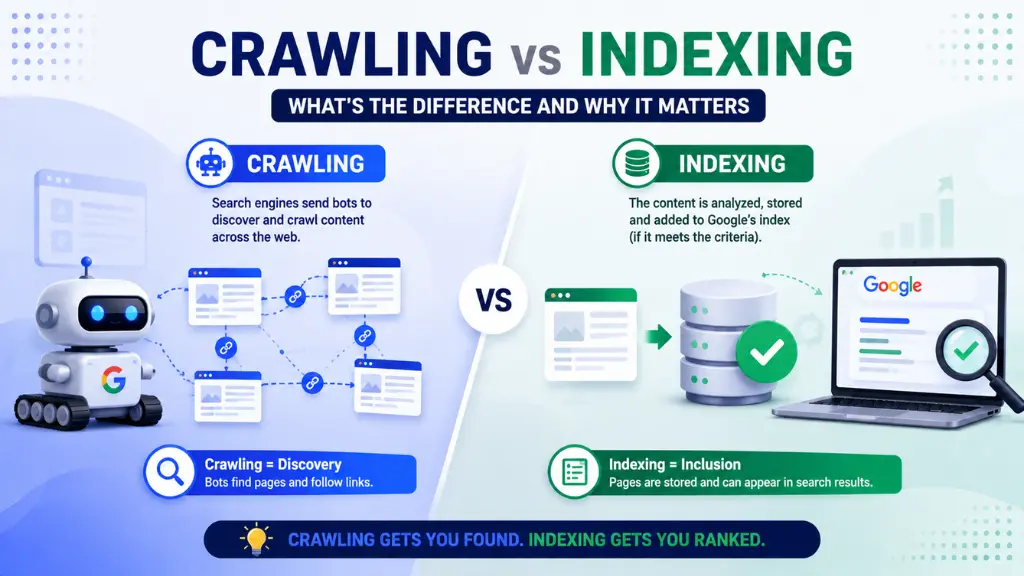
Crawling is the process by which automated bots, called crawlers or spiders, systematically discover pages across the web by following links, sitemaps, and previously known URLs.
Crawling works like a tireless reader jumping from link to link. Googlebot starts with a list of known URLs from past crawls, submitted sitemaps, or Search Console, sends an HTTP request to each one, downloads the HTML, and extracts every link it finds to add to its queue for future visits.
People Also Ask: What is the main purpose of crawling in SEO? Short Answer: Crawling exists purely for discovery. It lets a search engine find new or updated pages across the web through links, sitemaps, and backlinks, so those pages can later be evaluated for indexing. Crawling does not judge quality or decide rankings; it simply locates content.
What Is Indexing in SEO?#
Indexing is the process that happens after crawling, where a search engine analyses a page’s content and decides whether to store it in its index – the massive database used to generate search results.
Indexing involves Google evaluating relevance, quality, duplication, and technical signals before deciding whether a crawled page earns a place in the index. A useful analogy: crawling is submitting a job application, and indexing is being called in for an interview – the application being received does not guarantee the interview happens.
People Also Ask: Does every crawled page automatically get indexed? Short Answer: No. Crawling only means Google has visited and downloaded the page. Indexing is a separate decision based on content quality, originality, and technical signals like canonical tags. A page can be crawled repeatedly and still never be indexed if it fails these checks.
How Does Crawling vs Indexing Work Step by Step?#
Crawling vs Indexing follows a clear, sequential hierarchy: discovery, crawling, indexing, and only then ranking and visibility. If any earlier stage fails, the page never reaches the next one, regardless of how strong the content is.
How Does Google Discover URLs Before Crawling Them?#
Crawling vs Indexing both depend entirely on discovery happening first. Google typically finds URLs through three sources: internal links from already-known pages, external backlinks pointing to a URL, and the XML sitemap submitted through Search Console. Without at least one of these paths, a page may never be found at all.
How Does Google Decide What to Crawl?#
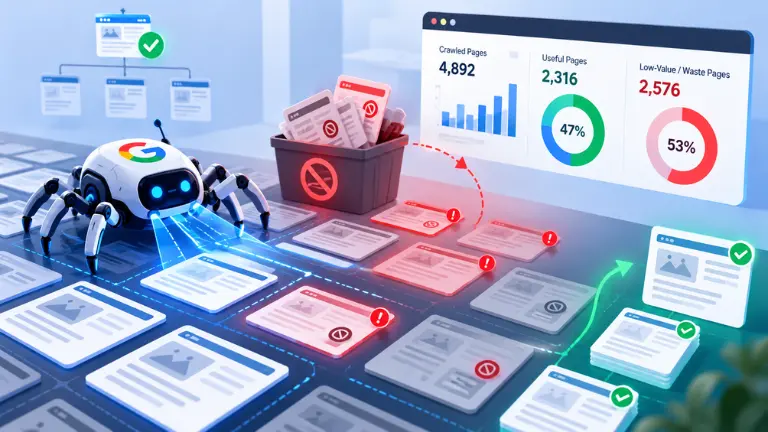
Crawling vs Indexing both run within constraints, and crawling specifically operates inside a “crawl budget” – the number of pages Google is willing and able to visit on a given site within a timeframe, based on site speed, authority, and server responsiveness. For most small to mid-sized sites, crawl budget is not a major constraint, but for sites with tens of thousands of URLs, wasting that budget on low-value pages can directly delay discovery of important content.
How Does Google Decide What to Index After Crawling?#
Crawling vs Indexing diverge sharply at this stage. Once a page is crawled, Google evaluates its content quality, originality, duplication against other indexed pages, and technical signals like canonical tags or a noindex directive before deciding whether to add it to the index. A page judged thin, duplicate, or simply not good enough relative to already-indexed competitors gets skipped.
People Also Ask: Why does Google Search Console show “Crawled – currently not indexed”? Short Answer: This status means Google has visited the page but chosen not to add it to its index, typically due to thin or duplicate content, a canonical pointing elsewhere, or the page simply not being competitive enough against similar pages already indexed on the same topic.
Why Is Understanding Crawling vs Indexing Important in 2026?#
Crawling vs Indexing has become more consequential in 2026 because the web has more content than ever, much of it AI-generated, and Google has become noticeably stricter about what earns a place in its index. Quality gaps are now widely cited as the leading cause of indexing problems, more than outright technical blocks.
Crawling vs Indexing also matters for AI search visibility specifically. Pages with strong entity usage, clear structure, and concise explanations are more likely to be selected as source material for AI Overviews and featured snippets, while pages offering no new depth or perspective are increasingly skipped by AI-driven indexing systems as well as traditional ones.
Crawling vs Indexing is further complicated in 2026 by mobile-first indexing, which has been Google’s default approach since 2023 – meaning Google primarily crawls and indexes the mobile version of a site, and desktop-only content risks not being captured at all.
- Most so-called ranking problems are actually crawling or indexing problems
- AI-generated content has raised the quality bar for what gets indexed at all
- Mobile-first indexing means desktop-only content may never be captured
- Indexed pages can still be deprioritised internally if Google judges them low-value relative to competitors
How Do You Check Crawling vs Indexing Status for Your Site?#
Crawling vs Indexing status can both be checked directly through Google Search Console, which is the single most reliable tool for diagnosing exactly where a page is stuck in the pipeline.
Crawling vs Indexing diagnostics start with the URL Inspection tool, which shows whether a specific URL has been crawled, when it was last crawled, and whether it is currently indexed. The Page Indexing report gives a sitewide view, breaking down excluded pages by specific reason – duplicate content, crawl anomaly, noindex tag, or simply “Crawled – currently not indexed.”
- URL Inspection tool – check crawl and index status for a single page
- Page Indexing report – sitewide breakdown of indexed vs. excluded URLs with reasons
- Request Indexing – manually prompt Google to recrawl a specific page after fixes
- Coverage and crawl stats reports – spot sudden drops in crawl rate that signal technical problems
People Also Ask: How can I manually check if Google has indexed a specific page? Short Answer: Search “site:yourdomain.com/page-url” directly in Google, or use the URL Inspection tool in Google Search Console, which gives a definitive answer along with the last crawl date and any indexing issues found.
What Causes Crawling Problems and How Do You Fix Them?#
Crawling vs Indexing problems often originate at the crawling stage, and these are usually the easiest to diagnose because they tend to be clear technical errors rather than subjective quality judgments.
- Robots.txt blocking – accidentally disallowing an entire section or important pages
- Server errors (5xx) – repeated errors signal Googlebot to slow down or stop crawling temporarily
- Broken internal links – dead links create orphaned pages Googlebot may never discover
- Crawl budget waste – large sites flooding crawlers with low-value parameter URLs instead of priority content
Crawling vs Indexing fixes at this stage are largely mechanical: confirm robots.txt is not blocking important content, fix broken internal links, ensure server response times are fast and reliable, and submit an accurate, current XML sitemap through Search Console.
People Also Ask: Does submitting a sitemap guarantee my pages get crawled and indexed? Short Answer: No. A sitemap is a discovery and prioritisation signal, not an “index now” button. It helps Google find and consider new or updated URLs faster, but the final decision to crawl and index still depends on quality signals, crawl budget, and existing constraints.
What Causes Indexing Problems and How Do You Fix Them?#
Crawling vs Indexing problems at the indexing stage are typically harder to fix, since they involve subjective quality judgments rather than clear technical errors.
- Thin or low-value content – pages that do not offer enough unique substance to compete
- Duplicate content – multiple pages saying nearly the same thing, with Google indexing only one
- Accidental noindex tags – a hidden instruction explicitly telling Google not to index the page
- Poor site performance – slow-loading or frequently crashing pages can be skipped during indexing
Crawling vs Indexing fixes at this stage require genuine content improvement rather than technical patches: ensure every page offers unique, helpful value, consolidate near-duplicate pages with canonical tags, and check for accidental noindex directives left over from development or staging environments.
How Should Indian Businesses Approach Crawling vs Indexing?#
Crawling vs Indexing deserves particular attention from Indian businesses given how much of the country’s traffic and crawling activity is mobile-first, making mobile site performance directly relevant to whether pages even get indexed properly.
Crawling vs Indexing issues are also common on Indian e-commerce sites with extensive filter and category combinations, which can generate near-infinite URL variants that dilute crawl budget away from the product and category pages that actually matter for revenue.
According to Search Savvy’s insights from auditing Indian SMB and D2C websites, the most frequent indexing gap is duplicate or near-duplicate blog content published across regional language variants without proper canonical tags, splitting authority that should be consolidated onto a single, strong version of each page.
Conclusion: Visibility Starts Before Rankings Ever Do#
Crawling vs Indexing is not a technicality reserved for advanced SEOs – it is the foundation every ranking conversation depends on. A page cannot rank if it was never crawled, and it cannot rank if it was crawled but never indexed.
Search Savvy checks crawl and index status before discussing content or keyword strategy with any client, because diagnosing visibility at its source consistently saves more time than chasing rankings for a page that was never eligible to appear in the first place.
FAQ: Crawling vs Indexing – Your Questions Answered#
Q1: Can a page be indexed without being crawled? No. Crawling must happen first for indexing to be possible. In rare cases, Google can index a URL based on external signals like backlinks even without fully crawling its content, but this typically results in a bare listing with no real description.
Q2: How long does it take for Google to crawl and index a new page? There is no fixed timeline. Strong internal linking from already-indexed pages, a current sitemap, and genuinely useful content can speed up the process, but Google ultimately decides based on relevance, quality, and available resources, with no guaranteed indexing speed.
Q3: Will blocking a page in robots.txt remove it from Google’s index? Not reliably. Robots.txt prevents crawling and saves crawl budget, but it does not guarantee removal from the index if Google already indexed the page through other signals like backlinks. Use a noindex tag instead if a page must definitively not appear in search results.
Q4: What does “Crawled – currently not indexed” mean in Search Console? It means Google visited the page but chose not to add it to its index, usually due to content quality concerns, duplication, or the page not being competitive enough relative to similar already-indexed pages on the same topic.
Q5: Does crawl budget matter for small websites? Generally no. Crawl budget becomes a meaningful constraint mainly for large sites with tens of thousands of URLs or heavy parameter-based duplication. Most small to mid-sized sites do not need to actively manage crawl budget.
Q6: How can I speed up indexing for a newly published page? Submit the URL for indexing directly in Google Search Console, add strong internal links from already-indexed pages, include it in your sitemap, and ensure the content is genuinely unique and helpful, since quality remains the strongest lever even with manual indexing requests.
Not sure whether your pages are stuck at the crawling stage, the indexing stage, or both? Visit Search Savvy for a crawl and index audit that pinpoints exactly where your content’s visibility is breaking down.