How to Repurpose Blog Content Into 10 Different Formats

Here is the content math most marketers miss: a single well-researched blog post contains enough raw material to generate weeks of content across a dozen different platforms, yet most brands publish it once and move on.
In this article17 sections
Blog content repurposing is the practice of transforming one original piece of written content into multiple formats, each suited to a different platform and a different kind of attention. It is not recycling old ideas; it is extracting full value from research and insight you have already done.
Blog content repurposing has become the defining content habit of efficient marketing teams in 2026. With the average brand operating across five or more platforms simultaneously, producing entirely original content for every channel from scratch is neither realistic nor necessary. A HubSpot report found that marketers who repurpose content consistently generate 3x more leads per hour spent than those creating net-new content for every format.
Blog content repurposing also strengthens SEO and AI search visibility simultaneously. When the same ideas, data points, and expertise appear coherently across video, audio, social, and written formats, it reinforces your topical authority in a way that a single page never can.
At Search Savvy, repurposing existing blog content is one of the first efficiencies we build into any content strategy, because it compounds the return on every piece a brand has already invested in creating. Here are the ten most effective formats to repurpose into, with practical steps for each.
What Is Blog Content Repurposing and Why Does It Matter in 2026?#
Blog content repurposing is the process of taking the research, structure, and insights from a written blog post and adapting them into new formats for new platforms, rather than creating original ideas from scratch for every channel.
Blog content repurposing matters in 2026 for a simple reason: audiences are fragmented across more platforms than ever, and different people consume the same ideas in different ways. Some read long articles. Others watch short videos. Others listen during a commute. Repurposing puts your expertise where each audience already is, in the format they already prefer.
People Also Ask: Is repurposing blog content the same as duplicate content for SEO? Short Answer: No. Repurposing adapts content into a different format for a different platform, which is entirely distinct from duplicate content. A blog post turned into a video, an infographic, or a newsletter is a new asset on a new channel, not a copied page competing with the original in search results.
How Do You Repurpose Blog Content Effectively?#
Blog content repurposing works best when it starts with selecting the right posts to repurpose rather than treating every published piece equally. Prioritise your highest-performing posts – the ones already driving strong organic traffic, engagement, or backlinks – since they have proven the idea resonates and deserve wider distribution.
Blog content repurposing does not mean copying and pasting. Each format requires genuine adaptation: restructuring the information to suit a different medium, trimming to match a different attention span, and adding platform-specific context where the original blog assumed a reading audience.
What Are the 10 Best Formats to Repurpose Blog Content Into?#
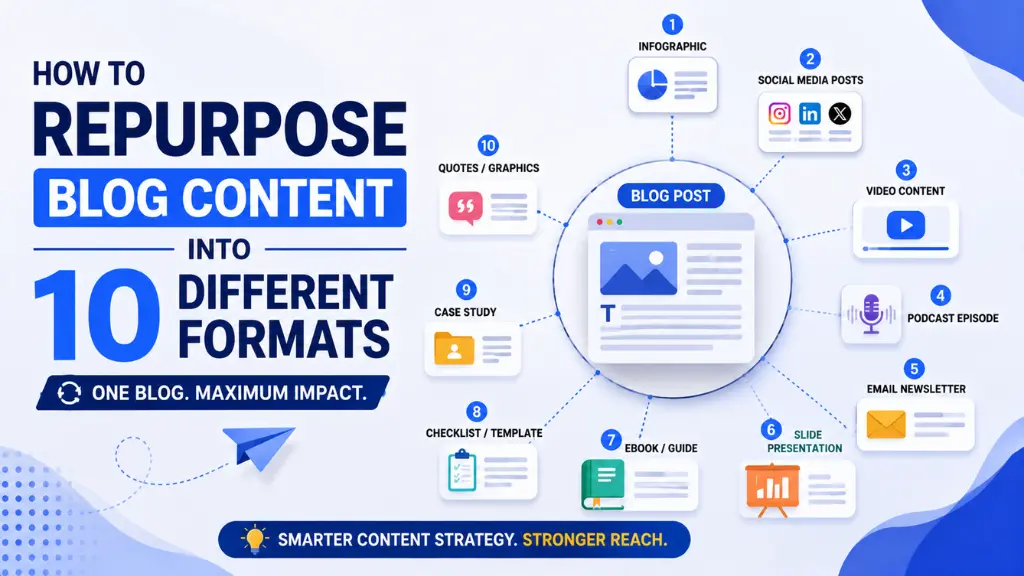
Blog content can be adapted into at least ten high-impact formats, each reaching a different segment of your audience without requiring the original research to be done again.
Format 1: Short-Form Video (Reels, Shorts, TikTok)#
Blog content translates naturally into short-form video by extracting a single key insight, statistic, or step from the original post and presenting it in 30 to 90 seconds. Short-form video generates the highest ROI of any single marketing format in 2026, according to HubSpot’s State of Marketing Report, making it the first format any blog should feed.
A simple template: open with the most surprising statistic from the post, explain the implication in two sentences, and close with a direct call to action pointing back to the full article.
Format 2: LinkedIn Carousel Post#
Blog content structured around a numbered list or step-by-step process converts almost directly into a LinkedIn carousel, where each slide covers one step or insight. Carousels consistently generate higher engagement than static text posts on LinkedIn because they encourage swiping and increase time-on-content.
Blog content with five to ten clear steps, tips, or examples is ideal for carousels. Each slide should carry one idea only, with clean design, minimal text, and a final slide pointing to the full blog post for anyone wanting depth.
Format 3: Email Newsletter Issue#
Blog content provides the ideal structure for an email newsletter edition – a short editorial intro, three to five key takeaways from the post, and a single strong CTA linking to the full article for readers who want more.
Blog content repurposed into email drives owned-audience engagement rather than depending on algorithm reach, which makes it one of the most reliable formats in an era where organic reach on social platforms is volatile and declining.
Format 4: Twitter/X Thread#
Blog content that covers a multi-step process, counterintuitive finding, or data-rich topic converts well into a Twitter/X thread, where each tweet expands one point from the blog with additional context, a real example, or a supporting statistic.
Blog content threads tend to perform well on X because the format rewards genuine expertise rather than promotional messaging – starting with a counterintuitive hook (for example, “Most marketers waste their best blog posts in a single step”) drives replies and shares that bring new audiences into the thread.
Format 5: Infographic#
Blog content that includes statistics, comparisons, frameworks, or step-by-step processes transforms naturally into an infographic, giving data a visual format that is shareable, saveable, and more accessible to audiences who skim rather than read.
Blog content infographics also earn backlinks disproportionately well compared to text alone, since other sites frequently embed infographics and link back to the source. Tools like Canva make this format accessible even for teams without a dedicated designer.
People Also Ask: What type of blog content works best as an infographic? Short Answer: Data-heavy posts, step-by-step processes, comparison posts, and “how it works” explainers convert most naturally into infographics. Posts built around a strong narrative argument or personal story are better suited to formats like video or newsletter, since their value lies in the voice rather than the visual structure.
Format 6: Podcast Episode or Audio Summary#
Blog content can be read aloud with minimal adaptation to create a podcast episode, or more effectively, used as a structured outline for a conversational episode where the blog’s key points become talking points rather than a script.
Blog content adapted into audio reaches audiences during commutes, workouts, and downtime – moments when no other content format competes for attention. Even a simple solo episode summarising a post’s five key points, recorded in one take, extends the post’s reach into a completely new channel.
Format 7: YouTube Long-Form Video#
Blog content built around a comprehensive guide, tutorial, or explainer converts well into a YouTube long-form video of eight to fifteen minutes, where the post’s structure becomes a filming script and each H2 heading becomes a new on-screen section.
Blog content repurposed for YouTube also benefits from the platform’s search engine, which is the second-largest in the world. Using the blog post’s target keyword in the YouTube title, description, and spoken script compounds the organic discovery potential of the original research.
Format 8: Slide Deck or Presentation#
Blog content structured with clear steps, frameworks, or hierarchies translates directly into a slide deck, which can be published on SlideShare, shared as a LinkedIn document post, or used in a webinar.
Blog content slide decks typically convert at a one-to-one ratio with the original post’s subheadings: each H2 becomes a section header slide, each bullet point becomes a supporting slide, and the post’s introduction and conclusion provide the opening and closing frames.
Format 9: Pinterest Pin or Visual Quote Card#
Blog content that contains strong, standalone quotes, statistics, or actionable one-liners converts well into Pinterest pins or branded quote cards for Instagram Stories and WhatsApp Status updates.
Blog content quote cards work particularly well for Indian audiences, where WhatsApp Status and Instagram Stories are high-engagement surfaces. A single well-designed quote from a post, paired with the blog URL in the caption, drives curiosity clicks back to the full article with very little production time.
People Also Ask: How many social posts can one blog post generate? Short Answer: One well-developed blog post can realistically generate 15 to 20 individual social assets – short-form video clips, carousel slides, quote cards, thread tweets, and Stories frames – spread across platforms over two to four weeks before the content feels repetitive to any single audience.
Format 10: AI-Optimised FAQ Page or Knowledge Base Entry#
Blog content structured around question-based subheadings converts directly into a standalone FAQ page or a knowledge base entry, which is one of the most valuable formats for AI search visibility specifically.
Blog content in FAQ format is highly eligible for AI Overview citations because AI tools extract clear, direct question-and-answer pairs from well-structured pages. Adding a dedicated FAQ page that mirrors the questions covered in your best blog posts creates a second indexed asset targeting the same intent with a format AI systems are built to prefer.
How Do You Decide Which Blog Posts to Repurpose First?#
Blog content selection for repurposing should be driven by performance data, not recency. Use Google Search Console to identify your highest-impression, highest-click posts, since these are the topics your audience is actively searching for and the ideas most worth amplifying.
Blog content that has already earned backlinks or strong engagement is a proven signal that the idea resonates widely enough to perform across formats. Posts that cover evergreen topics – SEO fundamentals, marketing strategy, platform best practices – tend to repurpose better than trend-driven news posts that have a short shelf life.
- Sort your posts by organic traffic in Google Search Console
- Prioritise evergreen topics with strong, sustained search demand
- Flag posts with a clear list, framework, or numbered steps (easiest to adapt)
- Avoid repurposing posts containing data that has since become outdated without refreshing first
How Should Indian Content Teams Approach Blog Content Repurposing?#
Blog content repurposing for Indian audiences should account for the platforms where that audience actually spends time. Instagram Reels, YouTube Shorts, LinkedIn carousels, and WhatsApp-shareable quote cards collectively cover the formats with the highest organic reach across Indian internet users in 2026.
Blog content repurposed for Indian platforms also benefits from regional language adaptation where relevant. A post covering, say, GST implications for freelancers or UPI payment strategies can be repurposed into Hindi or regional-language short-form video to reach tier-2 and tier-3 city audiences that English blog posts rarely capture.
According to Search Savvy’s insights from building content repurposing workflows for Indian SMB and D2C clients, the highest-ROI single repurposing move is almost always the same: turning a top-performing blog post into a LinkedIn carousel, which drives professional audience engagement that a blog post alone rarely receives on its own.
Conclusion: One Blog Post, Months of Content#
Blog content repurposing is not a shortcut; it is the most rational use of research you have already done. Each piece of blog content you have published is a library of ideas, data, and insight that most brands are currently leaving dormant after a single post goes live.
Search Savvy helps brands build systematic repurposing workflows so that every blog post continues driving traffic, engagement, and AI search citations long after its publish date – because the best content marketing is not about publishing more, it is about extracting more value from what already exists.
FAQ: Blog Content Repurposing – Your Questions Answered#
Q1: Does repurposing blog content hurt SEO with duplicate content penalties? No. Repurposing adapts content into a different format on a different platform, which is entirely distinct from duplicate content. A blog post turned into a video, infographic, or email newsletter is a new asset, not a copied page.
Q2: How long does it take to repurpose one blog post across formats? With a clear template and workflow in place, one blog post can be adapted into five to seven social assets in two to three hours. Tools like Canva for visuals and AI writing assistants for caption drafting significantly reduce production time once the workflow is established.
Q3: Which repurposing format drives the most traffic back to a blog post? Short-form video consistently drives the strongest traffic spikes, while email newsletters drive the most reliable, consistent click-through traffic. Long-form YouTube videos drive slower but highly engaged audiences and often continue generating views and clicks for months or years after publishing.
Q4: How often should I repurpose the same blog post? A well-structured evergreen post can typically generate 15 to 20 individual social assets spread over two to four weeks without feeling repetitive to any single audience. Posts covering different angles or new data updates can be repurposed again every six to twelve months as the content stays current.
Q5: Should I always update a blog post before repurposing it? Check for outdated statistics, broken links, or superseded advice before repurposing, especially for posts more than a year old. Refreshing the underlying post first ensures the repurposed assets accurately represent your current expertise and do not spread outdated information.
Q6: Is there a best day or time to publish repurposed blog content? Timing depends on the platform. LinkedIn posts perform best mid-week during business hours in your audience’s time zone, while Instagram Reels and YouTube Shorts benefit from late-afternoon or early-evening publishing when mobile usage peaks. Test with your own audience data rather than following generic advice blindly.
Sitting on months of blog posts that published once and disappeared? Visit Search Savvy for a content repurposing audit that maps your best existing posts to the formats and platforms most likely to multiply their reach in 2026.